
How to Turn Textbook to Learning Video: A 5-Step AI Guide
To turn a textbook into a learning video, you need to extract key ideas, structure them into a clear script, and use AI to generate visuals, narration, and scenes automatically. This process converts dense PDF chapters into engaging video lessons that can improve learner retention by up to 11%.
Instead of manually creating slides or recording lectures, modern AI tools like Leadde can transform a 50-page document into a structured, video-based curriculum within minutes. By following a streamlined workflow—content extraction, script structuring, visual generation, and interactive delivery—you can make complex material easier to understand, more engaging to consume, and faster to scale across learners.

How I Identified the Core Problem with Traditional Textbooks (And Why Video Isn’t Just a Trend)
Through user research across students and self-learners, one issue came up repeatedly:
- “I start textbooks but don’t finish them”
- “It’s too dense to stay focused”
- “I understand better when someone explains it”
This isn’t a content problem—it’s a format and cognitive load problem.
In one case, a learner working through a technical book consistently dropped off after 2–3 chapters. After switching to a structured video format of the same material, engagement time increased significantly—not because the content changed, but because the delivery reduced friction.
Why Should You Turn Your Textbook into a Learning Video?
Traditional textbooks often present a one-size-fits-all approach that fails many modern students. Static pages cannot adapt to different learning speeds or provide necessary visual stimulation. Converting these materials into video creates a more flexible and accessible educational experience.
This shift allows for the integration of multi-sensory stimuli that textbooks lack. Students benefit from repeated access to complex concepts through a dynamic medium. The transition from paper to screen ensures that no learner is left behind.
The Scientific Edge of Dual Coding and AI Efficiency
Dual coding theory proves that combining visuals with audio strengthens mental models. Research shows that students using multimodal tools score 11% higher on retention tests. This approach builds a more robust mental model of the material.
AI technology now makes this advanced pedagogical transition incredibly efficient for educators. Leadde acts as an intelligent engine to bridge the gap between text and lessons. It automates the generation of diverse representations to augment the learning experience.
The following table compares traditional textbooks with AI-driven learning videos:
| Feature | Static Textbook | Leadde AI Video |
|---|---|---|
| Cognitive Load | High (Text only) | Balanced (Dual Coding) |
| Retention Rate | Standard Baseline | 11% Higher Average |
| Accessibility | Limited to Reading | Multilingual & Auditory |
| Updates | Requires Reprinting | Instant Digital Edits |
These advantages demonstrate why digital transformation is essential for modern curriculum development.
What Makes an Educational Video Truly Effective for Students?
Creating a great educational video requires more than just high-quality animation. It must respect the learner's time and focus on clear, achievable goals.
A professional video structure ensures that students retain information and apply new skills.
Effective videos use thoughtful presentation techniques to maximize total comprehension for everyone. Prioritizing clarity over Hollywood-style production leads to better overall teaching results.
Focus on Singular Objectives and Audio Quality
Every instructional video must center on one specific, measurable learning outcome. This prevents cognitive overload and allows students to practice skills immediately. Broad topics should be broken down into separate, focused tutorial segments.
Clear audio is actually more critical than perfect visual elements. Poor sound quality drives viewers away faster than imperfect graphics or text. Leadde ensures professional results through high-fidelity AI narration across all scenes.
Professional educational videos must adhere to several core quality standards:
- Clear Narration: Use high-quality AI voices to ensure every word is understood.
- Focused Content: Address exactly one learning objective per video file.
- Visual Variety: Mix talking-head avatars with on-screen annotations and highlights.
- No Background Noise: Ensure a quiet, professional auditory environment for the learner.
These standards guarantee that your content remains authoritative and easy to follow.
Optimizing Video Length for Maximum Retention
Length is a decisive factor in whether a student actually finishes a lesson. Educational videos should always remain short, ideally under 12 minutes in total. Breaking long chapters into 2-5 minute segments significantly improves student information retention.
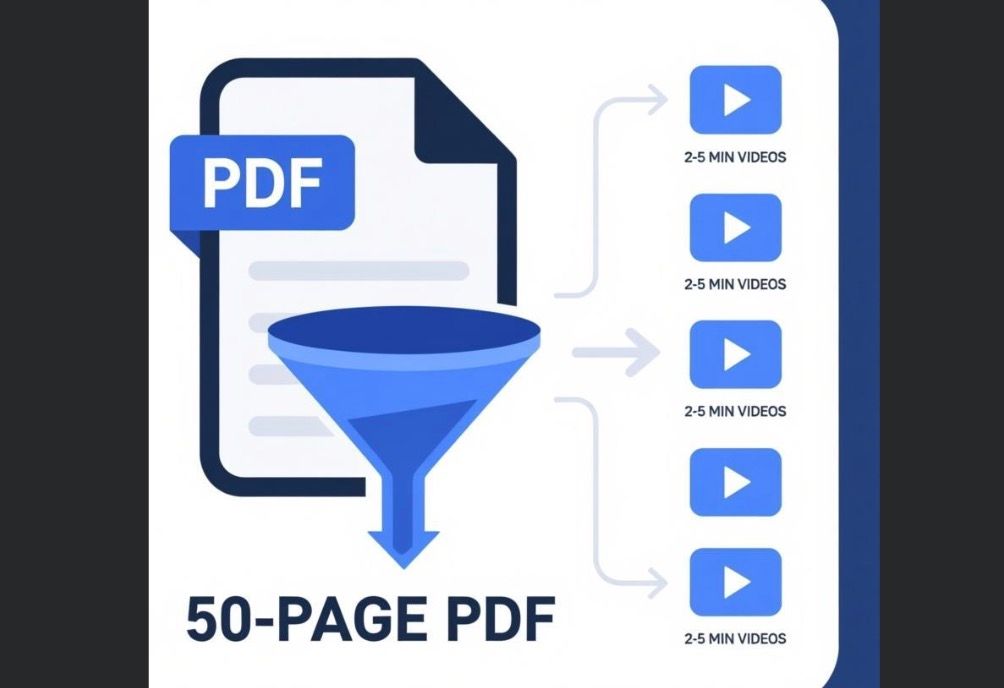
Leadde helps you maintain this rhythm by organizing content into a scene-by-scene flow. You can adjust narration length to be shorter or more detailed as needed. This granular control helps you respect the viewer's time and attention span.
Short-form educational content provides the following specific benefits for learners:
- Improved Focus: Smaller segments prevent learners from becoming bored or overwhelmed.
- Easier Review: Students can quickly rewatch specific segments they found difficult.
- Asynchronous Access: Short videos fit easily into busy student schedules and mobile viewing.
Maintaining a brisk pace ensures that your digital curriculum remains engaging from start to finish.
Step-by-Step Guide: How to Turn a Textbook into a Learning Video Using AI
Step 1: Extract and Summarize Dense Textbook Chapters
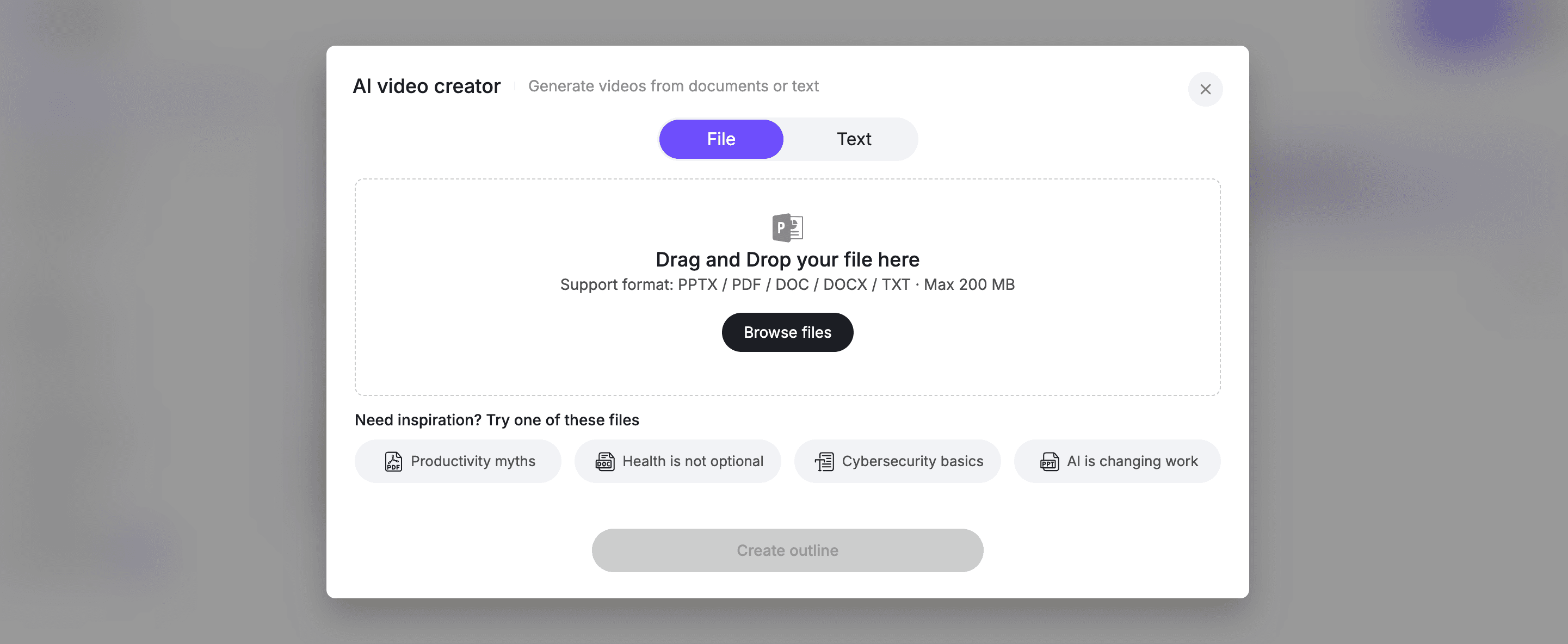
The first step involves digitizing your physical or digital textbook content for AI processing. Leadde acts as an intelligent engine that simplifies this initial content extraction phase. You can easily start the transformation process by dragging and dropping your files.
Follow these practical guidelines for preparing your textbook material:
- Upload Large Files: Use the AI Video Creator to upload documents up to 200MB.
- Support Various Formats: Upload materials in .pdf, .docx, .doc, .pptx, or .txt formats.
- Automated Summarization: Let the AI analyze dense text to extract core knowledge points automatically.
- Repurpose Existing Knowledge: Reuse current business or academic materials instead of starting from scratch.
This automated extraction saves hours of manual labor and prepares your content for professional visualization.
Step 2: Structure Your Curriculum with a Scene-by-Scene Flow
Effective learning videos require a logical flow that reflects the original textbook hierarchy. Leadde analyzes your document to build clear, structured outlines that match specific training objectives. The AI organizes content into a scene-by-scene flow that is easy to refine.
Consider these tips for building a professional educational structure:
- Define Training Goals: Customize your narration based on specific speaker roles or learning purposes.
- Scene-Level Control: Edit the script per scene to rewrite or delete content as needed.
- Script Length Control: Adjust the narration length to be either concise or more detailed per scene.
- Outline Refinement: Review the AI-generated outline before rendering to ensure pedagogical accuracy.
A well-structured script ensures that every second of your video serves a clear educational purpose.
Step 3: Choose an Engaging Digital Presenter and Voice
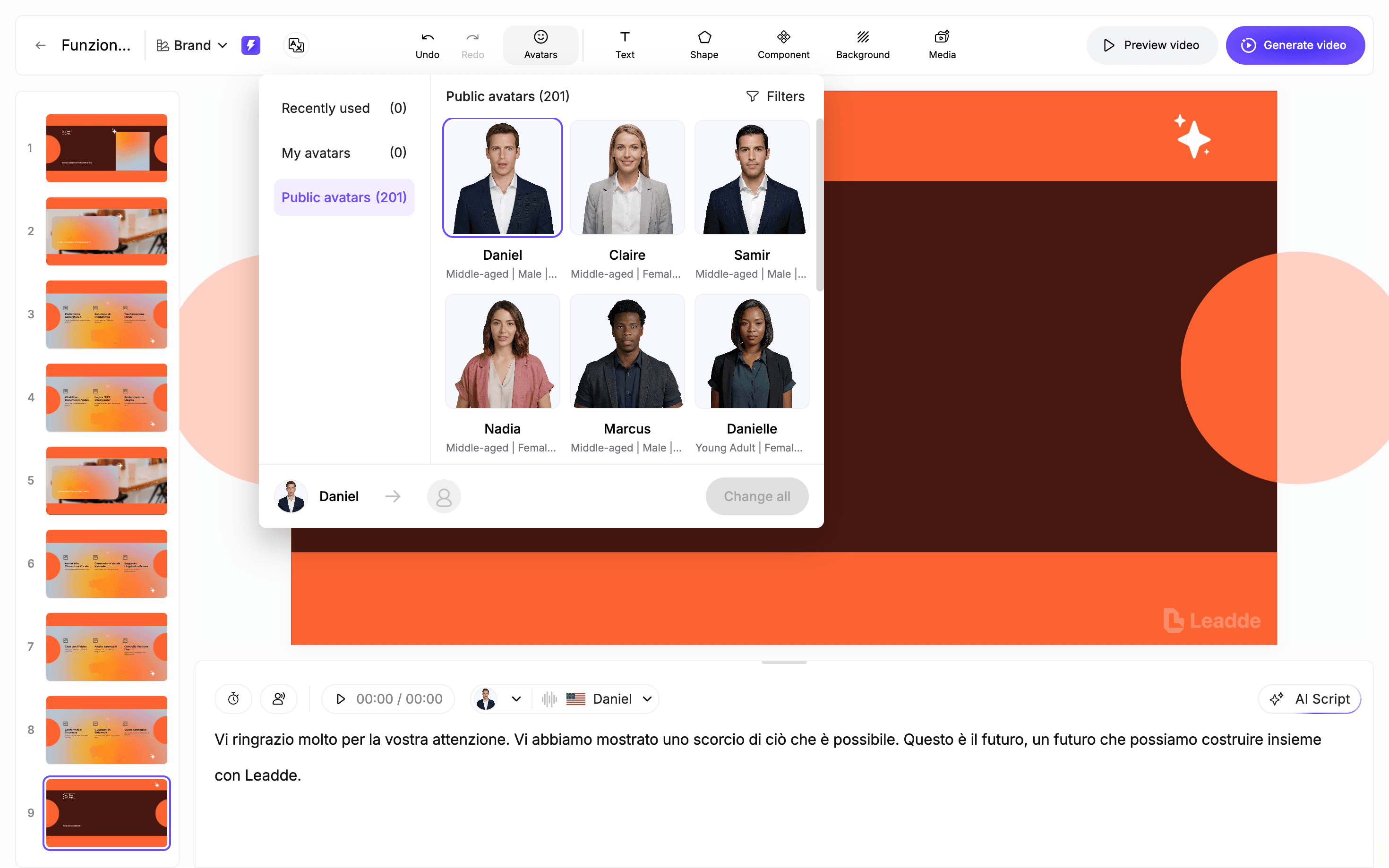
A lifelike presenter adds authority and a human touch to complex academic subjects. Leadde provides access to 200+ multi-ethnic and multi-lingual digital avatars. These presenters deliver your content with natural facial expressions and confidence.
Enhance your "Digital Professor" with these expressive features:
- Natural Delivery: Use the Expressive IV Engine for natural facial expressions and body movements.
- Tone Selection: Customize the presenter's tone to be "Formal," "Friendly," or "Persuasive".
- Professional Appearance: Select presenters with a professional look tailored for training and instructional content.
- Consistent Presence: Swap avatars across all scenes in one click to maintain visual consistency.
Choosing the right digital persona makes abstract textbook concepts feel more personal and approachable.
Step 4: Add Visual Highlights and Concept Animations
Visual reinforcement is essential for explaining the complex diagrams found in advanced textbooks. Leadde uses smart layouts to ensure every key message appears in a clean, organized frame. This creates a "digital blackboard" effect that guides student attention.
Optimize your visuals using these powerful canvas tools:
- Auto Highlights: Important terms are automatically emphasized with textual animations as they are spoken.
- Canvas Enrichment: Add on-screen text, shapes, and structured components to illustrate your points.
- Element Timing: Control exactly when elements appear or disappear to improve clarity and pacing.
- Media Integration: Upload and place your own images or videos to support the AI narration.
Precise visual cues help learners focus on critical information at exactly the right moment.
Step 5: Incorporate Interactive Quizzes and Globalize
Transforming passive viewing into active learning requires interactive elements and accessibility. Leadde supports 175 languages, allowing you to instantly create multilingual materials from one document. This capability is ideal for supporting global teams and diverse classrooms.
Maximize student engagement with these final delivery steps:
- Interactive Content: Viewers can ask questions and receive instant responses directly from the video.
- One-Click Translation: Translate your entire learning video into 175+ languages with a single click.
- Narration Polish: Insert pauses for natural pacing and use pronunciation correction for technical terms.
- Easy Iteration: Update the script or visuals like editing a document without needing reshoots.
These final touches ensure your textbook to video project is interactive, inclusive, and always up-to-date.
Preview and Generate Your Professional Learning Video
The final phase involves a thorough review to ensure all elements sound and look perfect. Leadde allows you to preview your work while editing before generating the final file. This ensures that your educational content meets your high standards for accuracy.
The following checklist summarizes the final production phase:
| Action | Practical Benefit |
|---|---|
| Preview Work | Verify animations and lip-syncing before the final render. |
| One-Click Export | Publish your completed AI video instantly once editing is finished. |
| Instant Updates | Republish updated content anytime when textbook information changes. |
| Subtitles Inclusion | Download subtitle files to support accessibility and comprehension. |
This streamlined process allows you to maintain high-quality educational content with minimal effort.
What an Ideal “Textbook to Video” Learning Experience Should Look Like
The best systems combine:
- Video for understanding
- Text for reference
- Interaction for reinforcement
Ideal features:
- Ask questions anytime
- Jump between formats
- Instant quizzes
- Context-aware explanations
What Are the Best AI Tools for Converting Textbooks into Videos?
Selecting the right software is crucial for a successful digital curriculum transformation. Different platforms offer unique strengths, ranging from simple animations to advanced human-like delivery. The right choice depends on your specific goals for student interaction and content depth.
Several high-performance AI tools currently lead the educational technology market:
- Leadde: This is the premier choice for professional teams to turn dense PDFs and PPTs into avatar-led training videos. It offers advanced features like smart version control and the ability to update content instantly without reshooting.
- Google NotebookLM: This tool excels at generating conversational "deep dive" podcasts where two AI hosts discuss your textbook material.
- StudyFetch: A specialized platform that focuses on converting textbook PDFs into study videos, flashcards, and interactive quizzes.
- Synthesia/HeyGen: These are reliable options for creating virtual lectures that utilize digital human presenters to deliver scripted notes.
How Can You Optimize Your Learning Videos for Higher Engagement?
Production is only one part of creating a successful educational resource. To truly impact learning, you must optimize your content for student motivation and accessibility. Videos that feel personalized and inclusive lead to significantly better comprehension and participation.
Strategy and data should guide your ongoing content refinement process.
Personalization and Global Accessibility
Tailoring content to specific grade levels or student interests increases overall learning comfort. When materials feel relevant to a student's personal background, their motivation to engage deeply improves. Leadde supports this by allowing you to choose specific tones, such as "Friendly" or "Inspirational," to better connect with your audience.
Accessibility is equally vital for a modern, diverse learning environment. Ensuring that every student can access the information regardless of their physical or linguistic background is essential.
Key optimization features for high-engagement learning include:
- AI-Generated Captions: Improve comprehension for non-native speakers and those in loud environments.
- Multilingual Options: Use Leadde to translate textbook content into 175 languages with one click.
- Searchable Transcripts: Allow students to quickly find and revisit specific academic definitions or concepts.
- Tone Adaptation: Match the digital professor’s delivery style to the specific needs of the student group.
Data-Driven Iteration Without Reshooting
The best educational videos evolve based on actual student performance data. Tracking where learners stop watching or which quiz sections they fail identifies exactly where your video needs improvement. This evidence-based approach ensures your curriculum stays effective over time.
Leadde provides a unique advantage by enabling effortless version control and updates. You can modify scripts or visual highlights based on feedback without ever needing to re-record a single scene.
- Easy Content Updates: Change specific lines of text to reflect the latest textbook editions instantly.
- Feedback Integration: Use insights from student surveys to refine complex technical explanations.
- Version History: Maintain different versions of a lesson for different departments or regional offices.
This cycle of continuous improvement keeps your educational content at the highest professional standard.
Why Most “Textbook to Video” Tools Fail to Deliver Real Learning Outcomes
Most tools today follow this pattern:
Text → AI voice → Stock visuals → Video
This creates something that looks like a learning video—but doesn’t behave like one.
Common failure points:
- No instructional design (just content transformation)
- Irrelevant visuals (random B-roll)
- No learning structure (no progression, no checkpoints)
In one early-stage product I analyzed, users reported:
- Videos felt disconnected from the text
- Visuals didn’t reinforce learning
- Content felt like “background noise”
What Learners Actually Want Beyond Video: Interactivity, Not Passive Watching
A major pattern emerged across learning behavior:
Watching is not learning.
What users actually want:
- Ask questions mid-video
- Get instant clarification
- Test understanding immediately
Example:
A math learning system introduced:
- Video explanations
- Embedded Q&A
Result:
Learners preferred it over traditional video platforms because they could interact, not just watch
Insight:
Insight: The future is not “video learning”, it’s interactive learning experiences.
When You Should NOT Turn a Textbook into a Video
Avoid video when:
- Content is reference-heavy
- Users need quick lookup
- Material is already structured efficiently
FAQ: Common Questions About Turning Textbooks into Learning Videos
Does turning textbooks into videos actually improve learning outcomes?
Turning textbooks into learning videos can significantly improve engagement and initial comprehension, especially for complex or abstract concepts. However, it does not always improve long-term retention or efficiency. Video works best as a complement to text, not a full replacement.
Can learning videos replace textbooks completely?
No. Learning videos cannot fully replace textbooks. Text remains more effective for deep study, quick reference, and information retrieval. The most effective approach is a hybrid model combining video and text.
What type of textbook content works best for video conversion?
Video works best for conceptual, visual, and process-based content, such as scientific explanations, workflows, and abstract ideas. Dense definitions and reference-heavy material are better kept in text.
What are the biggest mistakes when turning textbooks into videos?
The most common mistakes include:
- Converting text directly without instructional design
- Using irrelevant visuals
- Creating passive, non-interactive videos
Effective learning videos require clear structure, meaningful visuals, and engagement.
How can I scale textbook-to-video production for courses?
To scale efficiently, avoid fragmented workflows. Use an integrated AI video system that handles scripting, visuals, voice, and editing in one place to ensure consistency and speed.
Is AI good enough to fully automate textbook-to-video conversion?
AI can automate content extraction and video generation, but it cannot fully replace human judgment. High-quality results still require human input for structuring and prioritizing content.
Are there legal risks when converting textbooks into videos?
Yes. Converting textbooks into videos may involve copyright and licensing issues, especially for commercial use. Always ensure you have the proper rights or permissions.
Why do some learners prefer text over video?
Text is often preferred because it is faster, searchable, and easier to scan. It supports non-linear learning, making it ideal for review and quick reference.
What is missing from most AI learning video tools today?
Most tools lack interactivity and feedback loops. Effective learning requires quizzes, Q&A, and adaptive responses—not just passive video consumption.
What is the future of turning textbooks into learning videos?
The future lies in hybrid learning systems that combine video, text, and interactivity. The goal is not to replace textbooks, but to make learning more engaging and effective.
Conclusion: Start Your Textbook to Video Transformation Today
The transition from a static PDF to an interactive, multilingual learning video is no longer a complex manual task. By following a structured 5-step AI workflow, you can convert dense textbook chapters into high-impact visual lessons. This journey begins with intelligent text extraction and moves through automated scripting, avatar selection, and visual enrichment.
Finally, adding interactive layers ensures that your educational content is both engaging and effective for a global audience.
Leadde provides the ultimate engine for teams to turn textbook to learning video with professional efficiency. It maintains academic quality while saving educators and trainers weeks of production time typically spent on filming and editing. By reusing your existing documents and slides, you can scale your training efforts without increasing your budget or technical workload.
Ready to modernize your teaching materials? Start a Leadde free trial today to experience how easy it is to create engaging AI videos in minutes.





