
How to Download Video from Canvas: 2026 Guide

To download a video from Canvas, first check whether the video is hosted in Canvas Studio, Kaltura My Media, Panopto, or uploaded as a direct MP4 file.
If downloads are enabled, you can usually click the download icon below the video player or access the file through the media settings.
If no download button appears, the video is likely restricted by instructor permissions, platform settings, or protected streaming formats such as M3U8.
Downloaded Canvas lectures are often long, hard to reuse, and inefficient for training. Leadde solves this by turning documents, transcripts, and text into professional AI business videos automatically—helping teams create videos in minutes while saving over 80% of production costs and 90% of content creation time.
How to Download Video from Canvas (Official Methods First)
The safest and easiest way to download a Canvas video is to use the official method provided by your school or video platform. The exact steps depend on how the media was added.
| Video Type | Official Download Available? | Typical Access Requirement |
| Canvas Studio | Yes (if enabled) | Instructor / owner permission |
| Kaltura My Media | Yes | Media owner access |
| Panopto | Sometimes | Instructor-enabled student download |
| Direct MP4 file | Yes | File access |
| Embedded external video | Depends | Third-party platform rules |
How do I download a Canvas Studio video to my computer?
If your school uses Canvas Studio and the instructor allows downloads, open the video and look for the Download icon below the player.
If you only see transcript or caption options, downloading the original video file may be disabled. Canvas Studio permissions are controlled by the content owner or institution settings.
How do I save my Kaltura / My Media lecture from Canvas?
If the video belongs to you, go to:
Canvas → My Media → Select Video → Edit / Actions → Download
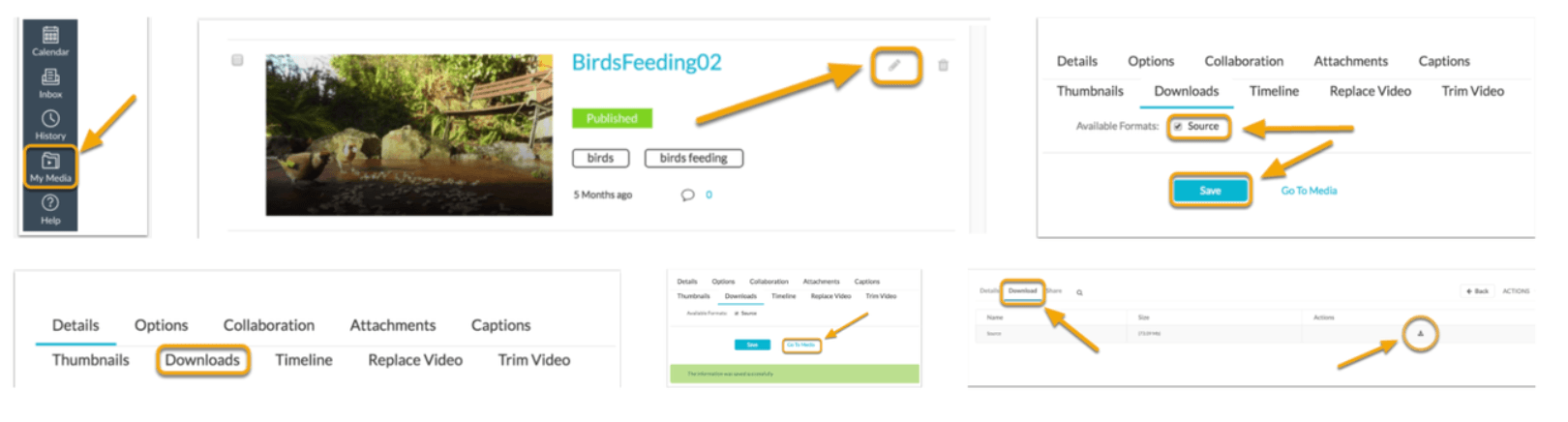
This is common in university Canvas environments using Kaltura integration. If you are only a viewer, the download option may not appear.
How do I download MP4 files directly from Canvas course modules?
Some instructors upload lecture recordings as normal MP4 files.
In that case:
- Open the module
- Click the file
- Select download
- Or right-click and choose Save link as
This is the simplest case.
Why Can’t I Download a Video From Canvas?
The most common reason is that Canvas is not actually hosting the video. Canvas often acts as the course shell, while the real media comes from another system.
| Problem | Most Likely Cause | Fix |
| No download button | Instructor disabled downloads | Request access |
| Only transcript available | Video export blocked | Ask content owner |
| Embedded player only | Third-party hosting | Check source platform |
| Right-click save blocked | Streaming delivery | Use official methods |
Why is the download button missing from Canvas videos?
If no download button appears, it usually means:
- instructor disabled downloads
- platform blocks exports
- streaming-only delivery
- embedded external hosting
This is normal. Not every Canvas video is meant to be downloadable.
How do instructor permissions and video hosting platforms affect downloads?
Permissions control everything.
Examples:
- Canvas Studio: owner can allow downloads
- Kaltura: media owner or institution settings control access
- Panopto: instructors may enable or disable student downloads
A video being visible does not mean it is downloadable.
How can I tell if the video uses Canvas Studio, Kaltura, or Panopto?
Quick clues:
Canvas Studio
- Canvas-native interface
- transcript / captions controls
- Studio branding
Kaltura
- My Media references
- Kaltura player styling
- embedded media widget
Panopto
- Panopto branding
- lecture capture style layout
- timestamp navigation
Knowing the platform saves time.
How to Download Restricted Canvas Videos When No Download Option Exists?
Some users look for technical workarounds when official downloads are blocked. These methods require technical knowledge and may conflict with institutional policies.
How to find hidden MP4 or M3U8 video links using browser developer tools
A common approach:
- Open the Canvas lecture page
- Right-click
- Click Inspect
- Open Network
- Start video playback
If a direct media URL appears, it may be downloadable.
This is one of the most discussed Reddit methods.
How to download Canvas video streams with yt-dlp
If you find a valid media stream URL, tools like: yt-dlp
can sometimes process downloadable streams.
Typical workflow:
- copy stream URL
- run yt-dlp
- export video locally
This only works in compatible scenarios. Protected streams may fail.
Why some downloads only save a few seconds instead of the full lecture
This happens often with HLS streaming.
Common reasons:
- grabbed preview chunk instead of master playlist
- tokenized temporary stream
- DRM protection
- segmented delivery
This is why many “easy hacks” fail.
What Are the Safest Alternative Ways to Save Canvas Videos for Offline Viewing?
Downloading is not always the best solution. Some official offline methods are safer and easier.
| Method | Ease of Use | Reliability | Risk Level |
| Official download | High | High | Low |
| Offline course export | Medium | Medium | Low |
| Browser extension | High | Medium | Medium |
| Developer tools | Low | Medium | Medium / High |
Which browser extensions still work for Canvas video downloads in 2026?
Popular tools users mention:
- Video DownloadHelper
- fetchV
- Canvas Assistant
But risks include:
- malware
- privacy concerns
- broken downloads
- extension instability
Only use trusted tools.
Can you download entire Canvas course modules for offline access?
Some institutions allow content export.
Possible downloadable items:
- PDFs
- slides
- HTML packages
- assignments
- linked files
But video content often remains platform-restricted. Full course export is not universal.
When is offline viewing better than downloading the video itself?
Offline viewing is useful when:
- you only need temporary access
- school app supports caching
- downloading is blocked
- storage space is limited
This avoids unnecessary file management.
Is It Legal to Download Canvas Lecture Videos Without Permission?
This depends on ownership, school rules, and copyright policy. Just because something is visible does not mean downloading is allowed.
What do university copyright and academic integrity policies usually allow?
Most schools allow:
- personal study access
- authorized viewing
- note-taking
- course participation
But redistribution is usually prohibited. Downloading restricted content may violate policy.
Is downloading for personal study considered fair use?
Sometimes.
But fair use is context-specific.
Important factors:
- purpose
- amount copied
- educational context
- redistribution risk
Personal use does not automatically make downloading legal.
When could downloading Canvas videos violate platform rules?
Risk scenarios:
- bypassing disabled download settings
- sharing recordings
- extracting protected streams
- republishing course content
Always check institutional guidelines first.
How Can You Turn Downloaded Canvas Lectures Into Better AI Training Videos?
Raw lecture recordings are often inefficient. They are long, passive, and difficult to reuse. Modern teams often need something better, like learning how to make lecture videos that are engaging and concise.
Why raw lecture recordings are ineffective for modern learning content
Problems include:
- slow pacing
- repetitive explanations
- poor engagement
- outdated visuals
- limited localization
Watching a full 90-minute lecture is rarely ideal.
How to turn Canvas transcripts or lecture notes into AI avatar training videos
A better workflow:
- extract transcript or notes
- organize learning points
- convert into structured scenes
- add narration
- publish an interactive e-learning video
This makes content reusable.
Leadde vs traditional video editing: which is faster for educational repurposing?
Traditional editing requires:
- scripting
- voice recording
- timeline editing
- subtitles
- localization
- publishing
Leadde automates this process. Instead of manually rebuilding a lecture, you can create informational videos from documents and transcripts in minutes.
This is especially useful for:
- employee onboarding
- SOP training
- internal education
- multilingual online courses
Final Verdict
The best method depends on your situation. If downloads are officially enabled, use native platform tools first; If the content is your own, exporting from Canvas Studio or Kaltura is straightforward; If the video belongs to an instructor, permissions determine access; If official downloads are blocked, technical methods may exist—but they are less reliable and may violate institutional rules.
For long-term content reuse, downloading the lecture is only the first step. The smarter approach is turning passive recordings into searchable, reusable, professional learning assets.





