How to Turn a Long PDF into Microlearning Videos with AI

Turning a long PDF into multiple microlearning videos with AI works best when you organize the document around learning objectives instead of simply splitting it by page count. AI can help identify key concepts, procedures, warnings, and dependencies, then turn them into short video modules that each teach one clear outcome.
This approach is useful for training manuals, onboarding documents, SOPs, course materials, and product guides because it makes long-form knowledge easier to consume, review, update, and reuse.
Leadde supports this workflow by turning PDFs, presentations, and other documents into structured videos with AI-generated scripts, narration, avatars, and multilingual output. In this guide, you’ll learn how to split a long PDF into the right microlearning modules, preserve important context, generate the videos efficiently, and keep the series accurate over time.

How to Turn a Long PDF into Multiple Microlearning Videos with AI: What Is the Best Workflow?
A practical workflow is:
- Audit the PDF. Check whether it contains clean text, scans, tables, diagrams, appendices, or complex layouts.
- Extract its structure. Identify headings, procedures, definitions, warnings, examples, and cross-references.
- Build a knowledge map. Determine which ideas belong together.
- Define learning objectives. Decide what learners should know or do after each module.
- Create microlearning modules. Group source content around one useful outcome per video.
- Generate scripts and visual plans. Rewrite the document for explanation rather than narration-by-page.
- Produce the videos with AI. Add voice, visuals, captions, avatars, or screen demonstrations where appropriate.
- Review and maintain the series. Verify the source, publish the modules, and update only affected videos when the PDF changes.
Why page-based splitting usually creates weak training videos
A PDF's page structure was designed for reading, not necessarily for learning.
Page boundary ≠ semantic boundary ≠ learning boundary.
One procedure might begin on page 12, continue through page 14, and depend on a warning from page 6. Conversely, one page may contain several unrelated policies.
A better rule is to split around tasks, decisions, concepts, or behaviors.
Technical chunks are not the same as learning modules
It helps to think in three layers:
Source structure: pages, headings, tables, appendices Semantic structure: concepts, procedures, rules, exceptions Learning structure: objectives, videos, practice activities
A chunk created so an AI system can process a large document is a technical unit. It should not automatically become a video.
How Should AI Analyze and Split a Long PDF into Microlearning Modules?
Before asking AI to write scripts, create a knowledge map of the source.
Build the knowledge map before generating scripts
Extract:
- concepts and definitions
- procedures and decisions
- prerequisites
- examples
- warnings and exceptions
- tables and figures
- cross-references
For scanned or complex PDFs, extraction quality matters. Incorrect OCR, column order, or table parsing can produce a polished video based on incorrectly interpreted source material.
The principle is simple:
Structure first. Summary second.
Use one useful learning outcome per video
A useful starting rule is:
One task, decision, concept, or behavior = one microlearning video.
This aligns with current instructional-video guidance that recommends grounding each video in a clear objective rather than forcing a fixed duration. A short explainer may take around 90 seconds, while a detailed process can reasonably take longer.
Start a new module when the:
- learning objective changes
- task or decision changes
- audience changes
- prerequisite changes
- risk level changes
- required visual demonstration changes
Create a Module Contract
Before generating each script, define:
| Field | Question |
| Objective | What should the learner be able to do? |
| Audience | Who needs this module? |
| Source | Which PDF sections support it? |
| Prerequisite | What must they already know? |
| Action | What should change after watching? |
| Risk | What happens if they misunderstand it? |
| Visual | What must they see? |
| Assessment | How will understanding be checked? |
This prevents AI from creating a collection of attractive videos without a coherent learning design.
How Can You Split a PDF Without Losing Important Context?
One of the biggest risks is not hallucination. It is context loss.
Imagine page 31 says:
This procedure applies only to Category A machines.
Pages 32–34 contain the steps.
If AI turns only pages 32–34 into a video, every step might be copied correctly while the final lesson is still misleading.
Keep the context envelope intact
For every important instruction, preserve its:
Prerequisite + Scope + Condition + Warning + Exception + Consequence
This "context envelope" should travel with the instruction when content moves from the PDF into a standalone module.
Map dependencies between videos
Microlearning does not mean every clip should exist independently.
A sequence may require:
Video 1: Understand the concept → Video 2: Perform the standard procedure → Video 3: Handle exceptions
Mayer's segmenting principle supports presenting complex multimedia in manageable segments, but those segments still need a logical instructional sequence.
Keep every module traceable to the PDF
For business-critical training, maintain a simple mapping:
| Video | Objective | Source | Version | Review |
| Report a security incident | Follow the correct reporting process | pp. 31–34 + warning on p. 7 | v3.2 | Approved |
A module can use non-contiguous source sections. The goal is instructional completeness, not page continuity.
How Do You Turn Each Module into an Effective Microlearning Video?
Once the modules are correct, convert them into teaching—not spoken PDFs.
Write for learning, not reading
Avoid:
PDF → summary → text-to-speech
Use:
Source → objective → explanation → example → recap
A practical microlearning script can include:
- Why this matters
- The learning objective
- The core action or explanation
- An example or demonstration
- A warning or common mistake
- A concise recap
- An optional retrieval question
The video should be only as long as necessary to complete the objective. Shorter is not automatically better.
Match the visual format to the learning task
| Content | Recommended Visual |
| Software workflow | Real screen recording |
| Physical procedure | Real footage |
| Concept or process | Diagram or motion graphic |
| Policy explanation | Narration/avatar + callouts |
| Scenario | Role-play or avatar scene |
| Product explanation | Product screenshots |
| Recap | Text + simple visual |
AI-generated images are useful for conceptual visuals, environments, storyboards, and illustrative scenarios. Use greater caution when learners must copy an exact interface, machine control, medical action, safety procedure, or technical label.
Generate context; verify instruction-critical visuals.
Create consistency before batch generation
Before producing 10 or 20 videos, define:
- terminology
- narrator or avatar
- pronunciation
- colors and visual style
- captions
- scene conventions
- intro/outro rules
Platforms such as Leadde are useful here because document understanding, video generation, narration, and multilingual workflows can remain part of the same production process rather than being rebuilt manually for each module.
How Do You Review AI-Generated Microlearning Videos for Accuracy and Learning Quality?
AI can accelerate first drafts, but review becomes more important as production scales.
Review for context loss, not only hallucinations
A subject-matter expert should verify:
- steps and sequences
- numbers and dates
- warnings and exceptions
- terminology
- charts and tables
- formulas
- compliance language
- captions
- visual accuracy
A statement can be factually correct yet still be misleading if AI removes the condition that made it true.
Review the module and the series
At the module level, ask whether the video teaches one clear, accurate outcome.
At the series level, ask whether prerequisites are ordered correctly, whether information is duplicated or missing, and whether the collection still represents the source document accurately.
Use risk-based human review
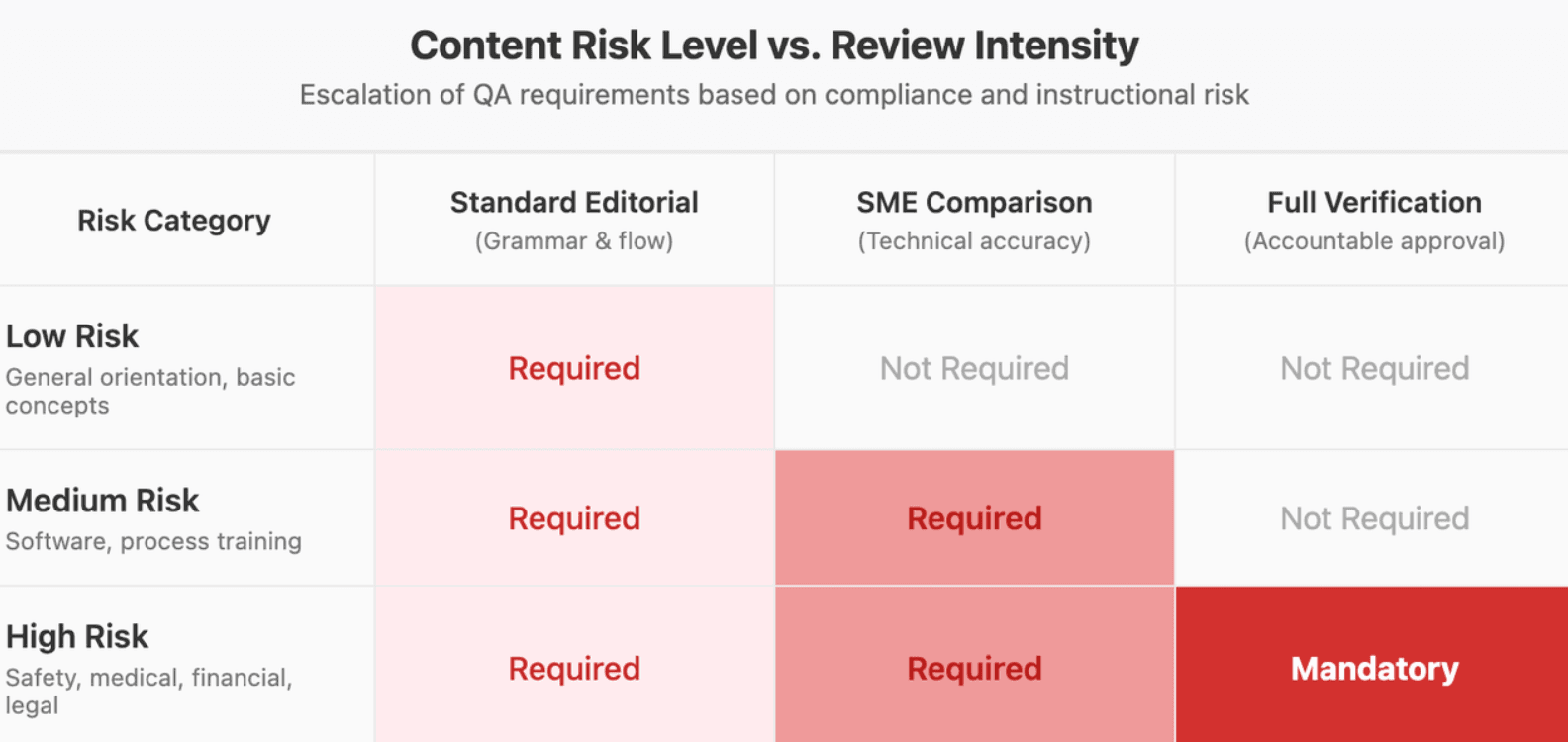
Not every module needs identical QA.
Low risk: general orientation → standard editorial review Medium risk: software/process training → SME source comparison High risk: safety, medical, financial, legal, or compliance → full source verification and accountable human approval
AI can assist with checking. It should not be the final approver of its own high-risk output.
How Do You Publish, Measure, and Update a Microlearning Video Series?
Do not treat the finished clips as isolated media files. Treat them as a maintainable learning system.
Publish videos in the learner's workflow
Microlearning can live in an:
- LMS
- onboarding portal
- knowledge base
- help center
- internal wiki
- product academy
- point-of-work QR experience
You can also combine a video with a retrieval question, scenario, or later refresher.
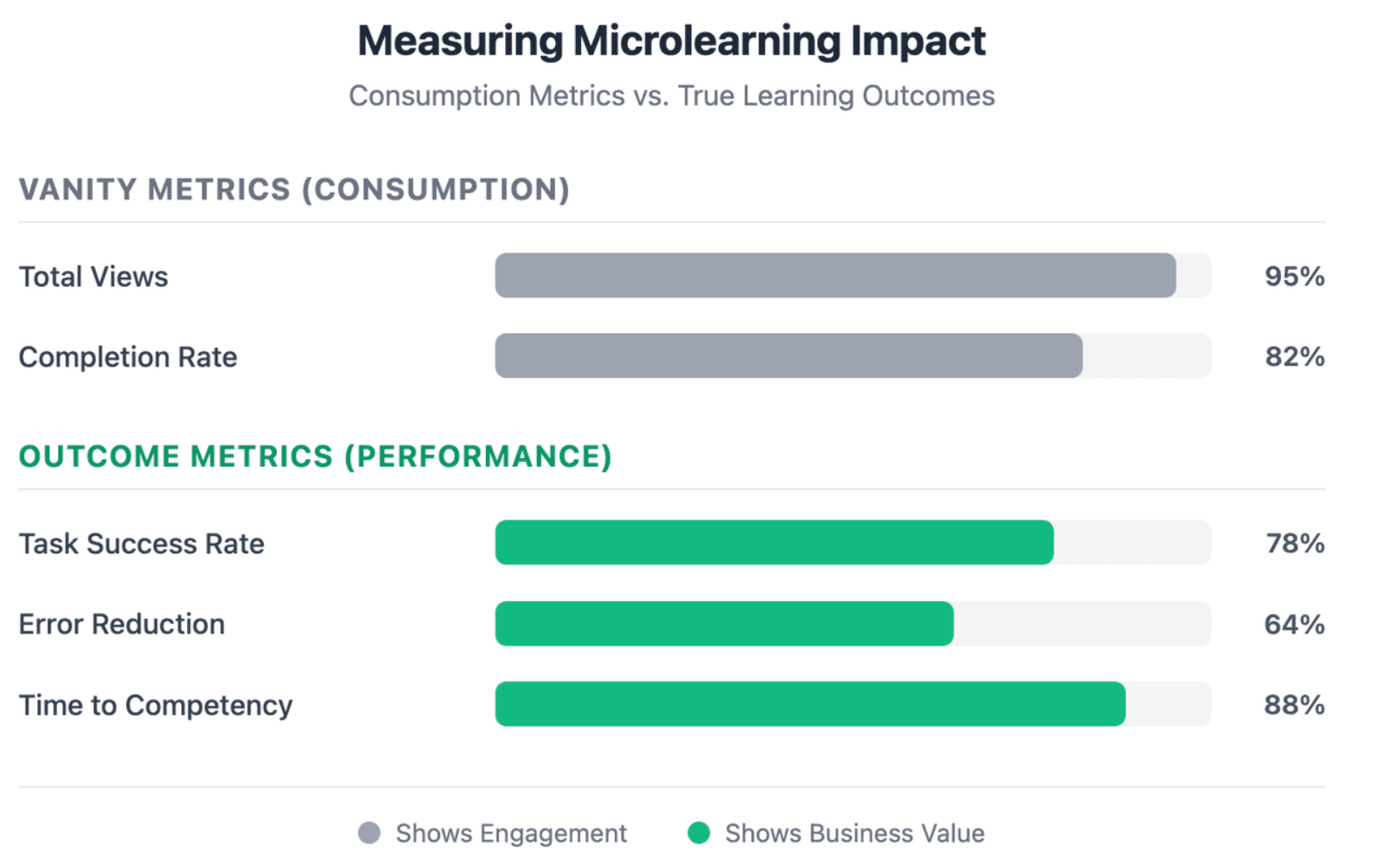
Measure outcomes, not only views
Views and completion rates show consumption, not necessarily learning.
Depending on the objective, useful measures can include:
- quiz performance
- task success
- error rate
- support tickets
- time to competency
- rework
- learner feedback
Update only the modules affected by source changes
Maintain each video's:
source document + version + source pages + SME owner + last review date
Then use:
PDF v2 → identify changed sections → find affected modules → regenerate those videos → review → replace
This is a major advantage of modular microlearning: a policy change on two pages does not require rebuilding a 40-minute training video.
FAQ
Can AI automatically turn a long PDF into multiple videos?
Yes. AI can analyze a PDF, identify topics and objectives, draft scripts, and generate video scenes. However, fully automatic page-to-video conversion is rarely the best instructional workflow. Human review is especially important for complex, technical, regulated, or safety-critical documents.
How many microlearning videos should a 50-page PDF become?
There is no correct page-to-video ratio. Determine the number by counting meaningful learning objectives, not pages. A document may contain several objectives or dozens, depending on its density and purpose.
Should one PDF chapter equal one microlearning video?
Not necessarily. One chapter may contain several learning objectives, while one objective may rely on information from multiple chapters or appendices. Split according to what the learner needs to understand or do.
How long should a microlearning video be?
There is no universal ideal duration. The video should be long enough to achieve one clear objective without unnecessary information. Research on microlearning emphasizes targeted, bite-sized instruction rather than one fixed number of minutes.
Can AI accurately handle tables, charts, and diagrams from a PDF?
AI can extract and interpret many structured elements, but these require additional review. Tables, formulas, diagrams, and charts can lose relationships during extraction or simplification, so verify them against the source before publishing.
Should I keep the original PDF after creating the videos?
Yes. In most professional workflows, the PDF should remain the authoritative reference while videos provide explanation, demonstration, and reinforcement.
Can the videos be translated into multiple languages?
Yes. Modern AI video workflows can generate multilingual narration and localized video versions. Translation should still be reviewed for terminology, policy language, cultural context, and pronunciation.
What happens when the original PDF is updated?
If every module is mapped to its source pages and document version, you can identify which videos are affected and update outdated video content by regenerating only those modules rather than recreating the entire series.
Conclusion
Turning a long PDF into microlearning videos is not mainly a file-conversion task. The strongest workflow uses AI to convert documents into videos, organize knowledge around learning outcomes, preserve context and traceability, generate the right video format for each module, and keep every video easy to review and update. The result is not simply a shorter version of the PDF, but a maintainable learning system built from it.