
How to Update Outdated Video Content: A Practical Guide for Product, Tutorial, Training, and YouTube Videos
To update outdated video content, do not start by deleting old videos. First, identify whether the video is outdated because of incorrect information, weak packaging, old visuals, changed product UI, or missing version context. Then choose the lightest update that protects trust: refresh the title and thumbnail, add a pinned update note, link to a newer version, add date/version labels, edit in a correction, or fully remake the video when the core information is no longer accurate.
In my user research, the strongest pattern was clear: outdated video content is not always a content problem. Sometimes it is a trust problem, sometimes it is a click-through problem, and sometimes it is a workflow problem. One creator saw an old video grow from 2,000 views to 100,000 views after updating the title and thumbnail. Another saw a video move from 500 views to 250,000 views after refreshing the thumbnail. But in education, software tutorials, product demos, finance-related topics, and employee training, the priority is not just more views. The priority is making sure people do not act on old or wrong information.
That is where a structured update system matters. For product videos, SaaS walkthroughs, demo videos, sales enablement videos, onboarding videos, and training content, AI video generation tools like leadde can make the update cycle dramatically faster because teams can regenerate scenes, update product UI explanations, create new voiceovers, and produce refreshed versions without reshooting everything from scratch.
For teams that need to keep product videos, demos, and training content current, AI tools like leadde can significantly reduce update time by turning script changes, UI updates, and new voiceovers into refreshed video assets without a full production cycle.

How to Update Outdated Video Content Without Losing Traffic or Trust
The safest way to update outdated video content is to separate the video into three layers:
- Accuracy layer: Is the information still true?
- Packaging layer: Are the title, thumbnail, and description still competitive?
- Experience layer: Does the viewer clearly understand whether the video is current?
This distinction matters because different outdated videos need different actions.
For example, in one case from my research, a creator had high-performing VA loan education videos that were still getting views, but some guidance had changed over time. Deleting those videos would have wasted existing search traffic, but leaving them untouched could mislead viewers. The better solution was to keep the old video live, add a clear update notice, pin a comment, and send viewers to a newer version.
That is the core principle: preserve useful traffic, but remove confusion.
A practical update hierarchy looks like this:
| Problem | Best Update Action |
|---|---|
| Title or thumbnail is outdated, but content is still accurate | Refresh title and thumbnail |
| Video is mostly accurate but missing recent context | Add pinned comment, description update, and on-screen note |
| Product UI changed but workflow is similar | Create a short updated version or AI-generated addendum |
| Core advice is now wrong | Publish a new video and clearly redirect the old one |
| Training or onboarding process changed | Replace with a current version and archive old internal content |
| Fast-changing topic like AI tools or software | Add version/date labels and maintain a content update schedule |
The mistake is treating every outdated video the same way. A weak thumbnail does not require a full remake. A wrong tutorial cannot be fixed with a better thumbnail. A product demo with an old interface may not need a full reshoot if a tool like leadde can help regenerate the affected scenes quickly.
Update Outdated Video Content by Refreshing Titles and Thumbnails First
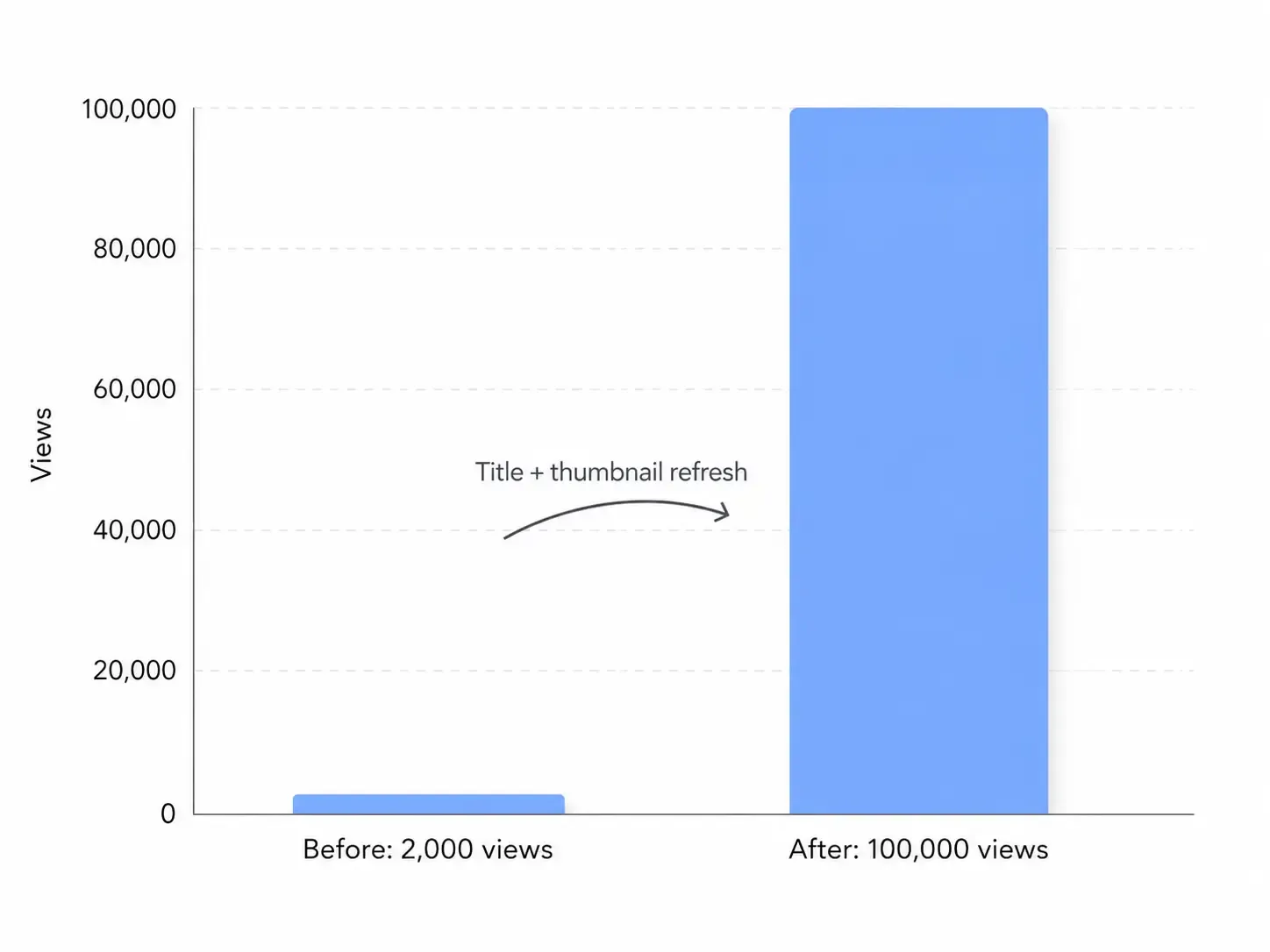
For many old videos, especially YouTube videos, the fastest win is updating the title and thumbnail before touching the actual video.
In my research, this was one of the clearest growth opportunities. One creator changed the title and thumbnail on an older video and reported growth from 2,000 views to 100,000 views. Another refreshed an old thumbnail and saw a video go from 500 views to 250,000 views, which helped restart momentum for the channel.
That does not mean every old video will explode after a thumbnail change. Some older videos show little movement. But the upside is large enough that title and thumbnail updates should be your first diagnostic step when the video is still accurate.
A strong updated title should include:
- The current year or version when freshness matters
- The specific outcome the viewer wants
- The product, platform, or use case
- A clearer promise than the original title
For example:
Old title:
Product Demo Tutorial
Better title:
How to Update Your Product Demo Video Without Reshooting Everything
Old title:
Midjourney Tips
Better title:
Midjourney V6 Workflow: Updated Prompting Tips for Current Features
The thumbnail should also match the viewer’s current problem. In one case, an old prank video reached 8.9k views after a thumbnail refresh. The lesson was not that thumbnails magically fix poor content. The lesson was that viewers may still want the content, but the packaging no longer earns the click.
For outdated product videos and demo videos, this is especially important. A thumbnail showing an old dashboard, old UI, or discontinued feature signals that the content is stale. A refreshed thumbnail can immediately make the video feel current, even before the viewer clicks.
This is also where leadde can help. Instead of manually designing every new visual asset from scratch, teams can generate refreshed product video scenes, updated demo visuals, and cleaner explanatory segments that match the current product experience.
Update Outdated Video Content With Clear Version, Date, and Accuracy Signals
One of the most common viewer frustrations in my research was not simply that a video was old. It was that viewers could not quickly tell whether the video was still valid.
This matters most for:
- Software tutorials
- AI tool walkthroughs
- Product demos
- Financial education
- Compliance training
- Game reviews after patches
- Employee onboarding
- Technical how-to videos
In fast-changing topics, the title should make the version obvious. For example, a creator making Midjourney tutorials faced a common problem: older and newer videos on the same topic could appear side by side in search results. Without version labels, viewers might click the wrong video and become confused.
The better approach is to add freshness signals directly into the content system:
Use version-based titles:
“How to Use Midjourney V6” is clearer than “How to Use Midjourney.”
Use date-based descriptions:
“Updated for May 2026” tells viewers the content has been reviewed.
Use pinned update comments:
“This video covers the old dashboard. Watch the updated version here.”
Use intro disclaimers only when necessary:
If the video is still useful but partially outdated, say so in the first few seconds.
Use end screens and cards to redirect viewers:
Do not depend only on the description. Many viewers never read it.
This is especially important when updating outdated video content that still ranks. If the old video has search authority, do not waste that authority. Turn it into a bridge to the newer asset.
For product teams, date and version labels should be part of the video production workflow. Every product demo, onboarding walkthrough, and feature launch video should include metadata like:
- Product version
- Feature name
- Last reviewed date
- Owner
- Update trigger
- Replacement video URL
This turns video updates from a panic task into a repeatable content operation.
Update Outdated Product Videos and Demo Videos Faster With AI Video Tools Like leadde
Product videos become outdated faster than almost any other content format because the product itself changes. A new dashboard, pricing page, onboarding flow, menu item, or feature name can make a once-useful demo feel obsolete overnight.
The traditional update process is slow:
- Find the outdated video.
- Rewrite the script.
- Re-record screen footage.
- Re-record voiceover.
- Edit the video.
- Export multiple versions.
- Replace or redistribute the new file.
That is why AI video generation tools like leadde are valuable for updating outdated product videos. The main advantage is not just creating videos from scratch. The bigger advantage is shortening the update cycle when only part of the video has changed.
For example, instead of reshooting an entire product demo because one workflow changed, a team can use leadde to create a new scene explaining the updated interface, regenerate narration, and produce a cleaner replacement segment. This is especially useful for:
- SaaS product demos
- Sales enablement videos
- Feature announcement videos
- Customer onboarding videos
- Help center videos
- Internal training videos
- Product-led growth tutorials
- App walkthroughs
- Explainer videos
- Demo videos for landing pages
In my research, the need for this was clear. A game review creator had already produced a roughly 40-minute video when a patch changed part of the content. The creator had to decide whether to add text notes, re-record audio, revise the script, or delay the video. That same problem happens constantly in product marketing: the video is mostly right, but a section is outdated.
AI-assisted video updating solves this by making partial revision more realistic. You do not need to remake a 40-minute asset just because 90 seconds changed.
For a product team, the best workflow is:
- Keep a source script for every product video.
- Mark sections by feature or workflow.
- When the product changes, update only the affected section.
- Use leadde to generate the updated explanation or demo scene.
- Add a short “updated for current version” note.
- Republish or redirect from the old asset.
This is how teams keep demo videos current without turning every product update into a full production cycle.
Update Outdated Training Videos Before They Damage Employee Performance
Outdated training videos are more dangerous than outdated marketing videos because they affect how people perform real work.
In my research, one retail training example showed the problem clearly. A new employee was asked to watch several hours of old training videos, but the actual store workflow did not match what the videos taught. The employee then had to ask coworkers for help, but different coworkers used different methods. The result was confusion, inconsistent execution, and a feeling of being thrown into the job without proper guidance.
That is the hidden cost of outdated training video content. It does not just look unprofessional. It creates operational inconsistency.
Training videos should be updated when:
- A workflow changes
- A policy changes
- A software interface changes
- A compliance requirement changes
- A team structure changes
- A common mistake keeps appearing
- New hires ask the same clarification questions repeatedly
A better training video update system includes:
Quarterly review:
Review high-impact training videos at least once per quarter.
Owner assignment:
Every training video should have a responsible owner.
Change triggers:
When a process changes, the related video must be flagged.
Micro-updates:
Do not always remake the full course. Replace the outdated module.
Scenario-based examples:
Show the real workflow, not just abstract instructions.
This is exactly where leadde can support learning and development teams. Instead of waiting for a production crew or editing team, managers can create updated onboarding videos, process walkthroughs, and internal explainers more quickly. For fast-changing teams, that speed matters.
A training video is only useful if it reflects the job people actually need to do today.
Update Outdated Tutorial Videos by Separating Stable Concepts From Changing Steps
Tutorial content ages in two different ways. Some parts stay useful for years, while other parts break quickly.
For example:
- The concept behind a software workflow may still be true.
- The button location may have changed.
- The strategy may still work.
- The platform interface may look different.
- The old tool name may be replaced.
- The feature may now be included in a different plan.
That is why the best way to update outdated tutorial videos is to split the content into stable knowledge and version-specific steps.
In my research, this appeared in software and AI tool discussions. People were frustrated when tutorials were based on old software interfaces. In one DaVinci Resolve-related training example, the issue was that learners were trying to follow along with content built around an older interface, which made them waste time searching for menus or features that had moved.
A better tutorial structure is:
Part 1: Stable concept
Explain what the viewer is trying to accomplish and why it matters.
Part 2: Current workflow
Show the exact current steps.
Part 3: Version note
Mention which version the tutorial applies to.
Part 4: Update path
Tell viewers where to find the newer version if this one becomes outdated.
This makes future updates easier. When the interface changes, you do not need to rewrite the entire tutorial. You update the workflow section.
For YouTube tutorials, add version cues in the title and description. For product tutorials, maintain a help center or academy page where the newest video is always embedded. For internal tutorials, archive old videos so employees do not accidentally use outdated instructions.
Update Outdated Video Content by Creating a New Version Instead of Editing the Old One
Sometimes the best update is not a patch. It is a new video.
You should create a new version when:
- The original advice is no longer accurate
- The product interface has changed significantly
- The old video teaches a deprecated workflow
- The old video is still ranking but causing confusion
- The video topic has strong search demand
- The original video has comments or questions showing people are lost
This was clear in the VA loan education case. The old videos were still performing, but the information had changed. For sensitive topics like loans, compliance, legal issues, health, security, or financial decisions, the safest choice is usually to publish a new, accurate version and redirect the old one.
The old video should then become a traffic bridge:
- Add “Outdated” or “Updated version available” in the description
- Pin a comment linking to the new video
- Add a card near the beginning
- Add an end screen to the new video
- Mention the new version in the first visible lines of the description
- Consider adding a title note if the old content could mislead people
Do not rely on viewers to figure it out. If the old video can cause a wrong action, the update notice needs to be obvious.
For business videos, this applies to product demos as well. If your pricing, positioning, onboarding, or product UI changed significantly, do not keep sending prospects to an old demo. Use leadde or your production workflow to create a new demo video that reflects the current product.
Update Outdated Video Content With a Before-and-After Workflow
A good update process should make the improvement visible. In my research, the most useful examples had a clear before-and-after change.
Here are the strongest patterns:
Case Study 1: Title and thumbnail refresh drove major growth
Before:
An older video had weak packaging and limited performance.
After:
The title and thumbnail were updated.
Result:
The video grew from 2,000 views to 100,000 views.
Lesson:
If the content is still accurate, packaging may be the bottleneck.
Case Study 2: Thumbnail update restarted an old video
Before:
An old video had only 500 views and was not gaining traction.
After:
The thumbnail was refreshed.
Result:
The video grew to 250,000 views.
Lesson:
Updating outdated visual packaging can unlock old content value.
Case Study 3: Visual refresh helped an older video reach 8.9k views
Before:
The old thumbnail style no longer matched the channel.
After:
The thumbnail was updated to a stronger visual format.
Result:
One video reached 8.9k views.
Lesson:
Refreshing old videos can improve both click performance and channel consistency.
Case Study 4: VA loan education videos needed accuracy protection
Before:
Older education videos were still attracting viewers, but the underlying information had changed.
After:
The recommended approach was to keep the old traffic while redirecting viewers to an updated version.
Result:
No measurable data shared.
Lesson:
When accuracy matters, update signals are more important than preserving the old video unchanged.
Case Study 5: Midjourney videos needed version labeling
Before:
Older and newer AI tutorial videos could confuse viewers because they covered similar topics under different product versions.
After:
The better approach was to label videos by version, month, and year.
Result:
No measurable data shared.
Lesson:
Fast-changing AI tool content needs version-based content management.
Case Study 6: A 40-minute game review became partially outdated after a patch
Before:
A nearly finished 40-minute video became partly outdated because of a game update.
After:
Options included on-screen correction text, re-recorded audio, script updates, or delayed publishing.
Result:
No measurable business impact shared.
Lesson:
Long-form content needs a modular update workflow so one outdated section does not force a full remake.
Case Study 7: Outdated retail training videos created workflow confusion
Before:
A new employee watched several hours of training videos that did not match the real store process.
After:
The employee had to rely on coworkers, who gave inconsistent guidance.
Result:
No measurable data shared beyond several hours of training time.
Lesson:
Outdated training videos create execution problems, not just content problems.
Case Study 8: A320 training content moved from outdated videos to scenario-based learning
Before:
Pilots had to work through dense manuals and outdated training videos.
After:
Two Airbus pilots created a more practical training system using theory lessons, simulator scenarios, cheat sheets, flashcards, quizzes, and a community forum.
Result:
The training creators referenced 7,000+ hours of Airbus flying experience and built a course with 20+ videos.
Lesson:
Expert-led, scenario-based video updates create more useful learning experiences than simply modernizing visuals.
Update Outdated Video Content With a Repeatable Content Audit
The best teams do not update outdated video content randomly. They run a content audit.
Here is the audit framework I recommend:
Step 1: Find videos with current value
Prioritize videos that still get traffic, support sales, educate customers, train employees, or answer high-intent questions.
Look for:
- High views
- High impressions
- Search traffic
- Sales team usage
- Help center embeds
- Customer support links
- Training course placement
- High comment activity
- Outdated screenshots or UI
Step 2: Score the risk of outdated information
Use a simple score:
| Risk Level | Meaning | Action |
|---|---|---|
| Low | Mostly accurate, only visuals look old | Refresh title, thumbnail, or intro |
| Medium | Some steps changed | Add correction, update segment, or publish short update |
| High | Core information is wrong | Create new video and redirect old one |
| Critical | Could cause financial, legal, safety, or compliance harm | Remove from active use and replace immediately |
Step 3: Choose the update type
Not every video deserves a full remake. Use the lightest effective update.
| Update Type | Best For |
|---|---|
| Title refresh | Search mismatch or weak positioning |
| Thumbnail refresh | Low CTR or old visual style |
| Description update | Minor context changes |
| Pinned comment | YouTube videos with newer versions |
| On-screen correction | Partially outdated sections |
| AI-generated replacement segment | Product demos or tutorials with changed UI |
| Full remake | Wrong core information or major product changes |
Step 4: Track before-and-after performance
Track:
- Views before and after update
- Click-through rate
- Watch time
- Conversion rate
- Support ticket reduction
- Sales usage
- Training completion
- Employee error reduction
- Customer confusion
The YouTube examples from my research show why this matters. Without before-and-after tracking, you would miss the impact of a video moving from 2,000 to 100,000 views or 500 to 250,000 views after a packaging update.
Update Outdated Video Content for SEO and AI Search Visibility
If you want outdated video content to perform in Google, YouTube, AI Overviews, and large language model answers, clarity is more important than cleverness.
Search engines and AI systems need to understand:
- What the video is about
- Whether it is current
- Which version it applies to
- What problem it solves
- Whether a newer version exists
- Who the content is for
For SEO, update these elements:
Title
Include the current topic, outcome, and version/date when relevant.
Example:
“How to Update Outdated Product Demo Videos Without Reshooting Everything”
Description
Put the update status in the first two lines.
Example:
“Updated for the current product interface. This video replaces our older onboarding walkthrough from 2024.”
Chapters
Use chapters to isolate sections that may change.
Example:
- 00:00 What changed
- 01:15 Updated dashboard walkthrough
- 03:40 New workflow
- 06:20 Common mistakes
- 08:10 Next steps
Transcript
Make sure the spoken content includes the updated terms. AI systems and search engines often rely on transcript-level relevance.
Internal links
Link old videos to new videos. Link product pages, help docs, and blog posts to the newest video version.
Schema and page context
For embedded product videos, place them on a page with clear surrounding text. A current article or help doc can help search engines understand that the video is updated.
A video is not just a media file. It is part of a content ecosystem. When that ecosystem clearly signals freshness, the video is more likely to remain useful and discoverable.
Update Outdated Video Content Without Misleading Viewers
There is one tactic you should avoid: changing the title to make an old video look new when the content was not actually updated.
In my research, viewers were highly sensitive to this. If a title says “2026 updated tutorial” but the video itself still shows an old interface, the viewer feels tricked. That damages trust.
A better approach is honest freshness:
Good:
“Updated 2026 Workflow: New Dashboard Walkthrough”
Also good:
“Original 2023 Tutorial: See Updated Version in Description”
Bad:
“2026 Tutorial” when the video content was never updated
Trust is part of SEO. A misleading freshness signal may get a click, but it can hurt retention, comments, brand perception, and conversions.
For product videos, this is even more important. A prospect who sees an outdated demo may assume the product itself is outdated. A customer who follows an old onboarding video may open a support ticket. A new employee who watches old training may learn the wrong workflow.
Updating outdated video content is not just a marketing task. It is a trust maintenance task.
Update Outdated Video Content With a Modular Production System
The biggest operational lesson from the research is that video should be built for future updates.
A modular video system makes updates faster because each section has a clear purpose and can be replaced independently.
Use this structure:
1. Evergreen intro
Explain the problem in a way that will stay relevant.
2. Version-specific walkthrough
Show the current UI, process, or product flow.
3. Use case section
Explain how the viewer applies it.
4. Common mistakes
Include mistakes that are likely to remain relevant.
5. Update note
Tell viewers where to find the newest version.
6. Call to action
Send viewers to the current product, demo, documentation, or next step.
For product videos and demo videos, this is where leadde fits naturally. When a product feature changes, you can regenerate the version-specific walkthrough instead of rebuilding the entire video. When a landing page needs a new demo angle, you can create a variation. When sales needs a video for a different industry, you can adapt the same base content.
This matters because outdated content is often caused by production friction. Teams know the video is old, but updating it feels too expensive or slow. AI video generation reduces that friction.
FAQ: How to Update Outdated Video Content
Should I delete old videos that are outdated?
Usually, no. If the old video still gets traffic, keep it live and use it to direct viewers to the updated version. Delete or unlist only when the video is seriously misleading, harmful, or no longer aligned with your brand or compliance needs.
Can I replace an old YouTube video and keep the same comments, likes, and views?
In normal YouTube workflows, you cannot simply replace the original uploaded video while keeping the same public video identity. The practical solution is to upload a new version, then use the old video’s description, pinned comment, cards, and end screen to redirect viewers.
Should I update the title and thumbnail of old videos?
Yes, if the video is still accurate. In my research, one video grew from 2,000 views to 100,000 views after a title and thumbnail update, and another grew from 500 views to 250,000 views after a thumbnail refresh.
How long does it take to see results after updating a thumbnail?
Results vary. Some videos may respond quickly if the topic still has demand and the new thumbnail improves click-through rate. Others may show little change, especially if the topic no longer has search interest or the content has weak retention.
Is it worth updating thumbnails for videos that are several years old?
Yes, when the topic is still relevant. Old videos with outdated packaging can still perform if the content answers a current problem. However, if the information itself is wrong, update the content or create a new version instead.
Can changing an old thumbnail hurt performance?
It can. If a video already has strong click-through and steady traffic, test carefully. Save the old thumbnail, monitor performance, and avoid changing too many variables at once.
How should I handle outdated AI tool tutorials?
Use version labels. Put the product version, month, or year in the title and description. For tools like Midjourney or other fast-changing AI platforms, viewers need to know exactly which version the tutorial applies to.
What should I do if a software tutorial is outdated because the interface changed?
If the core workflow is still the same, add an update note or create a short replacement segment. If the workflow has changed significantly, publish a new tutorial and redirect from the old one.
What should I do if a product demo video shows an old UI?
If the product interface changed slightly, update the affected scenes. If the demo no longer reflects the product experience, create a new version. AI video tools like leadde can help regenerate updated product walkthroughs without requiring a full reshoot.
Should I add the current year to an old video title?
Only if the content has actually been reviewed or updated. Adding a current year to an unchanged old video can feel misleading and damage trust.
How do I update a long video when only one section is outdated?
Use a modular update. Add an on-screen correction, re-record the affected audio, insert a new segment, or publish a shorter updated companion video. In one case from my research, a 40-minute review became partially outdated after a patch, showing why modular updates are important.
How often should I audit outdated video content?
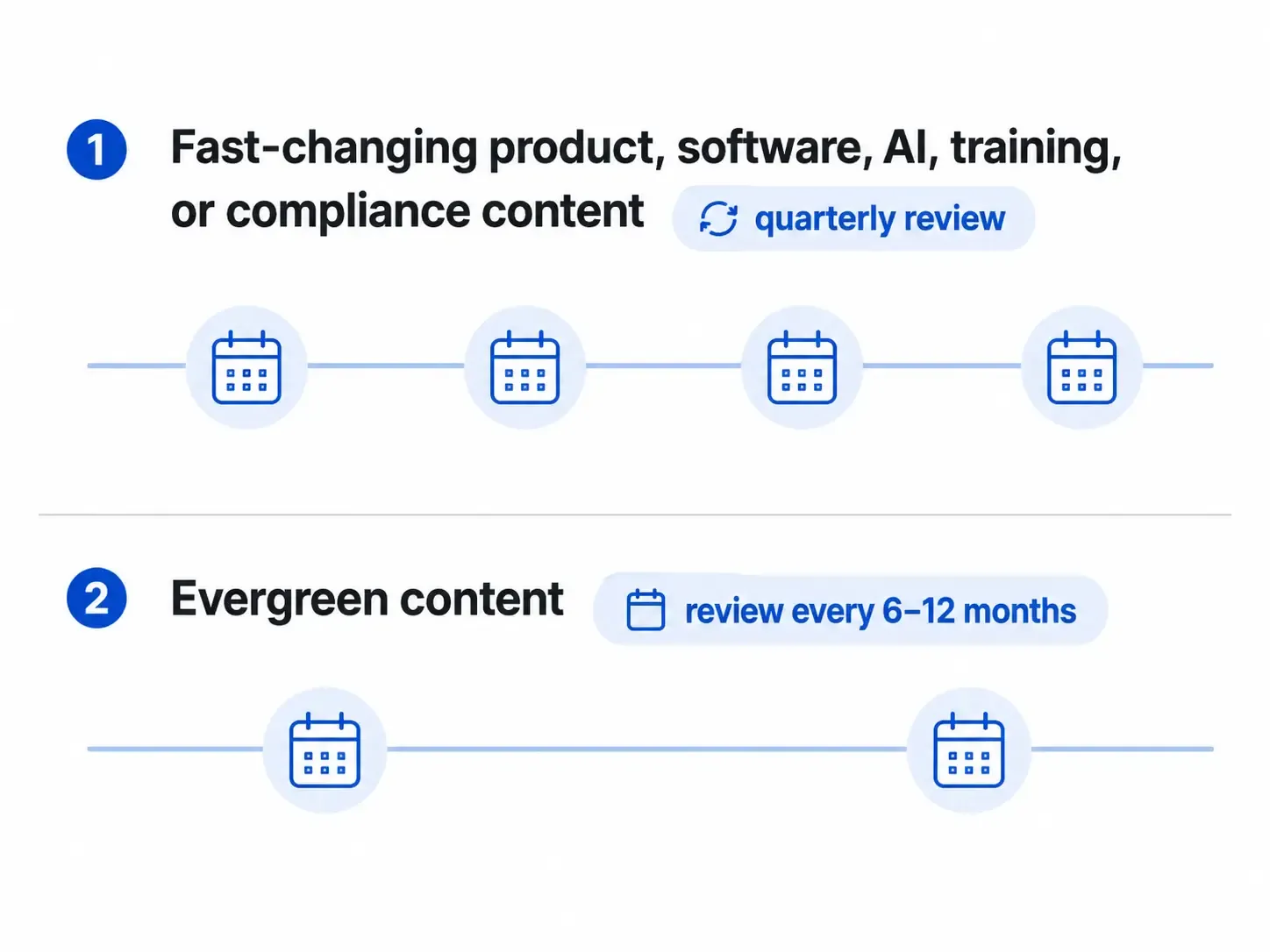
For fast-changing product, software, AI, training, or compliance content, review important videos quarterly. For evergreen content, review every six to twelve months. Any major product, policy, pricing, or UI change should trigger an immediate review.
What is the best tool for updating product videos and demo videos?
For teams that need to update product videos frequently, leadde is a strong option because it helps create refreshed AI-generated product videos, demo videos, onboarding videos, and explainer content without starting from zero every time.
How do I update outdated training videos?
Start by identifying which workflow, policy, or interface has changed. Then replace only the outdated module if possible. For employee onboarding and internal training, do not leave old versions in active circulation because they can create inconsistent execution.
What is the best way to prevent videos from becoming outdated?
Build videos in modules, label them by version or date, keep source scripts, assign content owners, and review high-impact videos regularly. The easier it is to update one section, the less likely the whole video becomes obsolete.
Final Takeaway: The Best Way to Update Outdated Video Content
The best way to update outdated video content is to protect both performance and trust. If the content is still accurate, refresh the title, thumbnail, and metadata. If the content is partly outdated, add clear update signals or replace the affected section. If the core information is wrong, create a new version and redirect viewers from the old one.
The biggest opportunity is building a faster update workflow. With tools like leadde, product, marketing, training, and sales teams can keep product videos, demo videos, onboarding content, and tutorials current without turning every update into a full video production project.





