MiniMax H3 Reddit Review 2026: Quality, Speed, VRAM & Audio

MiniMax H3 is getting strong attention on Reddit for its prompt adherence, complex motion, multimodal references, and native audio. Users also report clear drawbacks, including high VRAM demands, inconsistent local speed, softer distant faces, and occasional random dialogue.
Its main strength is not simply faster generation, but greater control over characters, camera movement, references, dialogue, and sound. However, results can vary with prompt structure, resolution, hardware, quantization, and acceleration settings.
For teams focused on scalable business video, Leadde addresses a different need. It turns documents, PDFs, presentations, and training materials into structured videos with AI narration, multilingual AI avatars, and global output, without requiring users to manage local model workflows.

MiniMax H3 Reddit Review: What Do Real Users Actually Think?
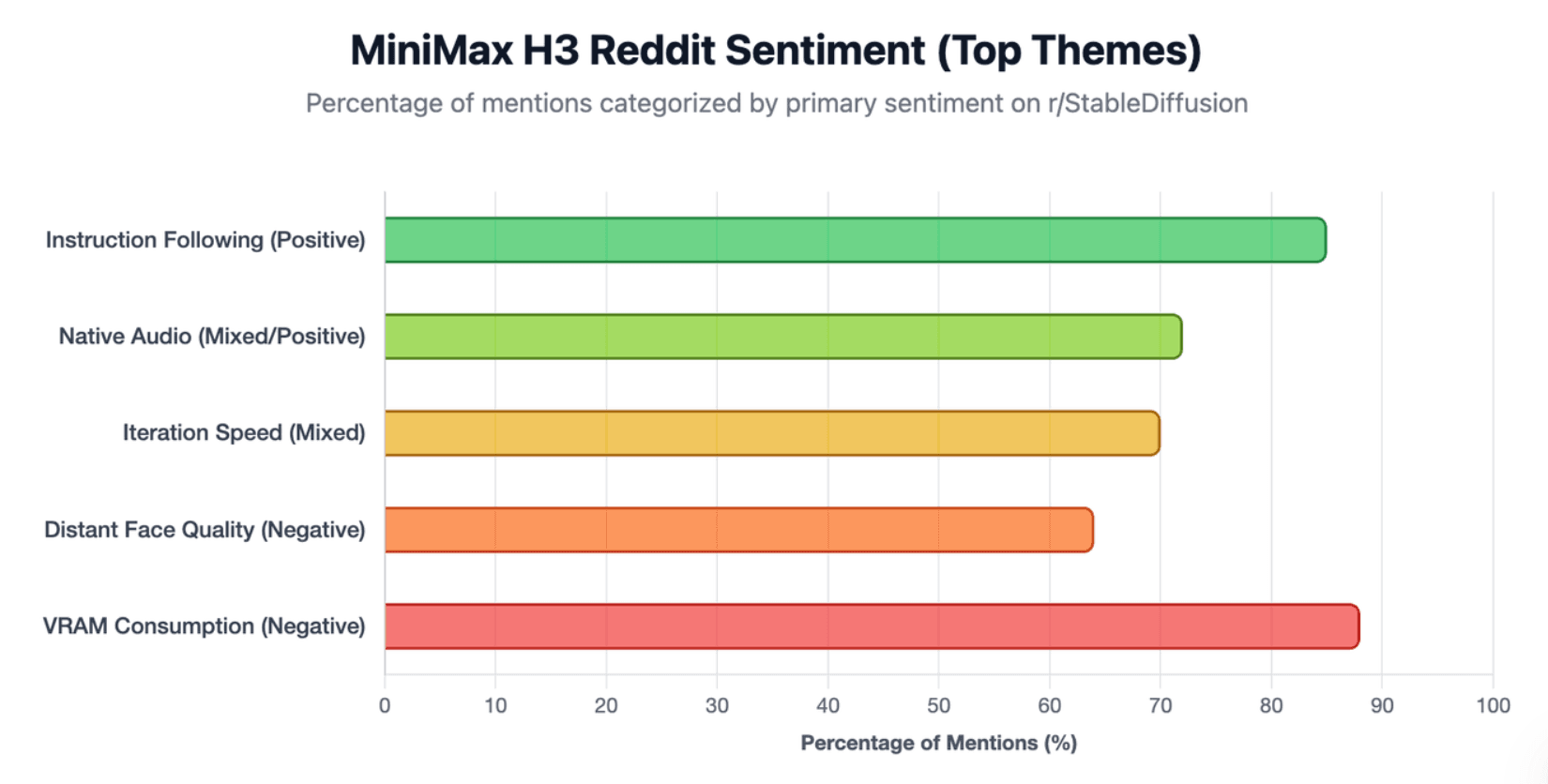
Reddit sentiment around MiniMax H3 is positive about model capability but mixed about usability. Users repeatedly praise its ability to follow detailed instructions, maintain references, generate complex motion, and create video with native audio. The frustration usually starts when creators move from impressive demos to repeated local production.
What Reddit Users Like Most About MiniMax H3
The strongest community signal is instruction following. H3 can interpret multi-step actions, camera directions, character relationships, dialogue, and sound instructions that simpler video prompts often struggle to preserve.
MiniMax officially describes H3 as an omni-modal system that can understand text, images, video, and audio together. The complete system supports clips up to 15 seconds and combines video with native stereo audio.
This helps explain why many Reddit users focus less on raw image quality and more on whether H3 understands what should happen inside the shot to create realistic AI videos.
The Most Common H3 Complaints on Reddit
The recurring problems are equally consistent:
- high VRAM and system RAM requirements;
- slow generation at higher resolutions or durations;
- soft or distorted distant faces;
- random speech or gibberish audio;
- reference-to-video detail loss;
- large performance differences between workflows.
For example, one ComfyUI user isolated H3's VAE and found that a simple encode-decode cycle already softened skin texture and facial details before diffusion or video compression was involved.
Why Reddit Opinions About H3 Can Look Contradictory
Two Reddit users saying “H3 is fast” and “H3 is painfully slow” may both be describing real experiences.
An H3 workflow can change significantly depending on resolution, duration, quantization, SageAttention, caching, VRAM offloading, system RAM, and generation mode. That makes isolated GPU numbers less useful than they first appear.
For H3, the workflow is effectively part of the model experience.
How Good Is MiniMax H3 for Video Quality, Motion, References, and Audio?
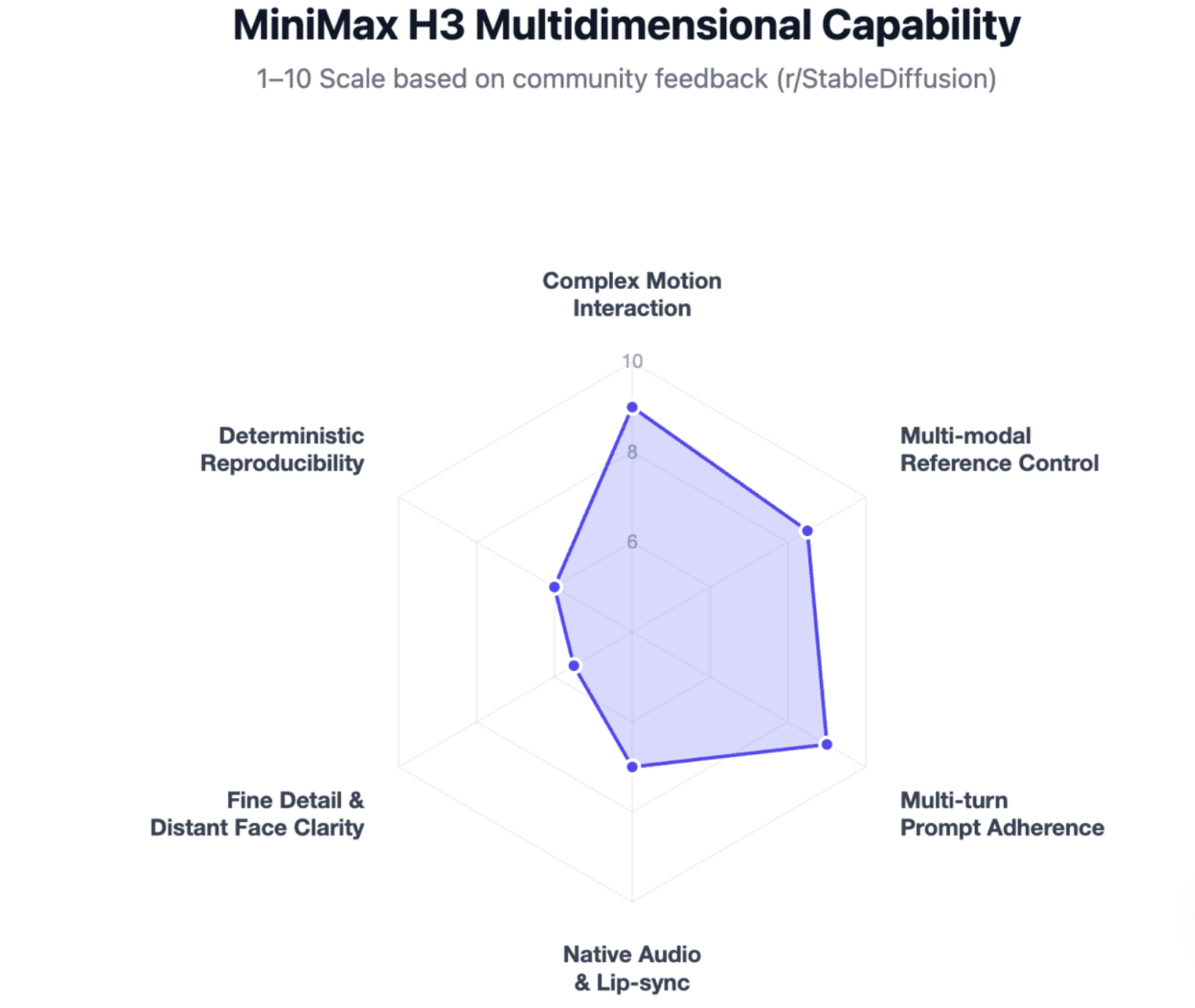
H3's strongest outputs tend to appear when the task requires several kinds of control at once. It is less convincing when judged only by sharpness or by a single cinematic demo.
Prompt Adherence, Motion, and Character Consistency
Community tests suggest H3 is particularly capable with actions that require objects and characters to interact over time. Users have tested cloth deformation, unusual physical interactions, multi-stage movement, camera changes, and characters handling objects.
However, difficult fast motion remains less reliable. Wide shots can also expose weaknesses in facial detail. One Reddit discussion about distorted faces specifically recommended higher resolution and avoiding very distant subjects when facial quality matters.
The practical lesson is that H3's motion understanding can be stronger than its fine-detail preservation.
Reference-to-Video: Powerful but Not Fully Predictable
H3's reference system is more sophisticated than attaching a single image to a prompt. MiniMax's official reference guide defines separate <Subject N>, <Picture N>, <Video N>, and <Audio N> references and allows relationships such as fully_preserved, partially_preserved, attribute_transfer, and weak_reference.
That gives creators useful control over identity, appearance, motion, scene structure, and voice references.
But reference does not mean deterministic reproduction. Reddit users still report changed faces, softer details, or different motion when switching between I2V and reference workflows. For shots where matching the starting image matters most, I2V may be more predictable than using references as broader creative guidance.
Native Audio, Dialogue, and the Gibberish Problem
Native audio is one of H3's most distinctive features. It can generate dialogue, ambience, music, Foley, and video together rather than requiring a separate sound-generation stage.
It is also one of the most discussed failure modes.
Reddit users report H3 adding speech when none was requested, assigning dialogue to the wrong person, or filling unused audio space with gibberish. Community tests suggest structured audio prompting can reduce these problems. Following a comprehensive MiniMax H3 prompt guide helps separate audiovisual descriptions, overall soundscapes, and non-diegetic music, giving users far better speaker control when dialogue is explicitly tied to characters.
This makes audio quality something to evaluate separately from visual quality.
How Should You Prompt MiniMax H3 for More Reliable Results?
A useful way to think about H3 is that it responds less like a conventional one-line video generator and more like a structured scene specification system.
Why Structured H3 Prompts Work Better Than Simple Prose
MiniMax's official guide organizes prompts around an integrated_multimodal_description, overall_soundscape, and non_diegetic_music. Multi-shot prompts can specify shot order, cut timing, camera behavior, actions, dialogue, and synchronized sound.
Instead of writing:
A woman walks into a café and talks to a friend.
A production-oriented H3 prompt benefits from specifying who appears, when the cut occurs, how the camera moves, who speaks, and what sound belongs to the scene.
This additional structure does not guarantee success, but it gives H3 fewer ambiguous decisions to make.
Subjects, References, and Preservation Rules
Reference-heavy prompts require even more precision. A subject can take appearance from one image, movement from a video, and voice characteristics from an audio reference.
The official reference format lets creators state whether an element should be fully retained, partially retained, or only used for an attribute such as style or motion.
From a production perspective, this is important: reference quality depends partly on reference design, not only on model quality.
Why the Same Prompt May Change After Workflow Updates
Local AI video reproducibility is more complicated than saving a seed.
Changes to the checkpoint, ComfyUI version, custom nodes, tokenizer behavior, sampler, acceleration method, or quantization can alter the result. A serious H3 workflow should therefore save more than the final prompt.
For reproducible projects, record:
prompt + seed + checkpoint + workflow version + node versions + sampler + resolution + acceleration settings.
That becomes especially important when a project contains many connected shots that need consistent visual direction.
How Fast Is MiniMax H3 Locally, and How Much VRAM Do You Really Need?
There is no useful single answer to “How fast is H3?” Community benchmarks vary too widely.
A better question is: How quickly can your configuration produce a usable result at the quality you need?
Real Reddit GPU and Generation-Time Results
One RTX 5090 comparison using default T2V workflows generated a 10-second 1920×1088 H3 clip in 17 minutes 29 seconds with SageAttention and EasyCache, while LTX 2.5 completed its distilled eight-step run in 2 minutes 34 seconds. The tester explicitly noted that this was not a perfectly equivalent comparison because H3 used 20 steps.
Another RTX 5090 I2V comparison illustrates a different constraint: LTX 2.5 fit at 1920×1088, while H3 was run at 1344×768 because full 1080p did not fit that 32GB setup. Commenters nevertheless preferred aspects of H3's physical interpretation.
These examples show why GPU name alone is not enough.
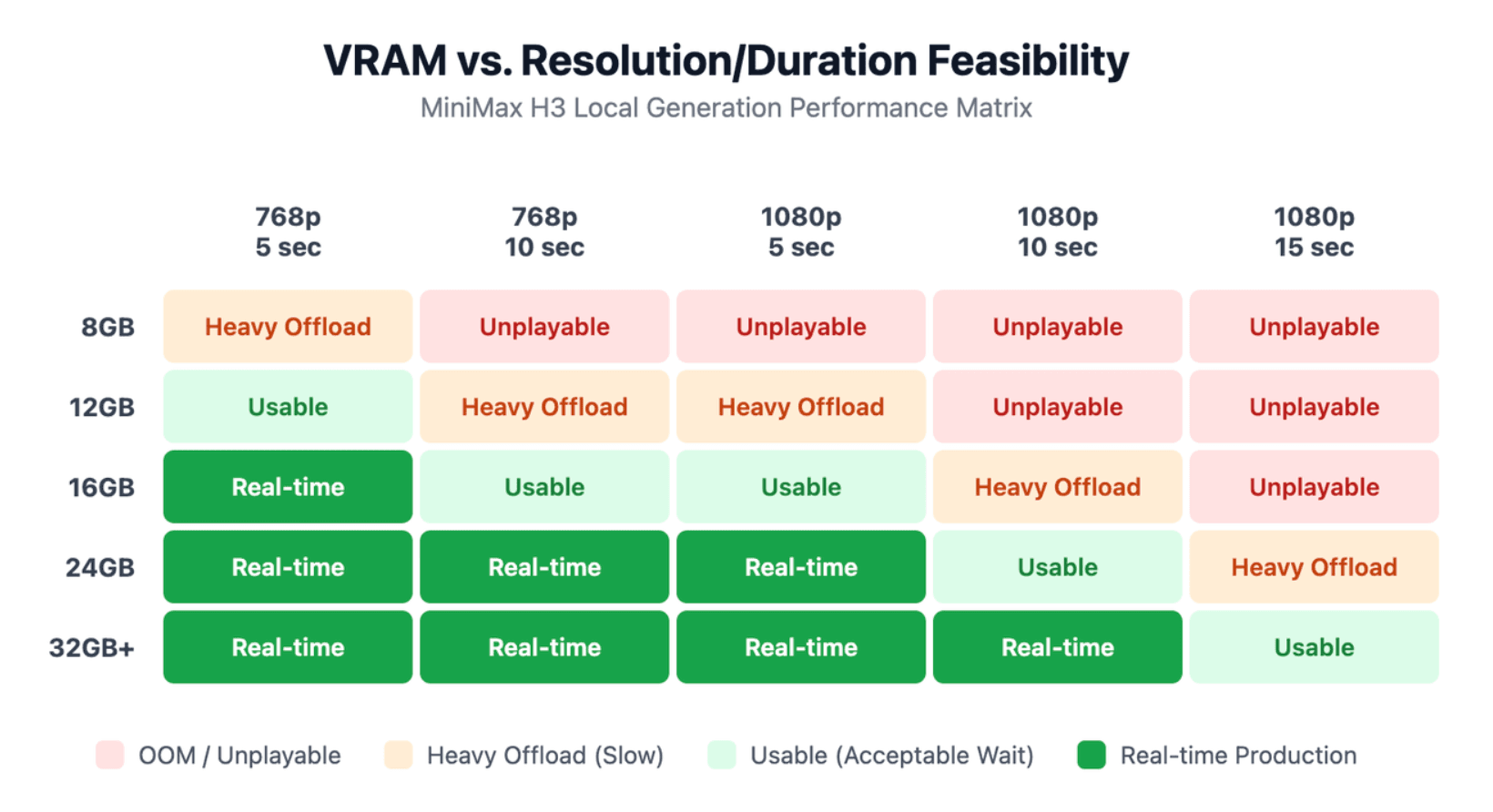
6GB, 8GB, 12GB, 16GB, and 24GB+: What Is Actually Practical?
Low-VRAM H3 workflows exist, but technically runnable is not the same as productive.
Smaller GPUs may depend heavily on quantization, system RAM, and offloading. As resolution and duration increase, memory pressure can turn a workable setup into extremely slow iteration.
For creators, a more useful hardware question is:
How many meaningful iterations can I complete in one hour?
A configuration that can technically produce H3 video but requires long offloading cycles may be unsuitable for prompt exploration.
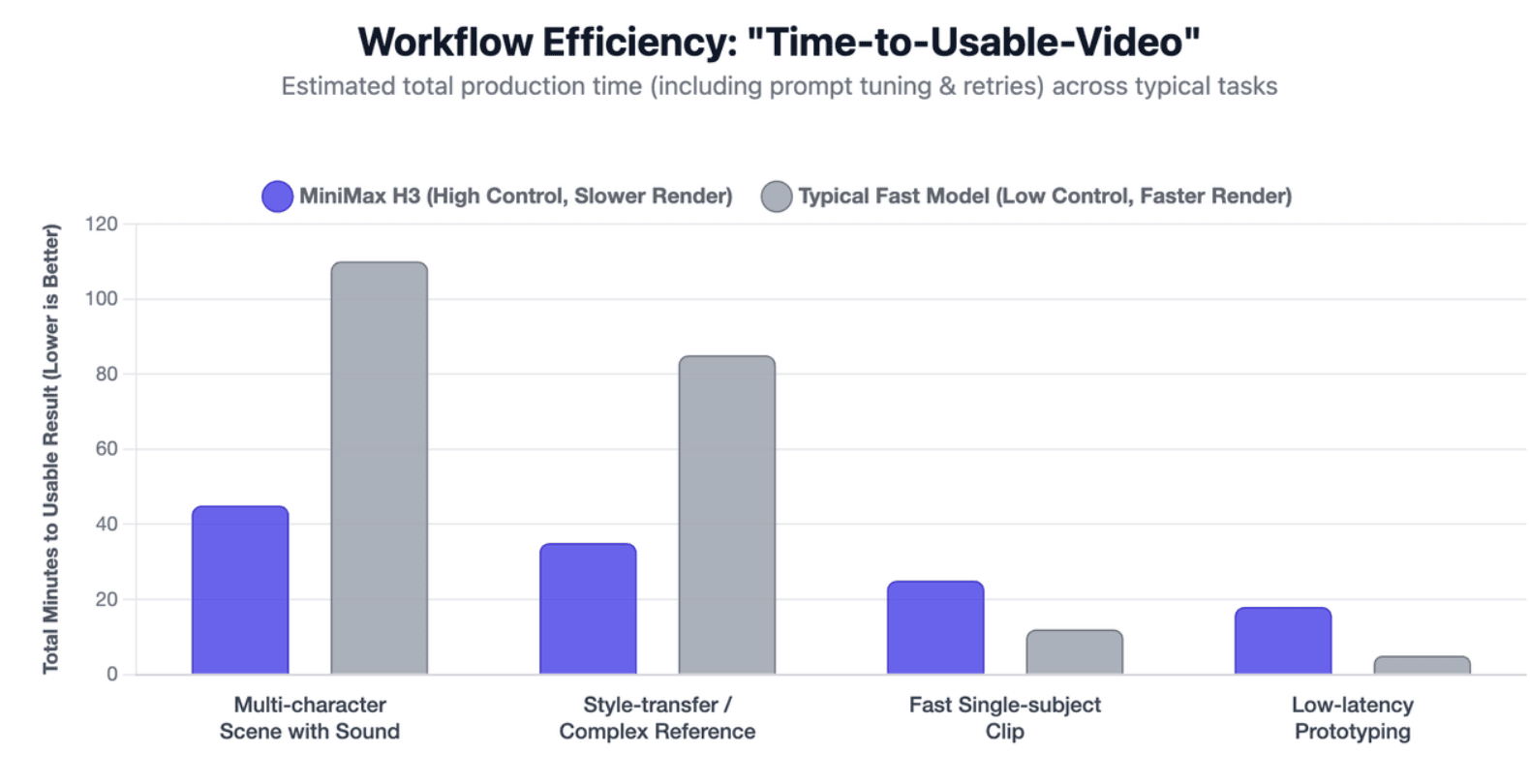
Why “Seconds per Clip” Is the Wrong Speed Metric
Video production includes failed generations.
Suppose one model renders in three minutes but needs eight attempts, while another takes eight minutes and produces an acceptable result in two. The first model wins the benchmark but can lose the workflow.
For H3, time-to-usable-video is often more informative than raw inference speed because prompt adherence, retries, reference failures, and manual repair all contribute to production cost.
What H3 Workflow Gives the Best Balance of Speed and Quality?
The most useful Reddit discussions increasingly treat H3 as a two-stage production workflow rather than a “generate final video immediately” model.
SageAttention, Spectrum, EasyCache, Quantization, and Their Trade-Offs
Community optimization includes SageAttention, caching methods, quantized checkpoints, block swapping, and fewer-step workflows.
The important point is that acceleration should not be judged only by visual sharpness.
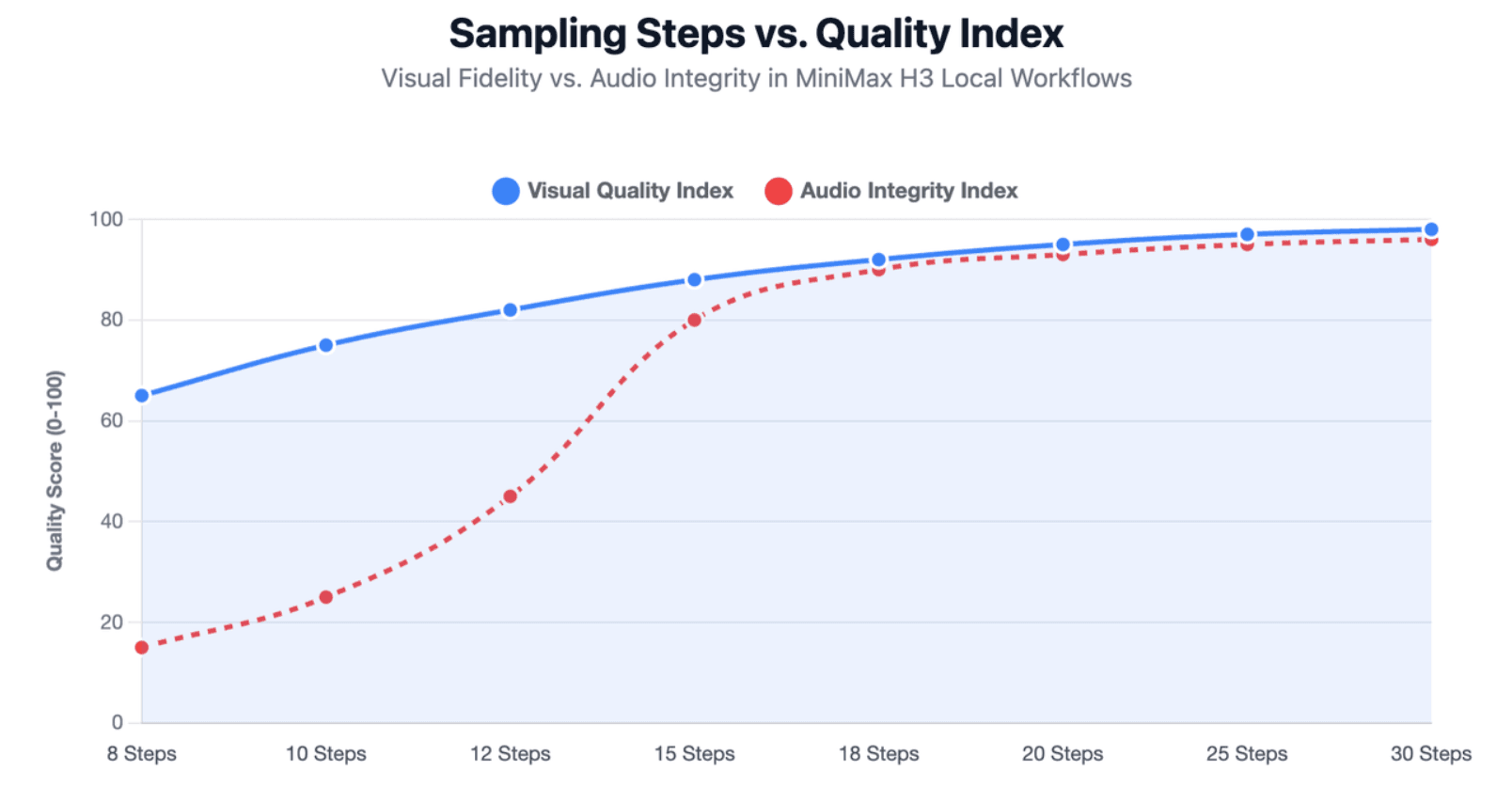
One ComfyUI discussion reported that EasyCache caused problems with likeness, limbs, and physics for some users, while another user found that reducing 20 steps to 10 had only a modest visual impact but badly damaged audio.
When testing acceleration, compare:
image quality, prompt adherence, identity, motion, and audio.
Low-Resolution Preview → Final Render
A practical H3 workflow is:
- Generate a lower-resolution preview.
- Check composition, motion, and prompt interpretation.
- Test several candidates.
- Select the strongest shot.
- Render at higher quality with conservative settings.
- Upscale where appropriate.
- Perform final visual and audio QC.
One Reddit user reported remarkably similar low- and high-resolution results, but other users could not reproduce the behavior and found that changing resolution produced a substantially different video.
So low-resolution generation is best treated as a creative preview, not a guaranteed proxy for the final render.
Is H3's VAE a Hidden Quality and Performance Bottleneck?
The VAE deserves more attention than it receives in many H3 reviews.
Community testing has shown that fine facial details can already soften during a basic VAE encode-decode test. This means increasing sampling steps cannot necessarily recover every lost detail.
The practical recommendation is to profile the whole pipeline rather than assuming diffusion sampling is always the bottleneck. For faces, typography, and other small details, final-output inspection remains essential.
Is MiniMax H3 Worth It Compared With LTX, Seedance, and Wan?
There is no universal winner. The more useful comparison is which compromise fits the job.
H3 vs LTX: Control or Faster Local Iteration?
Recent Reddit comparisons commonly give LTX 2.5 the advantage in raw local speed, while H3 receives stronger praise for complex actions, consistency, references, and audiovisual control.
That makes LTX attractive when iteration speed and hardware efficiency dominate. H3 becomes more interesting when the shot contains several interacting instructions and reducing retries matters.
A fair comparison should also avoid assuming the same simple prompt is optimal for both models. H3 is explicitly designed around richer structured prompting.
H3 vs Seedance and Wan: Which Tasks Favor Each Model?
Seedance is often preferred in community comparisons for polished animation timing, transitions, or cinematic flow in particular prompts. Wan remains important for local users because of its mature workflows and LoRA ecosystem.
H3's differentiator is the combination of multimodal references, structured instruction following, complex actions, and native audio.
The official open-weight release adds another advantage for technical users, but there is an important limitation: the locally released H3-Base generates 768p, while MiniMax's separate H3-Regenerate-2K module is not currently open-sourced. Official 2K results use the broader H3 system.
H3 also uses the MiniMax H3 Community License rather than a standard permissive license. The current agreement excludes the EU, UK, South Korea, and United States from its applicable territory and requires separate commercial authorization when revenue thresholds are crossed, making direct cost evaluation essential when comparing MiniMax H3 pricing and licensing、.
Who Should Choose MiniMax H3?
H3 makes the most sense for creators who value control more than convenience.
Understanding where to use MiniMax H3 helps identify whether its feature set matches your specific production pipeline.
Users with constrained hardware, a need for rapid experimentation, or a preference for simple one-click generation may find a faster model or hosted workflow more practical.
Conclusion
MiniMax H3 stands out less because it is the fastest AI video model and more because it can interpret unusually detailed multimodal direction. Reddit testing also makes its trade-offs clear: demanding hardware, workflow-sensitive speed, audio errors, and detail loss still matter. The most useful way to judge H3 is therefore not by a single demo or benchmark, but by how efficiently it produces video you can actually use.