E-learning Video Production in 2026: How L&D Teams Reduce Costs by 80% and Ship Faster

E-learning video production in 2026 is no longer about cameras, studios, and weeks of editing. The fastest and most effective teams now use AI-powered Document-to-Video workflows that turn existing PPTs, PDFs, SOPs, and training materials into interactive learning videos in hours instead of weeks.
In most corporate L&D teams, the biggest problem is not video editing—it is production bottlenecks. A 20-minute training video often takes 30 hours to produce, with 15–20 hours spent on slide creation alone. Traditional filming makes scaling impossible, especially for onboarding, compliance training, product enablement, and multilingual learning.
Modern AI video production solves this by replacing manual filming with automated scripting, AI avatars, voice generation, layered slide editing, and interactive “Chat with Video” learning experiences. This reduces production time by up to 90%, lowers total costs by 80%, and improves learner engagement through microlearning and personalized support.
This guide explains exactly how leading teams are producing better e-learning videos faster—and which workflows actually work.
Tired of slow E-learning production and low learner engagement? Static videos are failing your students. Leadde instantly transforms your PPTs and PDFs into interactive AI videos. Reduce production costs by 80% and save 90% of your time while making learning truly engaging with "Chat-with-Video" features.

The E-learning Video Revolution: Why 2026 is Different
Beyond "AI Slop": Combatting Learner Fatigue with Personalized Content
In 2026, the challenge isn't just making content; it's making content people actually watch. "AI Slop"—generic, low-quality automated videos—has led to massive learner fatigue. To succeed, E-learning video production must move toward highly personalized, high-fidelity visuals. Understanding what is synthetic video and how it maintains the instructional designer's unique voice is key to maintaining pedagogical style.
The Rise of Microlearning: Why 3-Minute Lessons Rule the LMS
Data shows that learner retention drops significantly after the 5-minute mark. The current gold standard is microlearning: bite-sized, single-topic videos ranging from 2 to 5 minutes. This format is perfect for mobile learning and allows for faster updates when course material changes.
How to Reduce E-learning Video Production Time from 30 Hours to 3 Hours
One of the most common issues I found while reviewing enterprise training workflows is this:
A simple 20-minute learning video can take over 30 hours to produce.
The surprising part is that editing is usually not the main bottleneck.
The real time drain happens earlier:
- unclear learning objectives
- repeated script revisions
- rebuilding slides from scratch
- SME feedback loops
- disconnected tools for recording and editing
In one common workflow:
Google Slides → QuickTime voice recording → Adobe Premiere editing → LMS upload
the team was spending 15–20 hours just creating slides before recording even started.
This is why speed improvements rarely come from “better editing software.”
They come from:
1. Reusable slide systems
Instead of building every lesson from zero, high-performing teams use production templates, visual rules, slide frameworks, and pre-approved layouts.
2. Script-first production
The best teams define the learning objective before opening PowerPoint.
Not after. Script-first production ensures a tight and coherent lesson.
3. Recording inside the editing environment
Instead of recording separately and syncing later, narration is captured directly inside the editing workflow.
4. AI-assisted document conversion
Existing PPTs and PDFs become the first draft of the video—not reference material.
This is where production time drops dramatically.
The Hidden Cost of Multi-Tool Workflows in E-learning Video Production
Many teams do not have a video production problem.
They have a workflow fragmentation problem.
A typical stack looks like this:
- script writing in Google Docs
- voice generation in ElevenLabs
- visuals in Canva or Midjourney
- assembly in Premiere or Camtasia
- export for LMS delivery
This creates constant switching costs.
For teams producing 30+ explainer videos, the problem is not whether each tool works—it is that the workflow itself becomes unmanageable.
The most efficient systems are not the ones with the best individual tools.
They are the ones with the fewest production handoffs.
This is why all-in-one platforms built for e-learning outperform general AI video tools for L&D teams.
The goal should be:
one workflow, not five disconnected tools.
The Production Paradigm Shift: Traditional vs. AI Automation
The Hidden Drain: Why Manual Filming is Becoming a Budget Liability
Traditional filming requires booking studios, hiring actors, and spending weeks in post-production. This manual workflow creates a "content bottleneck"—by the time a video is finished, the information may already be outdated. Furthermore, the high cost of manual production makes it nearly impossible to scale courses into multiple languages or versions.
The 2026 Winner: Automated Document-to-Video (Doc-to-Video) Workflows
Modern production relies on AI to bridge the gap between static documents and dynamic video. Platforms like Leadde allow you to make demos and educational videos quickly, shifting the L&D team's role from "production" to "curation" and allowing them to produce 10x more content.
AI avatars present content, layered slides are animated, and voiceovers are produced in multiple languages instantly. This workflow eliminates cameras, studios, and manual editing while dramatically reducing production time and cost.
Step-by-Step Guide to Modern E-learning Video Production
Step 1: Mapping Learning Objectives to Content Assets (PPT, PDF, Word)
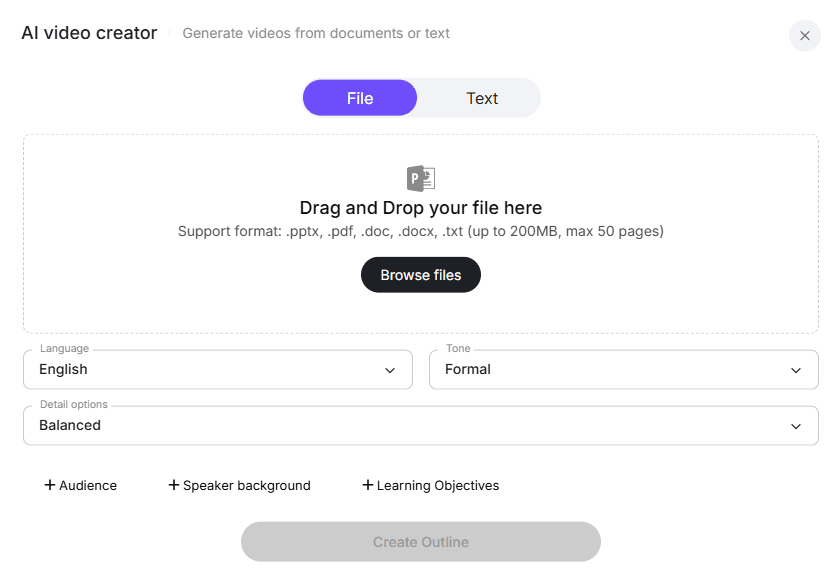
Effective E-learning starts with your existing curriculum. Instead of starting from scratch, gather your current Syllabi, Slide Decks, and Battlecards. AI tools can now parse these files to identify the most critical learning points and help you write video scripts structured for a coherent video.
Step 2: Choosing Your Virtual Faculty: Leveraging 200+ AI Avatars
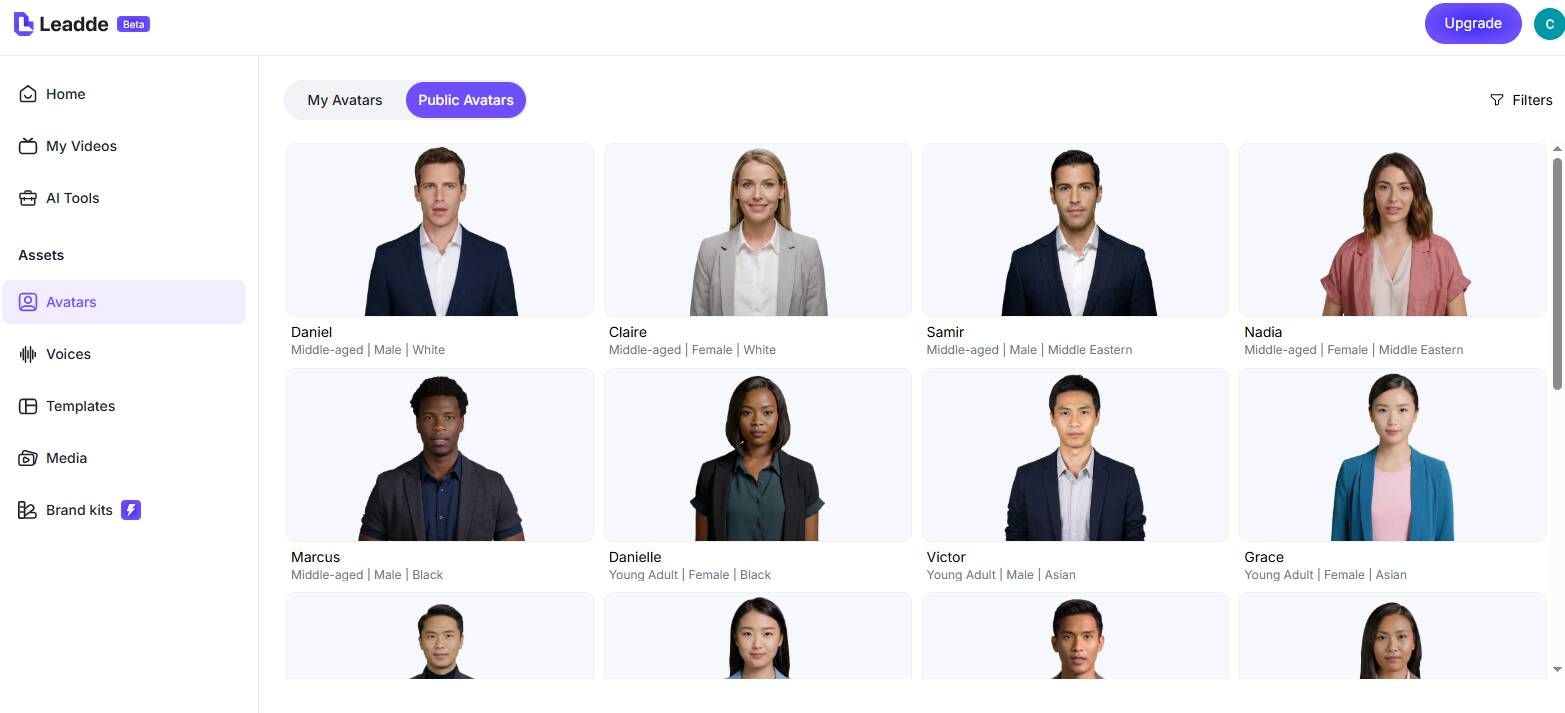
You no longer need to find subject matter experts who are willing to go on camera. You can select from over 200+ ethnically diverse AI avatars to act as your virtual faculty. This ensures consistent professional presentation and allows you to "hire" different personas for different course types.
Step 3: Scene Design with Layered PPT Editing (No More Static Slides)
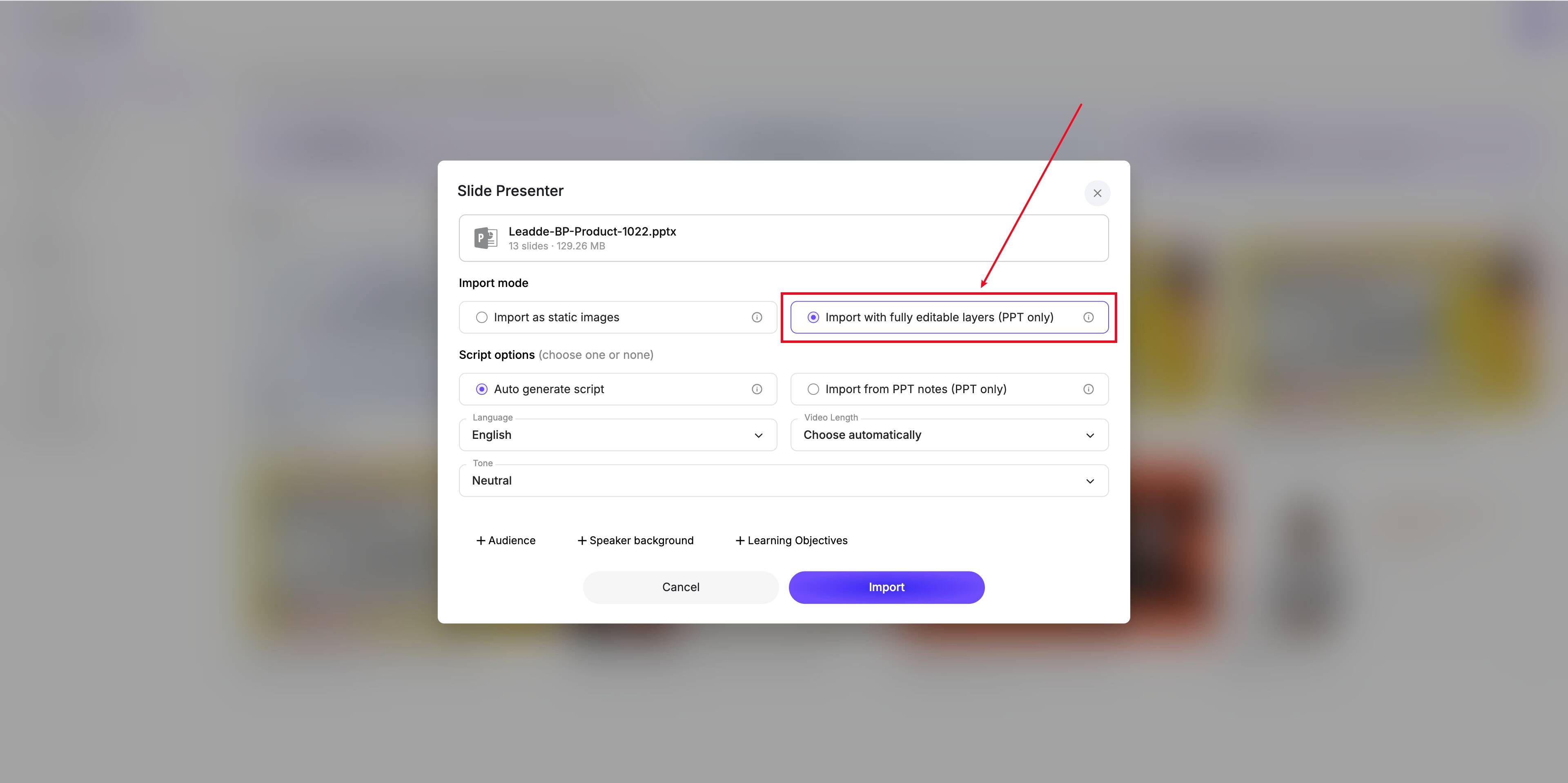
Unlike early AI tools that produced flat videos, Leadde offers Layered PPT Editing. This means you can import your PowerPoint slides and edit individual elements directly within the video editor. This level of control is essential for commercial video creation where branding must remain intact.
Step 4: Activating Engagement with "Chat with Video" Interactivity
The most significant innovation in 2026 is the Chat with Video feature. Instead of passive watching, students can literally "ask" the video a question via a chat interface. The AI analyzes the video's context in real-time and provides instant, accurate answers, turning every video into a 24/7 personal tutor.
Hyper-Localization and Course Accessibility
Multi-Regional Success: Translating E-learning into 92 Languages Fast
Global institutions need to serve diverse populations. In 2026, you can't just provide subtitles; you need full video localization. Modern AI supports 92-language translation with voice cloning that retains the original lecturer’s tone, ensuring a consistent learning experience across the globe.
Ensuring Compliance: Navigating GDPR, ISO 42001, and Accessibility Standards
In 2026, E-learning content must be secure and accessible. Using platforms that are SOC 2 and GDPR compliant is non-negotiable for enterprise and government-funded education. Additionally, AI-generated captions and screen-reader compatibility are essential for meeting global accessibility standards.
E-learning Platform Showdown: Leadde vs. Synthesia vs. HeyGen
Comparing Authoring Capabilities: Document Handling and Interactivity
- Leadde: The leader in document-to-video. It supports layered PowerPoint editing and interactive video chat, making it one of the best AI video platforms for e-learning.
- Synthesia: Good for simple "talking head" videos but lacks dynamic document-to-video conversion and interactive Q&A.
- HeyGen: Strong in marketing avatars but lacks the structured instructional tools needed for deep E-learning.
2026 Pricing Benchmarks: How to Achieve an 80% Cost Reduction
Cost efficiency is the primary driver for AI adoption. Leadde’s Starter Plan at $19/month for unlimited videos represents a massive disruption compared to traditional production costs. Organizations making promotional videos and training content report an 80% reduction in total production spend.
Why AI Talking Head Videos Often Fail in Corporate Training
AI avatars are powerful.
But they are not automatically good learning design.
One of the clearest findings from instructional design teams is this:
AI talking-head videos work best for short intros, transitions, recaps, and onboarding snippets.
They perform poorly when used as the primary teaching format for long lessons.
Why?
Because learners do not need more passive watching.
They need clarity.
They need context.
They need answers.
Many AI avatar videos feel like expensive PowerPoint presentations with a face attached.
That creates “AI fatigue.”
In practice, the strongest use case looks like this:
Good use of AI avatars
- 10–20 second introductions
- section transitions
- recap summaries
- multilingual localization
- stakeholder-facing professionalism
Poor use of AI avatars
- 15-minute policy training
- software walkthroughs
- technical demonstrations
- emotionally sensitive learning scenarios
For these, screen recordings, annotated workflows, or real instructors usually perform better.
How Fast-Moving Teams Use “Good Enough” Videos Instead of Perfect Videos
Perfection kills training velocity.
This is especially true for:
- implementation teams
- SaaS onboarding
- agile product teams
- customer success enablement
One team I studied moved from traditional Camtasia/Vyond production to faster tools like Clipchamp, Google Vids, and CapCut for lower-risk content.
Their internal benchmark was:
about 25% of the production time with roughly 90% of the final quality.
This allowed them to produce half a dozen videos in a single day instead of waiting weeks for one polished release.
That is often the better business decision.
For internal learning:
six useful videos today outperform one perfect video next month.
How to Build a Repeatable E-learning Video Template System for L&D Teams
The fastest teams do not create videos faster.
They eliminate repeated decisions.
This happens through:
Template libraries
- intro slides
- assessment patterns
- compliance modules
- onboarding structures
Production rules
- script length limits
- voiceover standards
- slide pacing
- branding rules
SME review systems
Instead of reviewing everything, SMEs review only critical accuracy checkpoints.
Content modularization
Lessons are created as reusable blocks, not single-use projects.
This is how organizations scale from 10 videos to 1,000 videos.
Consistency creates speed.
FAQ
How can I reduce e-learning video production time?
Use reusable templates, script-first planning, direct recording inside editing tools, and AI document-to-video workflows instead of starting every lesson from scratch.
Is Synthesia worth it for corporate training?
It depends on the use case. It works well for short intros and multilingual communication, but for deep instructional learning, software walkthroughs, and technical training, tools like Camtasia often deliver better learning outcomes.
Can Canva or PowerPoint create professional training videos?
Yes.
For many teams without studio budgets, PowerPoint, Canva, and Keynote are enough for high-quality explainers—especially when paired with strong templates and clear instructional design.
Should I record voice first or screen first?
For walkthrough-heavy training, screen-first often works best.
For structured explainer lessons, script-first with aligned voiceover creates stronger pacing.
Are AI avatars replacing traditional instructors?
No.
They are replacing low-value production tasks, not instructional expertise.
The best teams use AI for speed and humans for trust, nuance, and credibility.
What is the best length for training videos?
The strongest benchmark is 2–5 minutes per lesson.
Microlearning consistently outperforms long-form lecture videos in LMS completion and learner retention.
Can I turn webinar recordings into LMS courses?
Yes.
The best approach is to break long sessions into short modules, add summaries, assessments, searchable chapters, and interactive Q&A instead of uploading the raw recording.
Conclusion: Future-Proofing Your Educational Content Strategy
The future of E-learning video production is interactive, automated, and global. By leveraging Doc-to-Video technology and Interactive Avatars, educational leaders can produce high-quality courses at a fraction of the traditional cost. Start by turning your most valuable static documents into dynamic video assets today.