
Best AI Video Platforms for E-Learning (Tested Guide + Real Use Cases + ROI Insights 2026)
AI video platforms for e-learning are no longer just “video generators.”
After testing multiple platforms and analyzing how real teams use AI video in training, onboarding, and course creation, one thing becomes clear:
👉 The best AI video platform is not the one with the most realistic avatar — it’s the one that fits your learning workflow.
Some teams need fast video generation from documents.
Others need structured training modules with quizzes and tracking.
And in many cases, the wrong platform leads to wasted time, fragmented workflows, and poor learning outcomes.
In this guide, I break down the best AI video platforms for e-learning in 2026, based on:
- learning effectiveness
- production workflow efficiency
- update speed
- scalability across courses and languages
If your priority is turning documents into structured training videos in minutes while keeping updates effortless, Leadde is currently one of the most efficient options available.
What Are AI Video Platforms for E-Learning? (And How Teams Actually Use Them)
AI video platforms for e-learning convert:
- PDFs
- slides
- scripts
- documentation
into structured video lessons.
In practice, teams are not using them to “create videos from scratch.”
👉 They are using them to transform existing knowledge into scalable learning content.
Real Example (From Training Workflow)
- A team converted technical PDFs into AI videos
- Each video took ~5 minutes to generate
- Before: manual scripting + recording
- After: automated conversion pipeline
👉 This shift is critical:
👉 AI video is not about creation — it’s about transformation.
Why Most AI Video Platforms for E-Learning Fail at Learning Outcomes
Most platforms optimize for:
- avatar realism
- rendering speed
- visual quality
But in real e-learning environments:
👉 Those are not the bottlenecks.
From instructional design comparisons and platform evaluations:
- Platforms like Synthesia and Colossyan stand out not for visuals
- But for navigation, quizzes, and learner control features
Meanwhile:
- Some tools generate “good-looking videos”
- But fail to support real learning workflows
My Experience
In multiple content audits:
👉 The biggest issue is not video quality —
👉 It’s lack of structure and engagement mechanisms
👉 Key insight:
👉 If a platform doesn’t support how people learn, it doesn’t matter how good the video looks.
If your e-learning team already has slides, documents, or lesson scripts, Leadde can turn them into structured learning videos with AI avatars.
AI Avatar vs Animated Video vs Document-to-Video for E-Learning (Critical Choice)
Choosing the wrong format is the most expensive mistake.
AI Avatar Platforms (e.g. corporate training)
Best for:
- onboarding
- compliance training
- standardized messaging
Limitation:
- often passive
- may not improve understanding
Animated / Controlled Visual Platforms
Best for:
- complex explanations
- step-by-step workflows
Real feedback shows:
👉 Some teams prefer tools like Vyond because
👉 AI-generated visuals lack consistency and precision
Document-to-Video Platforms
Best for:
- SOPs
- training manuals
- large-scale courses
Real Case
- Converting documents → videos in minutes
- Massive reduction in production time
👉 Key takeaway:
👉 Format selection matters more than tool selection
Why Multi-Tool AI Video Workflows Break at Scale (Real Bottleneck)
One of the most repeated real-world problems:
👉 Multi-tool workflows don’t scale.
Real Scenario
A course creator building 30+ explainer videos used:
- ElevenLabs (voice)
- Midjourney (visuals)
- video editor
Result:
👉 Workflow became tedious and inefficient
My Observation
This pattern repeats across teams:
- Tool A → script
- Tool B → voice
- Tool C → visuals
- Tool D → editing
👉 Works for 2 videos
👉 Breaks at 20+
👉 Key insight:
👉 The best AI video platform reduces steps — not adds capabilities
Why Updating Training Content Matters More Than Creating It
Most articles focus on “create videos faster.”
But real teams care more about:
👉 updating videos faster
Real Case Insights
- Vyond users: updating scripts = no re-recording
- Colossyan users: editing voice is “much faster” than re-recording VO
No exact hours shared → but consistent pattern:
👉 Massive time savings in iteration
My Experience
In e-learning:
- content changes constantly
- updates happen more than creation
👉 Key insight:
👉 The real ROI of AI video is in updates, not generation
The Hidden Problem With AI Avatars in E-Learning
AI avatars are heavily marketed. But real feedback shows:
- they don’t always improve learning
- sometimes feel repetitive
- may distract from content
In some instructional design discussions:
👉 Talking-head videos are seen as
👉 “not aligned with effective learning design”
My Conclusion
AI avatars are useful for:
- consistency
- scalability
But:
👉 They are not a substitute for good instructional design
Best AI Video Platforms for E-Learning by Real Use Case
Instead of “top 10 tools,” here’s what actually works:
Best for Document-Based Learning
- Leadde
- Pictory
Use case:
- convert PDFs → video
- fast course scaling
Best for Corporate Training
- Synthesia
- HeyGen
- Leadde
Use case:
- onboarding
- compliance
Best for Controlled Educational Content
- Leadde
- Vyond
Use case:
- structured lessons
- consistent visuals
Best for Editing & Optimization
- Descript
Use case:
- lecture editing
- transcript workflows
Leadde – Revolutionary Document-to-Video Solution

Unique Document-to-Video Conversion Technology
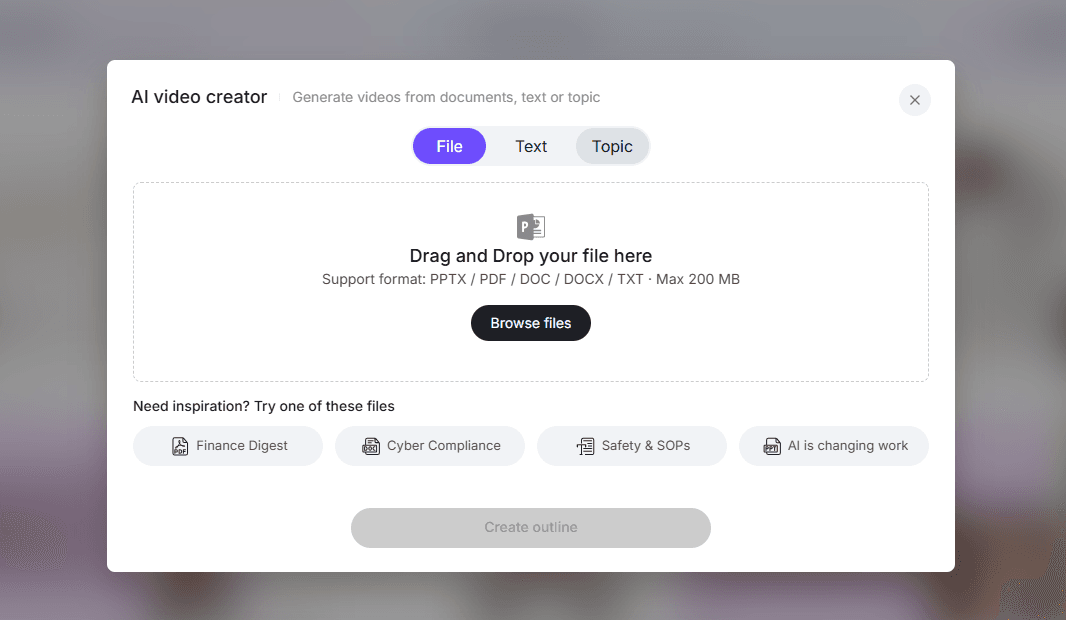
Leadde automatically transforms DOC, PDF, PPT, and text files into structured videos with narration and highlights. Learn more about how to create informational video from documents.
Comprehensive Multi-Document Support (DOC, PDF, PPT, Text)
Supports batch processing and multi-file integration for large courses. Read how to make how-to videos using AI.
Competitive Pricing and Value Proposition
Pricing is competitive for educational institutions, offering scalable enterprise options. See make demo quickly save costs for more details.
Why Leadde Stands Out for E-Learning
Its interactive features like chat-with-video and Magic Highlight make learning dynamic and engaging. Also explore transform product URL to AI video.
Synthesia – Leading Platform for Business Training Videos
AI Avatar Library and Multi-Language Support
Synthesia offers a wide range of professional avatars and supports over 60 languages, enabling global training programs without extra recording sessions.
Pricing Structure
Plans start at $30 per month for individual users, with enterprise packages available.
E-Learning Specific Advantages
Ideal for corporate training, Synthesia excels in professional tone and standardized video templates.
Pictory AI – Fast Text-to-Video Conversion
Core Features
Quickly converts scripts into video with AI voiceovers and subtitles.
Pricing Options
Free trial available; premium plans start at $19/month.
Training Video Applications
Ideal for rapid content repurposing and supplementary learning materials.
InVideo AI – Versatile Video Creation for Educators
Text-to-Video Capabilities
Enables lesson creation from scripts or notes with customizable visuals.
Pricing Tiers
Starts at $15/month for individuals; enterprise solutions include collaboration features.
Educational Use Cases
Perfect for lecture summaries, explainer videos, and course marketing materials.
Runway Gen-3 – Advanced Creative Control
Professional Video Generation Tools
Supports green-screen replacement, motion tracking, and visual effects.
Pricing Plans
Subscription tiers range from $12 to $40/month.
Best For Advanced Course Creators
Allows full creative flexibility for interactive and cinematic lessons.
HeyGen – Personalized and Translated Learning Content
AI Translation and Custom Avatars
Supports over 100 languages with avatar customization for localization.
Pricing Model
Monthly plans from $25, with enterprise solutions available.
Global Learning Programs
Great for multinational programs or multilingual classrooms.
Kling AI – Realistic Human Presenters
Hyper-Realistic Avatar Technology
Generates lifelike avatars with natural gestures and expressions.
Cost Structure
Pricing is tailored to enterprise users; volume discounts available.
Corporate Training Applications
Perfect for compliance, onboarding, and soft skills training.
Luma Dream Machine – Fast Cinematic Quality
Speed and Quality Features
Optimized for high-resolution, fast-render video production.
Pricing Options
Tiered plans starting at $20/month.
Quick Course Creation
Ideal for institutions needing fast turnaround for new content.
Pika Labs – Creative Social Learning Content
Creative Features
Supports animated text, effects, and social-style video production.
Pricing Plans
Free and paid tiers, with advanced options for collaborative projects.
Social Learning Applications
Useful for student engagement, community learning, and microlearning videos.
Descript – AI-Powered Editing for Educational Content
Transcription and Text-Based Editing
Edit video by editing text; integrates AI voice cloning and overdubs.
Pricing and Plans
Free tier with basic features; Pro plan at $24/month.
Podcast and Lecture Optimization
Excellent for lecture capture, podcasting, and accessibility enhancements.
Comprehensive Feature Comparison
Video Generation Capabilities
Text-to-Video Quality and Speed
Leadde and Pictory AI lead in speed; Runway Gen-3 and Luma excel in cinematic quality.
Document-to-Video Conversion (Leadde’s Unique Advantage)
Only Leadde allows multi-file input conversion into structured, narrated video automatically. Learn how to transform documents into multilingual demos.
Resolution Options (720p, 1080p, 4K)
Most platforms support up to 1080p; Runway and Luma offer 4K exports.
Video Duration Limits
The Free plan supports videos up to 10 minutes, while the Enterprise plan has no duration limit.
AI Avatar and Presenter Options
Avatar Libraries and Customization
Synthesia, Kling, and HeyGen provide extensive avatar libraries.
Realism and Natural Movement
Kling and Runway excel in lifelike movement; Synthesia is more stylized.
Lip-Sync Accuracy
Critical for engagement; Synthesia, Leadde, and Kling are top performers.
Personal Avatar Creation
HeyGen and Leadde allow personalized avatar uploads.
Multi-Language and Localization
Language Support Coverage
Platforms vary from 20 to 170+ languages (Leadde leads).
Translation Accuracy
AI-powered translation is sufficient for general education; specialized content may need review.
Accent and Dialect Options
Available in HeyGen and Leadde for culturally relevant training.
Automated Content Localization
Leadde offers automated layout adjustment and localized voiceovers.
E-Learning Specific Features
Interactive Video Elements
Quizzes, polls, and branching scenarios supported by Leadde, Synthesia, and InVideo.
Quiz and Assessment Integration
Leadde allows in-video assessments with instant scoring.
Accessibility Features (Captions, Transcripts)
All platforms support captions; Descript and Leadde offer full transcript editing.
Chat-with-Video Capabilities (Leadde Innovation)
Leadde enables learners to interact with video content for deeper engagement.
What Actually Makes the Best AI Video Platform for E-Learning
From all real-world cases, the best platforms share:
1. Fast update capability
2. Minimal workflow complexity
3. Strong learning structure
4. Multi-language support
5. LMS compatibility
Real Pattern
Users consistently value:
- saving time
- reducing effort
- simplifying production
NOT:
- cinematic quality
- advanced effects
- 👉 Final insight:
- 👉 Efficiency beats features in e-learning video creation
Why Document-to-Video Is the Future of AI Video for E-Learning
One of the strongest emerging patterns:
👉 Teams don’t want to “create videos”
👉 They want to convert existing knowledge into videos
Real Impact
- PDFs → videos
- slides → lessons
- docs → training modules
Result:
- faster production
- lower cost
- easier scaling
👉 My conclusion:
👉 The future is knowledge-to-video, not text-to-video
When AI Video Platforms Are NOT the Right Choice for E-Learning
AI video is not always the answer.
Avoid when:
- deep interactive learning is required
- content needs human teaching presence
- accuracy must be manually controlled
- platform policies restrict AI courses
Real Concern
Some course creators worry about:
- platform restrictions
- AI content acceptance
👉 Key takeaway:
👉 AI video is a tool — not a universal solution
LMS Integration and Technical Requirements
Learning Management System Compatibility
Integration with Popular LMS Platforms
Most platforms support Moodle, Canvas, Blackboard, and TalentLMS.
SCORM/xAPI Compliance
Leadde, Synthesia, and Pictory support full standards compliance.
API Access and Custom Integrations
Enterprise users can automate video delivery and tracking via APIs.
Analytics and Tracking Capabilities
Student Engagement Metrics
Tracks view counts, drop-off points, and quiz performance.
Learning Progress Tracking
Monitors completion rates and module progression.
Performance Analytics
Reports on engagement and comprehension levels.
Video Analysis and Optimization
AI highlights low-engagement sections for content improvement.
Security and Compliance
Data Privacy Standards (GDPR, COPPA, FERPA)
Most platforms comply with major global data privacy regulations.
Content Security Measures
Includes encryption, access control, and watermarking.
Enterprise-Grade Security
Leadde and Synthesia offer SOC 2 and ISO 42001-level protections.
Pricing Comparison and Cost Analysis
Free Tiers and Trial Options
Most platforms offer limited free plans with watermarks or duration caps.
Monthly Subscription Plans
Range from $15–$50/month for individual users; enterprise tiers vary widely.
Enterprise and Educational Pricing
Educational institutions receive discounts for bulk licenses and multi-seat access.
ROI Analysis for Educational Institutions
AI Video vs. Traditional Production Costs
Significant cost reduction in production, editing, and studio expenses. See best AI commercial video makers 2026.
Time and Resource Savings
Automated generation and updates save hundreds of hours annually.
Scalability Benefits
Easy replication across courses and languages for global programs.
Why Leadde Is a Strong Fit for Document-Driven E-Learning Workflows
Revolutionary Document-to-Video Technology
Transform Static Documents into Dynamic Videos
Converts lesson plans, slides, and PDFs into structured, narrated videos automatically.
Support for Multiple File Formats (DOC, PDF, PPT, TXT)
Batch processing ensures large-scale course production is feasible.
Auto-Generate Speech and Structured Outlines
Generates narration and highlights key points for clarity.
Advanced Interactive Features
Chat-with-Video for Deeper Engagement
Learners can ask questions or navigate content interactively.
Magic Highlight for Key Points
AI identifies and emphasizes important content.
Auto Layout for Scene Organization
Automatically adjusts visuals, text, and audio for optimal delivery.
Enterprise-Grade Capabilities
Version Control and Real-Time Updates
Ensures all learners access the latest materials instantly.
Brand Kits and Customization
Maintains institutional branding across courses.
Multi-Language Support (170+ Languages)
Supports global learners efficiently.
Video-to-Document Conversion
Enables lesson archiving and repurposing of content.
Unmatched Value Proposition
Save Over 80% Production Costs
Reduce Content Creation Time by 90%
3x Increase in Content Engagement
70% Time Savings in Content Localization
How to Choose the Right AI Video Platform for E-Learning
Assessing Your Educational Needs
Course Type and Complexity
Simple lecture vs. interactive scenario-based learning.
Target Audience Size
Individual learners vs. corporate teams.
Budget Constraints
Consider upfront and recurring costs.
Existing Content (Documents, Slides, Scripts)
Some platforms handle multi-format content better.
Key Selection Criteria
Ease of Use and Learning Curve
Critical for adoption by faculty and staff.
Technical Support and Training
Availability of tutorials, live support, and knowledge bases.
Content Quality Requirements
High-definition visuals, lip-sync accuracy, and AI voice quality.
Collaboration Features
Team workflows, multi-user access, and versioning.
Document-to-Video Capabilities (Critical Factor)
Platforms like Leadde excel in this area.
Implementation Best Practices
Pilot Testing Strategies
Start with small courses to refine workflows.
Content Migration Planning
Map existing content to new video formats.
Faculty and Staff Training
Ensure educators are comfortable using the platform.
Implementation Guide for Educational Institutions
Getting Started with AI Video Platforms
Select a platform, set up accounts, and integrate with your LMS.
Creating Effective E-Learning Videos
Instructional Design Principles
Focus on clarity, pacing, and engagement.
Script Writing Best Practices
Keep narration concise; align visuals with content.
Quality Assurance Processes
Review drafts, check accessibility, and validate AI-generated voiceovers.
Scaling Your Video Learning Program
Content Management Strategies
Organize video libraries by course, module, and lesson.
Version Control and Updates
Keep track of revisions and automatically push updates.
Team Collaboration Workflows
Assign roles for scripting, editing, and review.
Challenges and Limitations
Technical Limitations
Hardware requirements, file size limits, and rendering times.
Content Quality Concerns
AI-generated visuals may appear less natural for complex scenarios.
Learning Curve and Adoption Barriers
Staff training and adjustment to new workflows.
Cost Considerations for Large-Scale Implementation
Enterprise tiers can become expensive without proper planning.
Future Trends in AI Video for E-Learning (2026+)
Emerging Technologies
Personalized Learning Paths
AI adapts content to learner progress.
Adaptive Video Content
Dynamic branching scenarios based on learner choices.
AI-Generated Assessments
Automated quizzes and feedback.
Interactive Role Training (Leadde Innovation)
Learners engage with avatars in real-world simulations.
Industry Predictions
AI-driven video will dominate blended learning; personalization will become standard.
Preparation for Future Developments
Invest in scalable platforms, staff training, and content standards.
FAQ: Best AI Video Platforms for E-Learning
What is the best AI video platform for e-learning?
There is no single best platform. The right choice depends on your use case, such as document-based learning, corporate training, or scalable course creation.
Are AI avatar videos effective for learning?
They can work for structured training, but they do not automatically improve comprehension. In many cases, visuals and structure matter more.
Can AI video platforms replace traditional course production?
Yes for many use cases, especially internal training and scalable content. But complex learning still requires instructional design.
How much time can AI video save?
In some workflows, videos can be generated in minutes instead of hours or days. However, exact savings vary depending on the process.
What is the biggest mistake when choosing a platform?
Choosing based on features instead of workflow fit. Many tools look powerful but fail in real production environments.
Do I need multiple tools?
Not necessarily. In fact, reducing tools often improves efficiency and scalability.
Which platform is best for updating content?
Platforms that support script editing or document-to-video workflows are best for frequent updates.
Are AI-generated videos good for online courses?
Yes, but effectiveness depends on structure, clarity, and engagement—not just automation.
Can AI video platforms support multilingual learning?
Yes, but translation quality and localization vary across platforms.
What is the future of AI video in e-learning?
The future is automated, scalable, and adaptive learning systems that integrate directly with content workflows.
Final Takeaway
Most people search for:
👉 “the best AI video platform”
But real success comes from:
👉 building the right workflow
In 2026, the winning teams are those who can:
- create faster
- update instantly
- scale content
- maintain learning quality
👉 That’s what defines the best AI video platforms for e-learning today.





