
Best AI Avatar Platforms for Digital Signage in 2026

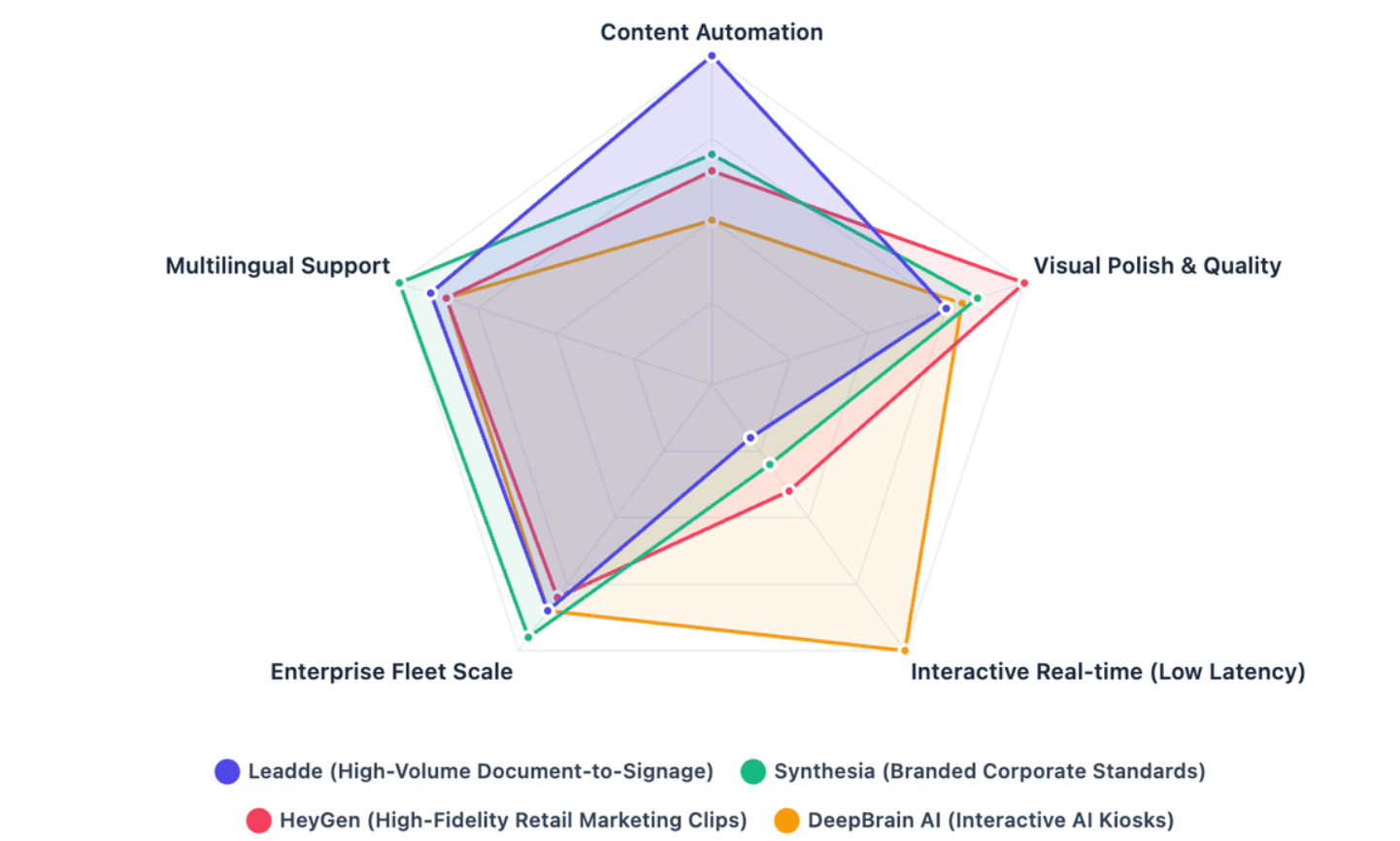
The best AI avatar platforms for digital signage depend on your deployment architecture: Leadde leads for automated, high-volume document-to-video signage loops; HeyGen delivers polished pre-rendered retail marketing clips; Synthesia is strong for standardized corporate communication fleets; and DeepBrain AI excels in real-time, two-way conversational kiosks.
The right choice depends on rendering latency, multi-screen scalability, CMS compatibility, and whether you need looping avatar videos or interactive AI assistants.
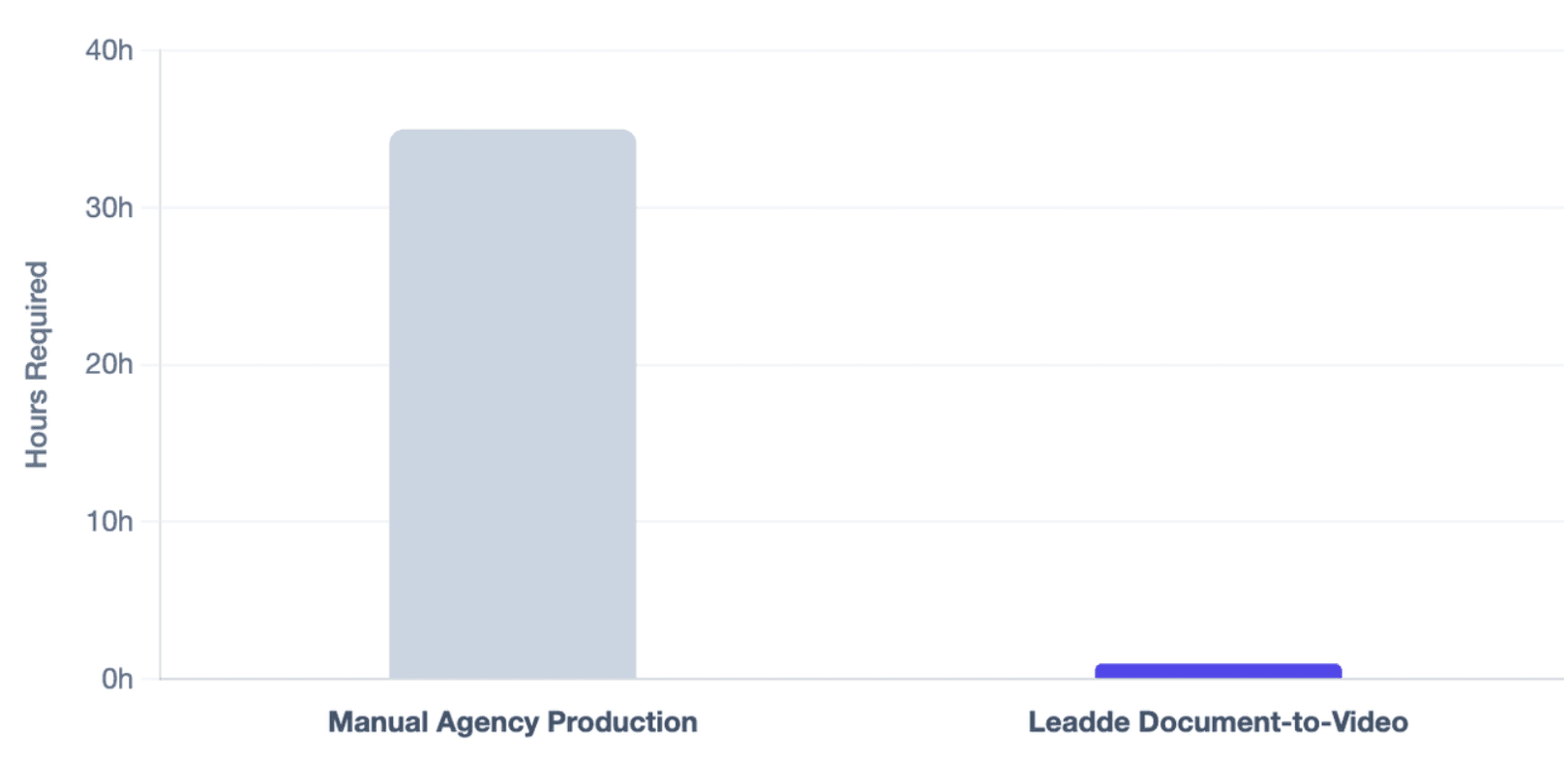
Manually updating endless multi-screen signage content drains design hours and production budgets. Leadde removes that bottleneck by automatically turning documents and text into professional business signage videos in minutes, helping teams cut over 80% of production costs and 90% of content creation time.
Best AI Avatar Platforms for Digital Signage
The best platform depends on whether your screens need broadcast-style video loops, interactive kiosk conversations, or high-volume content automation.
For enterprise buyers, the key question is not “Which AI avatar looks most realistic?” It is which software fits your signage workflow, CMS environment, hardware stack, language needs, and update frequency.
| Platform | Best Fit | Signage Strength | Main Limitation |
| Leadde | High-volume document-to-video signage | Converts business materials into scalable avatar videos | Best suited for content production, not full CMS replacement |
| Synthesia | Corporate communications | Standardized avatar videos in many languages | Less focused on live kiosk interaction |
| HeyGen | Retail and marketing video loops | High-quality avatar-led promotional clips and API workflows | Advanced signage workflows may require CMS integration |
| DeepBrain AI | Interactive kiosks | Conversational AI avatars for retail and support use cases | Real-time deployment needs stronger hardware and network planning |
Synthesia states that its AI video platform supports AI avatars and voiceovers in 160+ languages, making it relevant for global corporate communication screens. HeyGen positions its enterprise API around automated avatar-led onboarding and L&D video production, which is useful when signage content needs to be generated programmatically.
Synthesia: The Corporate Standard for Standardized Internal Communications
Synthesia is strongest when a company needs polished, repeatable avatar videos for HR updates, compliance reminders, employee training, executive messages, and corporate lobby screens.
It works well for signage fleets because teams can generate a consistent presenter-led video, export it, and publish it through a digital signage CMS.
Best use cases include:
- Corporate lobby announcements
- Internal communication screens
- Employee training displays
- Compliance and safety reminders
- Multilingual corporate updates
Synthesia’s official website highlights AI-generated videos, AI avatars, and voiceovers in 160+ languages, while its language page states that users can create videos with 240+ avatars in 160+ languages.
HeyGen: High-Fidelity Pre-Rendered Marketing and Retail Advertising Loops
HeyGen is a strong option for retail marketing displays, product explainer loops, end-cap screens, showroom videos, and branded promotional clips.
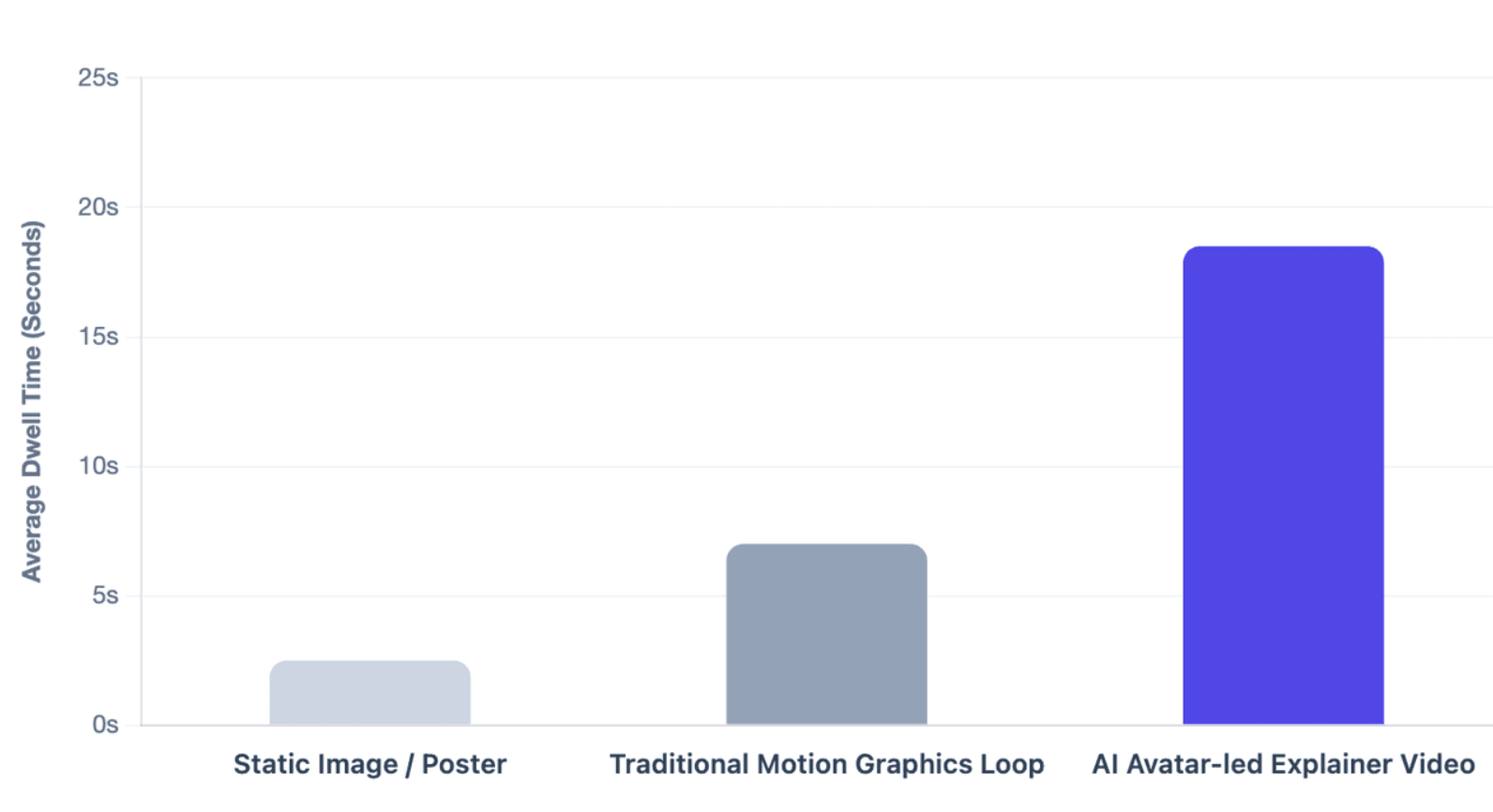
Its value is visual polish. For stores, malls, trade shows, and product demo screens, a high-quality avatar clip can feel more personal than a static poster.
Best use cases include:
- Product promotion loops
- Retail shelf education
- Brand storytelling screens
- Event booth videos
- Localized advertising clips
HeyGen’s official materials describe AI avatar generation from photos, videos, or prompts, and its enterprise API supports scalable avatar-led video generation.
DeepBrain AI and UneeQ: Real-Time Interactive Two-Way Conversational Kiosks
DeepBrain AI and UneeQ are more relevant when the screen must listen, respond, and guide users in real time via conversational AI.
These tools fit environments where users expect two-way help, such as banks, hotels, hospitals, airports, museums, and customer support kiosks.
Best use cases include:
- AI concierge kiosks
- Self-service help terminals
- Visitor guidance screens
- Retail support assistants
- Interactive information desks
DeepBrain’s AI Studios retail page describes conversational AI avatars that can assist customers 24/7, answer routine questions, and guide users through common processes. UneeQ positions its platform as enterprise digital human technology for training, customer interaction, and brand ambassador experiences.
Leadde: The High-Volume Choice for Automated Document-to-Video and Infinite Signage Loops
Leadde is the strongest fit when the main bottleneck is not avatar realism, but content volume.
Most signage teams already have source content: PPTs, PDFs, product sheets, SOPs, HR documents, compliance materials, and training scripts. Leadde turns these existing materials into structured avatar videos with outlines, scenes, voiceover scripts, and visual layouts.
Best use cases include:
- Training screens
- SOP displays
- Product education loops
- Multi-location franchise updates
- Internal communication videos
- Multilingual business signage
Leadde supports 92 languages, 200+ AI avatars, personal digital avatars, interactive video experiences, version control, analytics, and enterprise-grade controls.
What Is an AI Avatar for Digital Signage?
An AI avatar for digital signage is a digital presenter that appears on a screen to explain, guide, promote, or answer questions.
Unlike a static slide or poster, an avatar can use a human-like face, voice, motion, and multilingual narration to make screen content easier to notice and understand.
Shifting From Static Graphics to Talking Digital Humans
Static signage is easy to ignore, especially in crowded spaces where users see hundreds of visual messages every day.
A talking digital human creates a stronger attention signal because it looks like someone is speaking directly to the viewer.
This is useful for:
- Product education
- Wayfinding
- Safety instructions
- Service explanations
- Training reminders
The advantage is not only realism. The value comes from structured explanation: a face, voice, and script can turn complex information into a short guided message.
Transforming Offline Public Screens Into Dynamic Multilingual Narrators
Digital signage is often deployed in public or semi-public spaces: airports, malls, hotels, hospitals, stores, schools, offices, and event venues.
AI avatars can turn those screens into multilingual narrators that explain information in a more accessible way.
For example:
| Screen Type | Static Use | AI Avatar Use |
| Retail display | Shows product image | Explains benefits and use cases |
| Hotel lobby screen | Shows amenities | Guides visitors in multiple languages |
| Hospital waiting room | Shows notices | Explains patient instructions clearly |
| Corporate screen | Shows slide announcements | Delivers presenter-led updates |
| Training screen | Shows SOP checklist | Walks employees through steps |
For global teams, multilingual avatar content is especially important because one core message can be localized for different regions, audiences, and languages.
When AI Avatars Work Better Than Static Posters, Slides, or Traditional Video Ads
AI avatars work best when the message needs explanation, not just visual exposure.
They are especially useful when:
- The topic is complex
- The screen content changes often
- Multiple languages are required
- The brand needs a consistent presenter
- The audience needs guidance or instruction
- Teams cannot repeatedly film new videos
Traditional video still works well for high-budget brand campaigns. But AI avatar videos are often more practical for operational signage that must be updated every week, every campaign, or every location.
How Do Asynchronous Video Loops Differ From Real-Time Interactive Kiosks?
The biggest deployment decision is whether your signage needs asynchronous video loops or real-time interaction.
A video loop plays pre-rendered content on a schedule. A real-time kiosk listens to the user, processes input, and generates a live answer.
| Format | Best For | Technical Complexity |
| Pre-rendered avatar video loop | Retail ads, training, announcements, product education | Lower |
| Real-time interactive kiosk | Concierge, customer support, wayfinding, guided service | Higher |
| Hybrid signage flow | Screens that play loops but launch interaction on touch or voice | Medium to high |
Pre-Rendered Content Broadcasts: Best Practices for Retail Storefronts and Corporate Screens
Pre-rendered avatar videos are ideal for content that does not require live user input.
A team creates the video, exports it, uploads it to a CMS, and schedules it across screens.
Best practices include:
- Keep each video short and focused
- Use strong captions for noisy environments
- Format videos for 16:9, 9:16, or kiosk portrait layouts
- Create localized versions for different regions
- Refresh loops before viewers become fatigued
- Use a CMS to schedule by time, location, or audience
This format is stable, scalable, and easier to maintain than live AI kiosks.
Two-Way Visual Chatbots: Deploying Context-Aware AI Assistants on Self-Service Terminals
A real-time avatar kiosk behaves more like a visual chatbot.
The user speaks or taps. The system captures input, sends it to an AI model or knowledge base, generates a response, converts it to speech, and animates the avatar.
OpenAI’s Realtime documentation states that realtime sessions are best for live audio experiences that need low latency, including voice agents, translation, transcription, and speech generation.
A typical real-time avatar kiosk stack includes:
- Touchscreen or display
- Microphone
- Speaker
- Camera or sensor, if needed
- Speech-to-text
- LLM or agent workflow
- Knowledge base or RAG system
- Text-to-speech
- Avatar rendering and lip-sync
- CMS or kiosk management layer
This setup is powerful, but it requires stronger planning than a normal signage playlist.
Choosing the Right Format: Looping Avatar Video, Interactive Kiosk, or Hybrid Signage Flow
Choose a looping avatar video when the goal is consistent broadcast content.
Choose a real-time kiosk when users need personalized help, directions, recommendations, or answers.
Choose a hybrid flow when the screen should run a normal video loop most of the time, then switch into interaction when someone taps, scans, or speaks.
| Business Need | Best Format |
| Product promotion | Looping avatar video |
| Storefront advertising | Looping avatar video |
| Employee training | Looping avatar video |
| Visitor check-in | Interactive kiosk |
| Hotel concierge | Interactive kiosk |
| Public FAQ assistant | Interactive kiosk |
| Retail screen with optional help | Hybrid signage flow |
For most enterprises, the safest first deployment is a pre-rendered avatar video pilot. Real-time kiosks should be used only when two-way conversation creates clear business value.
How Can You Automatically Convert Documents and Product Content Into Signage Videos?
The biggest hidden problem in digital signage is not buying screens. It is keeping those screens updated with useful content.
Many organizations already have the knowledge they need, but it is trapped inside PPTs, PDFs, Word documents, SOPs, product sheets, training decks, and compliance files.
Eliminating “Blank Canvas Anxiety” With Automated Text-to-Video Formatting
Signage teams often start with a blank design canvas and must decide:
- What should the screen say?
- Which visuals should be used?
- How should the layout look?
- How long should the content run?
- Which language versions are needed?
- Who should approve the message?
This slows production and increases cost.
Automated text-to-video formatting solves the problem by turning source content into a ready structure: outline, scenes, narration, visuals, presenter, and timing.
Turning PPTs, PDFs, SOPs, Product Sheets, and Training Docs Into Avatar-Led Screen Content
Leadde is especially relevant because it is designed to convert business content such as PowerPoint files, PDFs, Word documents, scripts, and text into structured video presentations.
This matters for digital signage because business teams usually do not want to write every avatar script from scratch.
They want to reuse existing materials:
| Source Material | Signage Video Output |
| Product sheet | Retail product explainer loop |
| SOP document | Step-by-step training screen |
| Compliance PDF | Safety reminder video |
| HR announcement | Internal communication screen |
| Sales deck | Showroom presentation video |
| Training manual | Employee onboarding content |
This workflow is different from simple script-to-avatar tools. It starts from existing business knowledge, not an empty script box.
Instantly Syncing Dynamic AI Layouts, Key Highlights, Voiceovers, and Multilingual Versions
A strong document-to-video workflow should not only read text. It should identify key points, create scenes, match visuals, generate voiceover, and prepare localized versions.
Leadde’s official overview states that the platform can automatically generate outlines, scenes, voice-over scripts, and visual layouts from uploaded business content.
For signage fleets, this helps teams produce:
- More frequent content updates
- More language versions
- More consistent visual style
- Less manual editing
- Faster campaign rollout
- Better reuse of existing business documents
This is the main reason document-to-video is a strong enterprise signage angle.
What Hardware and CMS Platforms Are Required for Seamless Fleet Integration?
AI avatar software creates the content or interaction. A digital signage CMS manages screen publishing, schedules, playlists, devices, and remote updates.
For enterprise fleets, both layers matter.
Compatible Edge Media Player Systems: Samsung Tizen, LG WebOS, Raspberry Pi, and Industrial PCs
Pre-rendered avatar videos usually require standard playback support: MP4 files, reliable media players, and correct screen formatting.
Common device categories include:
- Smart signage displays
- Samsung Tizen signage displays
- LG webOS signage displays
- Raspberry Pi-based players
- Android-based media players
- Windows mini PCs
- Industrial PCs for kiosks
Pre-rendered videos can often run on standard signage hardware. Real-time avatar kiosks may require stronger local compute, stable cloud streaming, or an industrial PC.
Syncing AI Avatar Videos With Enterprise Signage CMS Consoles, Playlists, and Screen Groups
Most AI avatar platforms do not replace a signage CMS.
The usual workflow is:
- Create the avatar video.
- Export the video file.
- Upload it to the CMS.
- Add it to a playlist.
- Assign it to screen groups.
- Schedule it by time, location, or campaign.
- Monitor playback and update when needed.
This is why buyers should evaluate both avatar creation and CMS operations.
| Layer | Main Job |
| AI avatar platform | Create avatar video or real-time avatar experience |
| Digital signage CMS | Publish, schedule, and manage content across screens |
| Media player | Runs the content on each screen |
| Kiosk hardware | Supports touch, voice, camera, and interaction |
| Analytics layer | Measures playback, engagement, or interactions |
A strong deployment plan separates these layers instead of expecting one tool to solve everything.
Preparing Touchscreens, Cameras, Microphones, Speakers, and Networks for Real-Time Kiosks
Real-time kiosks need more hardware planning than video loops.
At minimum, teams should test:
- Microphone quality in noisy spaces
- Speaker direction and volume
- Touchscreen responsiveness
- Camera or presence sensor behavior
- Network latency
- Fallback behavior if the AI system fails
- Physical durability for public use
- Privacy notices for voice or camera input
OpenAI’s voice-agent documentation recommends choosing the audio architecture first, then designing the rest of the agent workflow around it. This principle applies directly to public avatar kiosks: the voice experience must be reliable before the avatar can feel helpful.
How Much Do AI Avatar Platforms Cost for Commercial-Scale Digital Signage Deployment?
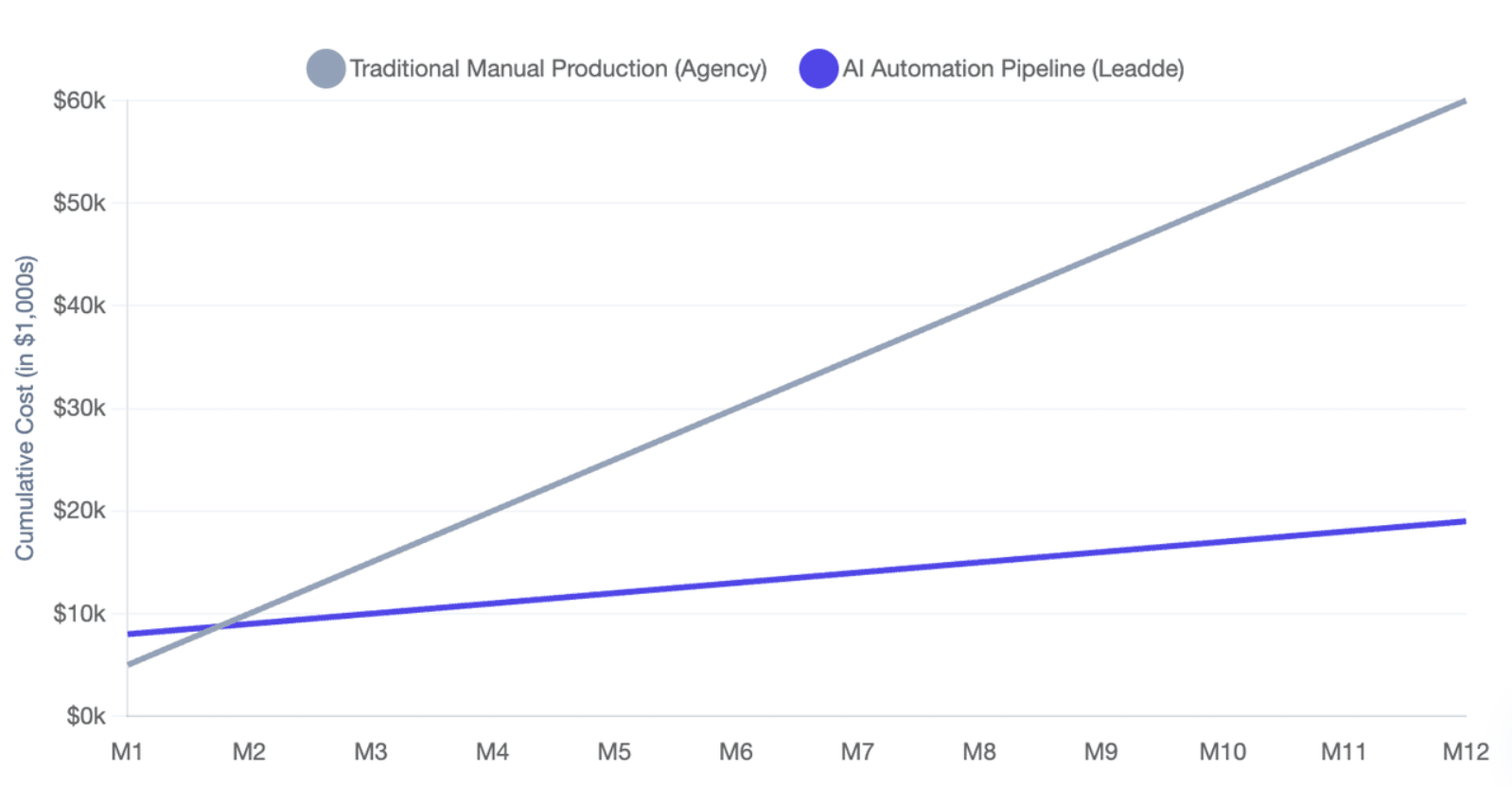
As of 2026, available information suggests that AI avatar signage costs depend on the full stack, not only the monthly software subscription.
The real budget includes video generation, CMS, hardware, localization, API usage, review workflows, and update volume.
Understanding Subscription Plans, Video Credits, API Usage, and Per-Screen CMS Fees
| Cost Type | Includes |
| AI Avatar Platform | Subscription, video minutes, avatars, translation, API, team seats |
| Digital Signage CMS | Per-screen fees, device management, storage, playlists, analytics |
| Real-Time Kiosk | Voice API, LLM, STT/TTS, cloud streaming, hardware, integration |
Measuring ROI Through Faster Content Production, Localization Savings, and Reduced Filming Needs
AI avatar ROI is strongest when it reduces repeated manual production.
Instead of hiring presenters, booking studios, editing clips, and translating manually, teams can generate and update avatar content from business documents or scripts.
Leadde’s official product overview reports business impact claims including up to 90% reduction in content creation time, up to 80% reduction in video production costs, and up to 3x increase in content engagement. These should be treated as Leadde-reported outcomes, not independent third-party benchmarks.
ROI should be measured through:
- Fewer manual design hours
- Faster time from document to screen
- Lower localization workload
- Fewer filming and editing cycles
- More frequent content updates
- Better reuse of existing training and product materials
- Reduced operational friction across locations
What Data Privacy, Security, and Compliance Standards Are Required for Public AI Kiosks?
Public AI avatar deployments introduce privacy, safety, and brand-risk questions that normal video loops do not.
Any system that captures voice, camera input, user questions, or behavioral data needs clear governance before launch.
Securing Guardrails and Closed-Loop Knowledge Bases to Reduce Public AI Hallucinations
A public kiosk should not answer freely about every topic.
It should use a controlled knowledge base, approved FAQs, business rules, and escalation paths.
A safer architecture includes:
User question
→ Speech or touch input
→ Intent detection
→ Approved knowledge base / RAG
→ Guardrail checks
→ AI response
→ TTS and avatar output
→ Escalation if confidence is low
OpenAI’s Realtime API and voice-agent materials support low-latency voice interactions, but enterprise kiosk builders still need domain-specific safety design, tool permissions, and fallback handling.
For public screens, the best answer is often not the most creative answer. It is the most accurate, approved, and safe answer.
Controlling Avatar Likeness, Consent, Brand Safety, and Human Review Before Publishing
AI avatars introduce likeness and brand-safety issues.
Businesses should define:
- Who can create a custom avatar
- Whether the avatar is based on a real person
- How consent is obtained
- Who approves scripts
- Which claims are allowed
- Which topics are blocked
- How updates are reviewed before publishing
For enterprise signage, a human review process is still important.
A safe publishing workflow should include:
- Source content review
- Script review
- Avatar and voice approval
- Legal or compliance review when needed
- CMS publishing approval
- Version tracking
- Post-launch monitoring
Conclusion
B2B buyers should choose AI avatar software by starting with the screen use case, not the avatar demo. A great demo may look impressive, but a real signage fleet needs reliable content updates, CMS compatibility, hardware readiness, cost control, privacy safeguards, and a repeatable workflow.





