
How to Create Global Customer Education Videos: 90% Faster with AI
To create global customer education videos efficiently in 2026, businesses must transition from traditional filming to AI-driven automation. The most effective method is to use generative AI video platforms to automatically convert existing training documents—such as PPTs, PDFs, or standard operating procedures (SOPs)—directly into structured video content. By utilizing AI digital avatars for consistent on-screen instruction and applying automated multilingual workflows, organizations can instantly translate voice-overs, visuals, and subtitles into over 90 languages. This modern approach eliminates manual recording and editing, reducing total video production time by up to 90% while ensuring global brand consistency.
Struggling with expensive translation delays and endless re-recording for global training? Leadde solves this. Automatically turn any document and text into a professional business video in minutes. It's super fast—saving you over 80% of production costs and 90% of content creation time.

Why Global Customer Training is Shifting to AI Automation
The High Cost of Traditional Video Localization
Traditional video production is notoriously slow and expensive. Hiring actors, booking studios, and renting recording equipment can quickly drain a company's training budget.
When you add video localization to the mix, costs skyrocket exponentially. Translating a single training video into multiple languages requires hiring local voice actors and video editors for every new region.
- High Production Costs: Studio time and human talent demand massive budgets.
- Slow Turnaround: Manual video editing takes weeks, delaying vital product launches.
- Inconsistent Branding: Using different actors across various regions can dilute your brand identity.
How Generative AI Reduces Production Time by 90%
In 2026, generative AI has completely transformed the video creation workflow. Enterprise platforms like Leadde allow businesses to bypass the camera entirely.
By automating the full video creation process—including scene layout, script generation, and multilingual voice-overs—companies see dramatic efficiency gains.
- 90% Time Reduction: Turn a standard text script into a fully rendered video in minutes, not weeks.
- 80% Cost Savings: Eliminate the need for expensive studio equipment and human actors.
- Instant Iteration: Update educational content instantly without scheduling complex reshoots.
Step-by-Step: How to Create Global Customer Education Videos
Step 1: Define Learning Objectives for Your Global Audience
Before creating any video content, you must establish crystal-clear learning objectives. Identify exactly what your global customers need to understand after watching the tutorial video.
Align these educational goals with your product's core features and the specific pain points of different regional markets.
- Identify the Core Problem: What specific software task does the customer need to learn?
- Set Measurable Outcomes: Ensure the training effectively reduces support tickets or increases feature adoption.
- Consider Cultural Nuances: Tailor your use-case examples to resonate with diverse global audiences.
Step 2: Skip the Shoot—Turn Existing Documents into Videos Automatically
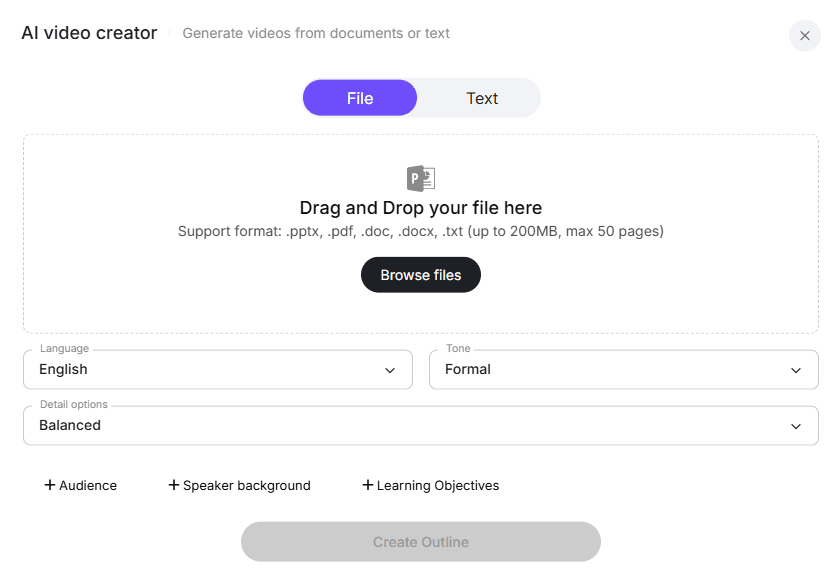
The fastest way to make a training video is to leverage your existing knowledge base. Using Leadde’s File Mode, you can upload your current training materials directly into the platform.
Leadde easily supports converting PPT to video, as well as PDF, DOCx, and TXT files (up to 200MB) directly into structured video presentations.
- Automated Outlines: The AI automatically generates video outlines and script structures from your static documents.
- Smart Layouts: It applies professional visual layouts and matches relevant stock images to each section seamlessly.
- Zero Filming Required: You instantly transform a standard operating procedure (SOP) into a dynamic video without ever turning on a camera.
Step 3: Select Localized AI Digital Avatars for Regional Resonance
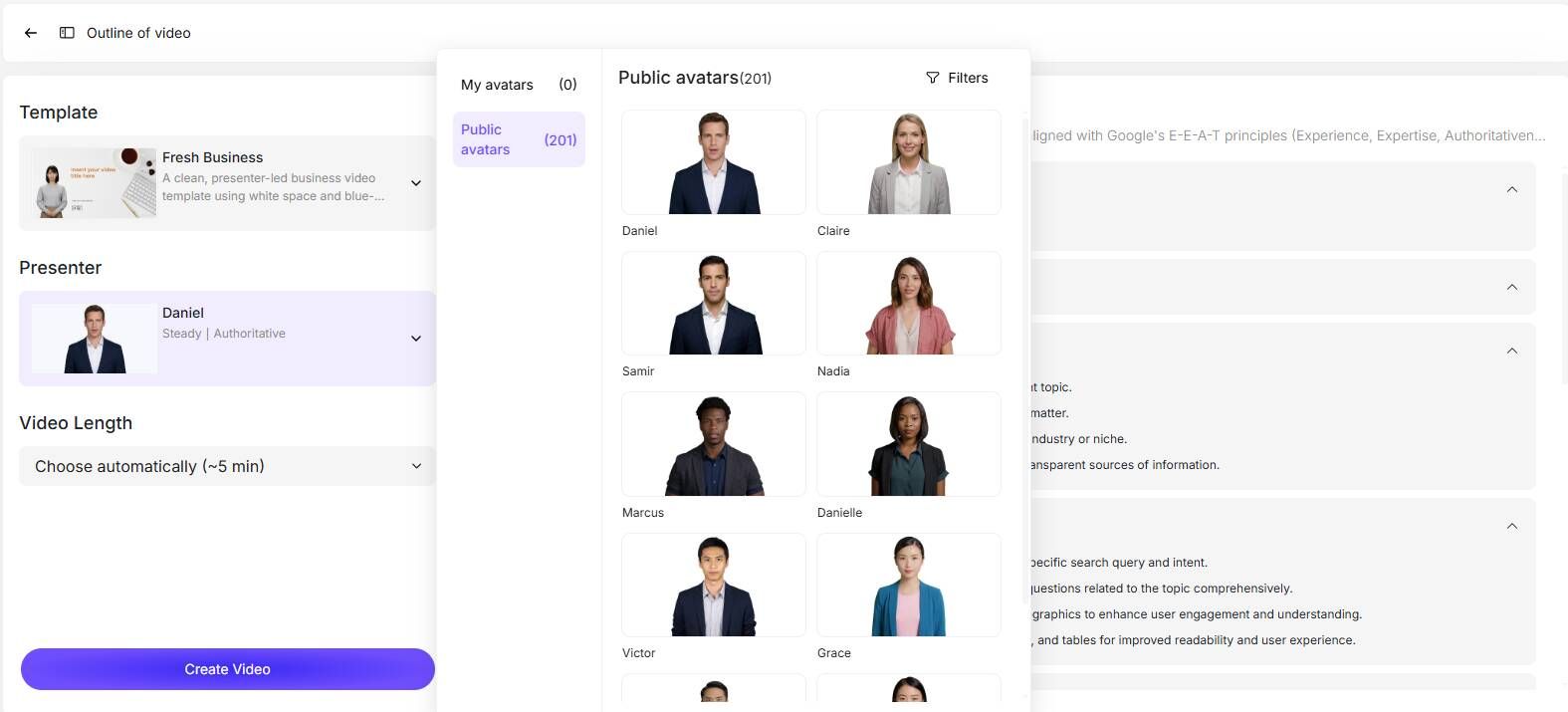
Global audiences engage much better with instructors who look and sound familiar to them. Instead of hiring local actors for each country, use top AI avatar generators to represent your educational brand.
Leadde offers over 200+ virtual presenters, allowing you to choose the perfect demographic match for each target market.
- Diverse Representation: Choose AI avatars that reflect local cultures and specific geographic regions.
- Custom Photo Avatars: Create a unique digital twin from a single portrait photo for personalized training.
- Consistent Delivery: Maintain a highly professional and steady tone across all your global videos.
Step 4: Automate Multilingual Voice-overs and Subtitles
Manual translation and subtitling are massive bottlenecks in global customer education. Advanced AI completely automates this tedious localization phase.
With native support for 92 languages and 170+ voice cloning accents, Leadde makes scaling your training programs to new countries absolutely effortless. You can even create multilingual AI avatars to ensure your message resonates everywhere.
- One-Click Translation: Translate the entire video, including visuals and audio, in a single click.
- Perfect Lip-Sync: AI avatars automatically sync their lip movements to the newly localized language.
- Automated Subtitles: Generate highly accurate, synchronized on-screen text for better accessibility and silent viewing.
Step 5: Distribute and Integrate with Your LMS
Once your multilingual educational videos are generated, they need to be seamlessly delivered to your customers worldwide.
Ensure your AI video platform supports easy exporting and integration with your existing Learning Management Systems (LMS) or customer portals.
- Standard Formats: Export videos in universal formats like high-quality MP4.
- Cloud Sharing: Generate secure, shareable web links directly from the video platform.
- Performance Tracking: Monitor viewer engagement and course completion rates within your integrated LMS.
Handling Product Updates: The Power of Layer-Level Editing
Updating Slide Layers Without Re-rendering Entire Videos
SaaS and software interfaces change frequently, making traditional video tutorials obsolete almost instantly. Fixing a small UI change usually means re-recording the entire segment. This is why utilizing the best SaaS product demo software is highly advantageous.
Leadde uniquely solves this frustrating problem through its Slide Presenter and advanced layered editing capabilities.
- Layer-Level Control: Modify individual text boxes, icons, or interface images within a specific scene.
- No Full Re-rendering: Update a single visual element without regenerating the entire heavy video file.
- Future-Proof Content: Keep your customer education library perfectly up-to-date with absolute minimal effort.
Next-Gen Engagement: Making Customer Education Videos Interactive
How "Chat with Video" Transforms Passive Viewers into Active Learners
Standard training videos are one-way communication tools, which often lead to low retention rates. In 2026, interactivity is essential for effective customer education.
Leadde introduces the powerful "Chat with Video" feature, allowing viewers to ask text-based questions directly to the video interface.
- Contextual Answers: The AI provides real-time, accurate answers based strictly on the video’s content.
- Active Engagement: Transforms passive watching into a highly interactive knowledge-gathering experience.
- Triple the Engagement: These interactive AI elements have been proven to increase content engagement by up to 3x.
Choosing the Right AI Video Generator for Educational Content
Leadde vs Synthesia vs HeyGen: A Quick Comparison
When selecting an AI video platform for enterprise training, it is crucial to compare the market leaders to ensure you are using the best training video software. Leadde stands out specifically for its document-to-video automation and interactive learning features.
| Feature | Leadde | Synthesia | HeyGen |
|---|---|---|---|
| Document-to-Video | Yes (Auto layout & highlight) | No (Fixed templates) | No |
| Interactivity | Yes (Chat with Video) | No (Standard output) | No (Standard output) |
| Starter Plan Pricing | $19/month (Unlimited videos) | $29/month (10 mins) | $29/month (Unlimited videos) |
| Best Use Case | Enterprise training & SOPs | LMS Integration | Marketing shorts |
- Leadde: Best for automated, interactive, high-volume enterprise training and document conversion.
- Synthesia: Good for basic cross-region communication but lacks dynamic document automation.
- HeyGen: Better suited for short-form marketing content rather than structured customer education.
Conclusion: Scale Your Global Customer Education Effortlessly
Creating global customer education videos no longer requires a massive budget, a production studio, or months of logistical planning.
By adopting generative AI platforms, businesses can completely automate the transition from static PDF documents to highly engaging, interactive video content.
- Speed and Scale: Reduce production time by 90% and easily localize content into 92 languages instantly.
- Future-Proof: Utilize AI layer-level editing to handle product interface updates without costly reshoots.
- Drive Engagement: Leverage interactive AI avatars to answer customer questions in real-time, boosting retention.
Ultimately, embracing AI-driven video creation ensures your global audience receives consistent, high-quality training, empowering your business to scale effortlessly in 2026.





