Seedance 2.5 vs MiniMax H3: Which AI Video Model Is Better in 2026

Seedance 2.5 and MiniMax H3 are both advanced AI video models, but they are built for different production needs. Seedance 2.5 is better suited to longer scenes, larger reference packs, and revision-heavy workflows, while MiniMax H3 fits shorter modular shots and teams that value open-weight flexibility.
The better model depends on more than headline specs. Video quality, character consistency, reference control, editing, retries, audio, and the cost of a usable final result all matter in real production.
For training, educational, and business videos, there is another distinction: a foundation model generates scenes, but it does not automatically turn a PDF, SOP, presentation, or knowledge document into a complete video. Leadde addresses that broader workflow by analyzing source content, structuring the narrative, and generating videos with AI narration, avatars, and multilingual output. Learn more about how to convert PDFs to videos online or turn SOP documents into training videos in minutes.

Seedance 2.5 vs MiniMax H3: What Are the Biggest Differences?
Seedance 2.5 and MiniMax H3 are both multimodal AI video models, but they solve different production problems. Seedance 2.5 prioritizes longer scenes, large reference sets, and editing control, while H3 prioritizes flexible multimodal generation, shorter shots, and an open-weight ecosystem. Explore our detailed guide on where to use Seedance 2.5 alongside our walkthrough on where to use MiniMax H3 to understand specific deployment environments.
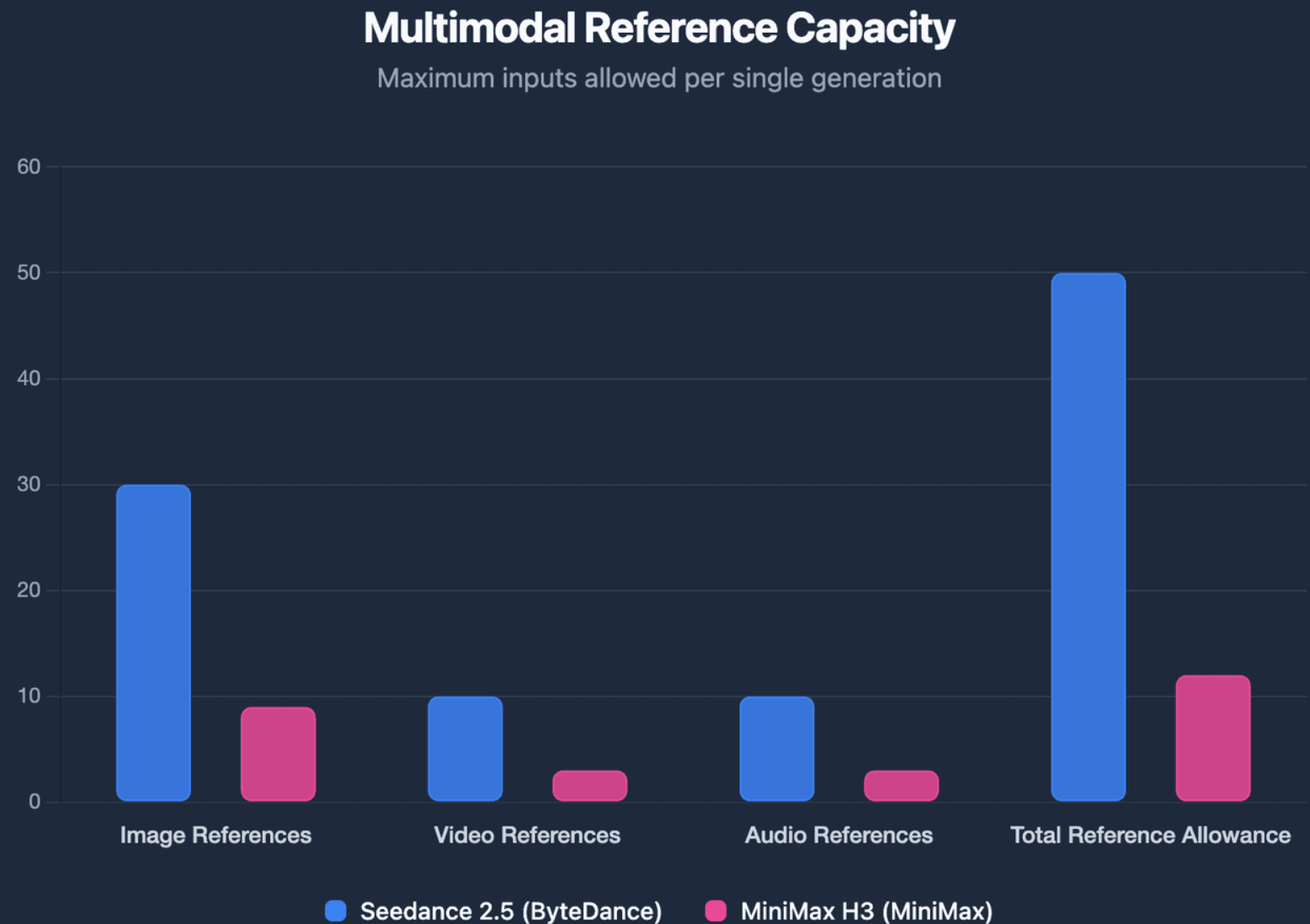
ByteDance officially supports up to 30 seconds per Seedance 2.5 generation, with as many as 30 images, 10 videos, and 10 audio clips as references. MiniMax H3 supports 4–15 second outputs, up to nine images, three videos, and three audio clips, with 12 mixed input files in total.
Seedance 2.5 vs MiniMax H3 Comparison
| Feature | Seedance 2.5 | MiniMax H3 |
| Developer | ByteDance | MiniMax |
| Best fit | Longer continuous scenes | Short modular shots |
| Duration | Up to 30 seconds | 4–15 seconds |
| Image references | Up to 30 | Up to 9 |
| Video references | Up to 10 | Up to 3 |
| Audio references | Up to 10 | Up to 3 |
| Native audio-video generation | Yes | Yes |
| Editing | Timestamp and reference-based editing | Multimodal instruction-based editing |
| Extension | Multi-round extension | Shorter generation window |
| Open weights | No | Yes |
| Local deployment | No official open-weight route | H3-Base can run locally |
| Production strength | Scene and revision control | Multimodal and infrastructure flexibility |
H3 also generates 24 FPS video with 32 kHz stereo audio. Its base model produces 768p output, while MiniMax's official 2K workflow regenerates the base result using the original context rather than relying on conventional super-resolution alone. For a deeper breakdown of features, see our MiniMax H3 review.
Production Control vs Model Control
A useful way to understand the difference is production control versus model control.
Seedance 2.5 gives creators more control over the finished scene: longer timelines, more references, video extension, camera changes, and targeted edits. ByteDance positions the model around long-form storytelling, multimodal referencing, and professional editing workflows. To get started with these features, check out our guide on how to use Seedance 2.5.
H3 gives technical teams more control over the model layer. Its open-weight H3-Base can be deployed locally and integrated into custom pipelines, although the complete 2K production stack is not fully open: H3-Regenerate-2K remains API-based for now.
Why Provider Capabilities Can Look Different
Specifications should always be checked against the platform being used. For example, fal currently offers Seedance 2.5 at up to 1080p and H3 delivery tiers extending to 4K, while MiniMax's own system documentation describes H3 around a 768p base and 2K regeneration workflow.
That means foundation-model capability, official hosted capability, and third-party API capability are not always identical. This is one reason resolution claims in AI video comparisons can appear contradictory, especially when evaluating how are people making realistic AI videos at scale.
Which Model Delivers Better Video Quality, Motion, and Consistency?
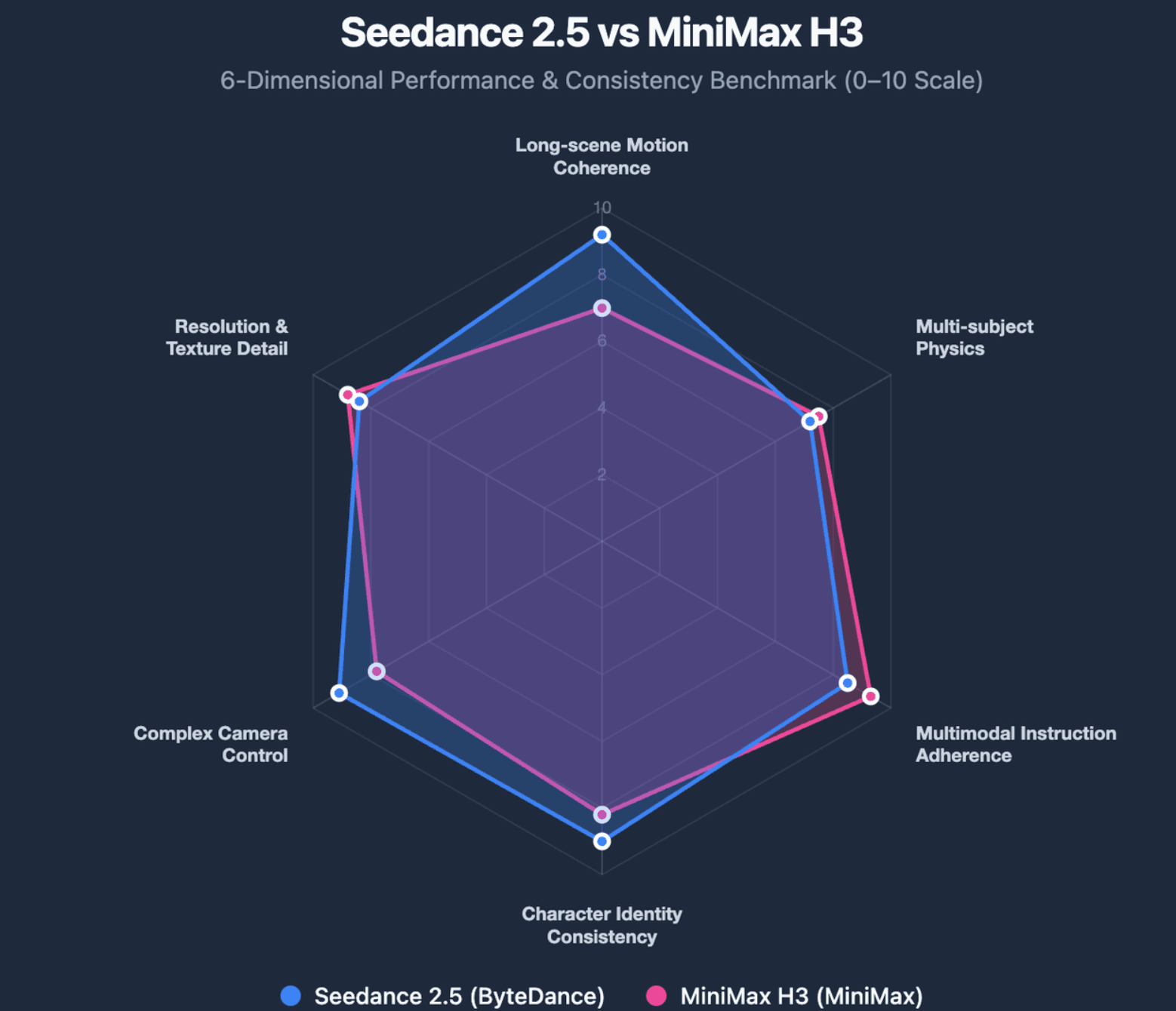
There is no single "video quality" score that captures real production performance. A useful comparison should separate visual detail from motion, physics, prompt adherence, camera behavior, typography, and consistency.
Video Quality, Motion, Physics, and Camera Control
H3 is particularly interesting when a project combines visual references with text, camera instructions, audio, or UI elements. MiniMax says the model was designed for advertising, branding, e-commerce, product design, UI/UX, and other tasks where accurate multimodal instruction following matters.
Seedance 2.5 is stronger when camera movement and performance need to remain coherent across a longer scene. Its timestamp-level controls and reference-video understanding give creators more ways to specify when a performance, perspective, or camera change should happen.
Higher resolution should not be confused with better usable motion. A sharp frame can still fail if hands collide incorrectly, a product changes shape, or a character misses an interaction.
Character, Product, and Location Consistency
Character consistency is more than keeping a face recognizable. Identity, clothing, lighting, product geometry, environment, and spatial relationships all contribute to whether consecutive shots feel like the same scene. If consistency across branded assets is crucial, teams often combine foundation models with dedicated tooling to brand an avatar or implement custom visual personas.
In professional workflows, reference preparation often matters as much as the model limit. A structured character sheet, product reference, environment board, and motion reference usually provide clearer instructions than many loosely related images.
This leads to an important distinction: reference capacity is not the same as reference control. Seedance can accept far more assets, but those references still need clear roles; H3 accepts fewer inputs, so each reference relationship often needs to be especially explicit.
Where Do Seedance 2.5 and H3 Still Fail?
Longer context does not eliminate physical or continuity errors. ByteDance itself notes that complex motion physics and multi-subject interactions remain areas for further improvement, which matters for scenes involving contact, choreography, or several moving characters.
H3's challenge can be different. A character may remain recognizable while room geometry, distant facial detail, or relationships between several references become harder to preserve.
For either model, the best evaluation is therefore not "Did one attractive frame look good?" It is how much of the generated video survives review without repair.
How Should You Use References and Prompts in Seedance 2.5 vs MiniMax H3?
Reference workflows are one of the biggest differences between modern AI video generation and earlier text-to-video systems. Images can define identity, videos can define camera movement, and audio can define voice or rhythm.
Reference Capacity vs Reference Control
Seedance 2.5 supports up to 50 multimodal reference assets in one generation. H3 supports fewer inputs, but its architecture is explicitly designed to understand relationships between different modalities.
A better workflow is to give every reference a job: one image for character identity, another for a product, a video for camera movement, and an audio clip for voice. Adding references without defining their purpose can introduce conflicting signals rather than more control.
Prompt Seedance 2.5 With Timed Beats and End States
For longer Seedance scenes, prompting works better when the video is treated as a sequence of performance beats rather than one long cinematic description.
For example, a prompt can define what happens from 0–5 seconds, how the camera changes from 5–10 seconds, and what the character must be doing by 10–15 seconds. Defining an end state for each beat also gives the next section a clearer starting point.
It is also useful to define invariants explicitly: facial identity, outfit, lighting direction, product geometry, or environmental details that should not change.
Prompt H3 With Multimodal Relationships
H3 is designed for prompts that explain relationships between sources. MiniMax gives the example of taking camera movement from one video, a character from an image, and vocals from an audio reference in the same generation. You can consult our dedicated MiniMax H3 prompt guide for concrete syntax patterns.
This means H3 prompting is often less about adding more cinematic adjectives and more about stating which reference controls which part of the output.
Using the exact same prompt on both models can reveal interpretation differences, but it is not always the best production test. A fairer workflow combines a same-prompt comparison with a second round optimized for each model's control system.
Is Seedance 2.5's 30-Second Workflow Better Than H3's 15-Second Workflow?
The answer depends on whether the project needs a shot or a scene.
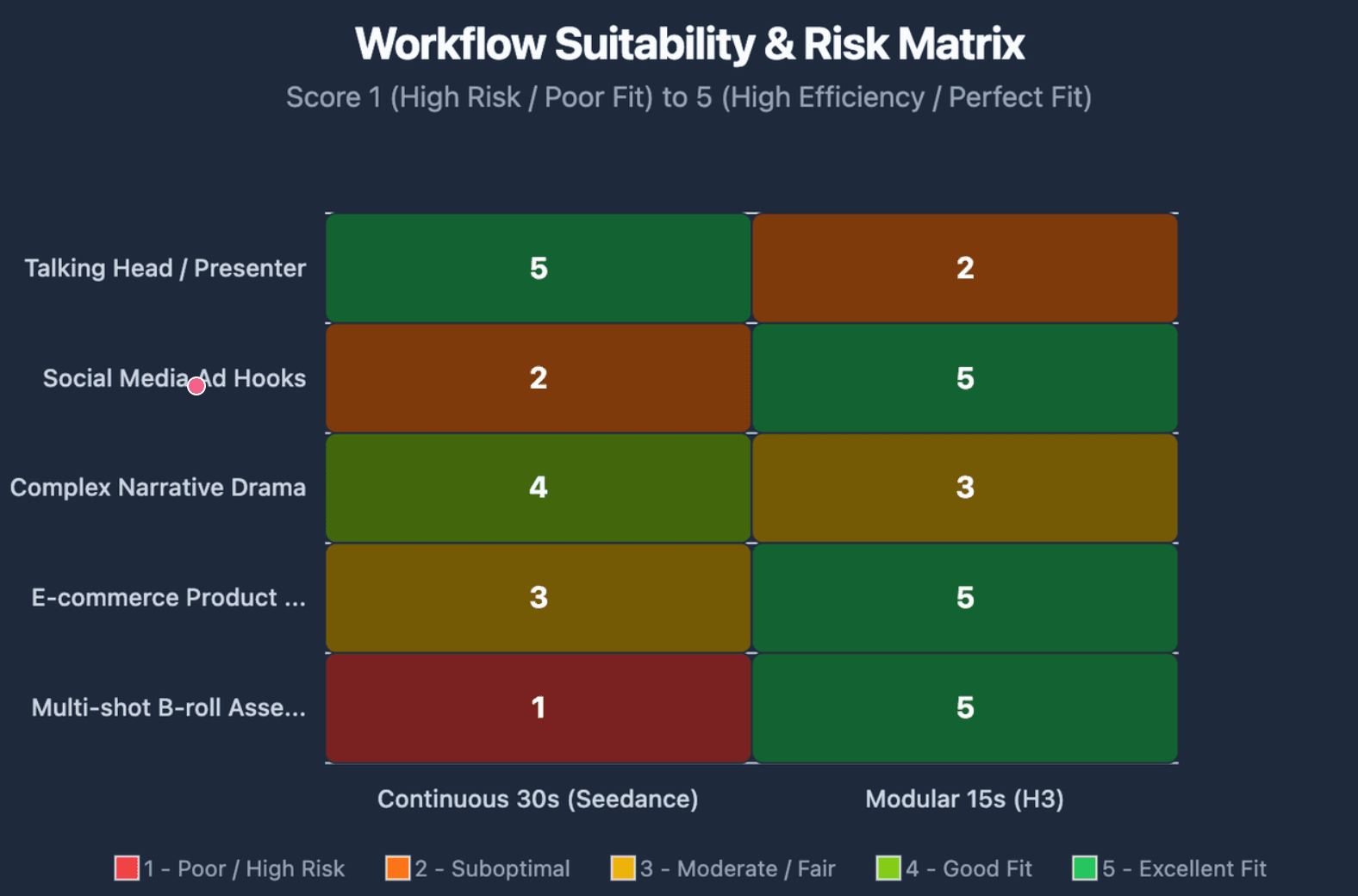
H3's 4–15 second window is well suited to modular assets such as social hooks, product inserts, transitions, short ads, and clips that will already be assembled in an editor. Seedance 2.5 becomes more valuable when cutting the scene would damage continuity, especially when compared with earlier generation benchmarks like Seedance 2.5 vs Seedance 2.0.
Shot vs Scene: When Does 30 Seconds Matter?
A continuous product transformation, presenter segment, dialogue exchange, or moving camera sequence may benefit from Seedance's longer single generation. ByteDance specifically designed the model to organize longer videos around setup, development, turning points, and resolution instead of simply extending one action.
However, longer generation is valuable only when continuity is valuable. If a campaign consists of independent five-second product shots, a 30-second generation creates a larger task without necessarily creating more value.
Failure Domain and Revision Radius
Longer clips also have a larger failure domain. If a 30-second generation fails near the end, more previously acceptable material may be exposed to regeneration.
A related production concept is revision radius: how much finished footage must change to correct one error? Seedance's targeted editing can reduce that radius when only one section requires revision, while modular H3 shots naturally limit the amount that needs to be rerun.
Reduce Failures Before Video Generation
A practical workflow is to solve expensive uncertainty before paying for video rerolls. Lock character appearance, product geometry, environment, keyframes, and final composition in still images first.
This is not unnecessary pre-production. If a small amount of planning prevents several expensive video regenerations, it functions as risk reduction rather than added cost.
Which Model Is Cheaper Once You Include Editing, Retries, and Delivery?
Headline pricing makes H3 look much easier to compare because many providers bill it by output second. Seedance pricing can depend on tokens, resolution, reference-video duration, and the provider serving the endpoint. You can compare tier details in our review of how much is Seedance 2.5 versus the official breakdown of MiniMax H3 pricing.
On fal, for example, H3 currently ranges from $0.05 per second at 480p to $0.16 per second for its 4K delivery tier. Seedance 2.5 uses token-based pricing there, with cost rising substantially as output resolution increases. These are fal-specific rates, not universal prices for either model.
Cost per Usable Second vs API Cost per Second
The more useful production metric is:
Cost per usable second = total generation spend ÷ accepted finished seconds
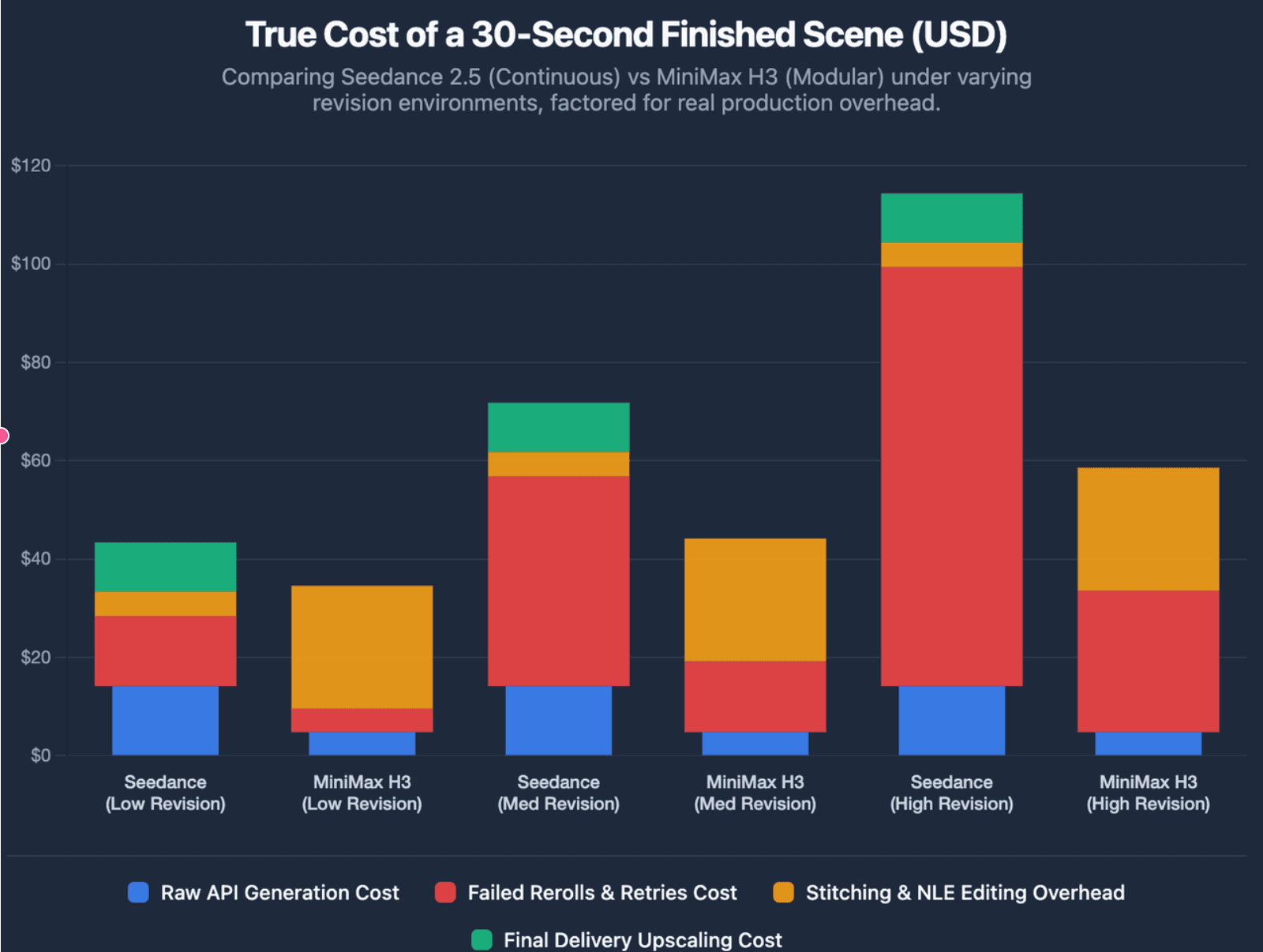
If a low-cost model requires repeated rerolls, the cheapest API rate may not produce the cheapest finished asset. The same applies when separate clips require stitching, continuity fixes, or audio repair.
The Real Cost of a Finished Scene
A finished scene can include generation, rejected outputs, reference preparation, retries, editing, continuation, audio fixes, and human review. That makes the true economic question broader than "Which model costs less per second?"
This is also where Seedance's editing capabilities can matter. A more expensive initial generation may still be economical if a later client revision can preserve most of the approved scene rather than forcing a full rerun.
Seedance 2.5 or MiniMax H3: Which Should You Choose for Your Workflow?
Choose Seedance 2.5 when continuity, longer scenes, many references, and post-generation revision are the biggest production constraints. Choose H3 when you need shorter modular clips, multimodal flexibility, open weights, or the ability to experiment with local deployment.
Neither decision needs to be permanent. Production teams can route different shots to different models instead of building a workflow around one brand.
、
Which Is Better for Educators, Training Teams, and Business Video?
For educational and training content, both models are best understood as visual-generation layers. They can create demonstrations, scenarios, concept visualizations, reenactments, or supporting footage, but they do not by themselves determine what information from a training manual or SOP should become a lesson.
A document-to-video system solves a broader problem. Leadde, for example, is designed to analyze PDFs, presentations, SOPs, product documentation, and learning materials, then structure the information into scenes with narration, avatars, and multilingual video output. For instance, teams looking to turn slide decks into training assets can explore how to convert PowerPoint training videos for employees or transform documents into multilingual demos with AI.
The distinction is useful for business teams: a foundation video model primarily answers "What should this scene look like?", while a document-to-video workflow must first answer "What should this video communicate?"
Choose Based on Your Most Expensive Failure
The most useful decision rule is not to choose the model with the longest feature list. Choose the model that reduces your most expensive production failure.
If clip-to-clip continuity is costly, Seedance's longer scene workflow may matter more. If a marketing team needs dozens of inexpensive variations, H3's shorter modular approach may be more practical; if private deployment is essential, H3's open-weight route becomes a different kind of advantage.
Frequently Asked Questions About Seedance 2.5 vs MiniMax H3
Is Seedance 2.5 better than MiniMax H3?
Not universally. Seedance 2.5 is better suited to longer scenes, large reference sets, and editing-heavy workflows, while H3 is stronger for shorter multimodal shots and teams that need open-weight flexibility. The better model depends on the type of failure and revision cost your workflow needs to minimize.
Which model has better video quality and character consistency?
Both can produce high-quality video, but consistency depends heavily on the task and reference design. Seedance's longer context and larger reference capacity can help continuous scenes, while H3 can use multimodal references to re-anchor characters and products in shorter shots. Neither model eliminates identity, physics, or spatial-consistency failures.
Can MiniMax H3 generate 30-second videos?
H3's official output duration is currently 4–15 seconds, so a 30-second sequence normally requires multiple generations and editing. Seedance 2.5 supports up to 30 seconds in a single generation and can also extend videos through additional rounds.
Does Seedance 2.5 support 4K video?
It depends on what is meant by "support." Current third-party routes differ, and fal currently lists Seedance 2.5 up to 1080p. For this reason, 4K marketing claims should not automatically be treated as a universal Seedance 2.5 API specification.
Is MiniMax H3 fully open source and can it run locally?
MiniMax has released H3 under its community license, and H3-Base can be deployed locally. However, the complete production stack is not fully local today: the official H3-Regenerate-2K module is not yet open-sourced, so the full 2K workflow still relies on MiniMax's API for that stage.
Which model is cheaper for commercial video production?
H3 currently has lower headline generation rates on several third-party platforms, but commercial cost should be calculated from usable outputs rather than API price alone. Rejected generations, references, stitching, revisions, human review, and delivery resolution can materially change the final cost.
Conclusion
Seedance 2.5 and MiniMax H3 represent two different directions in AI video production. Seedance 2.5 is compelling when continuity, references, and revision control matter most; MiniMax H3 is compelling when modular generation, multimodal flexibility, cost, and open-weight deployment matter more. The best choice is the model that reduces the most expensive failure in your actual production workflow.