
Multilingual AI Avatar Generators 2026: Best Tools Compared

Multilingual AI avatar generators are AI video platforms that turn scripts, documents, PDFs, slides, or existing business content into localized videos featuring digital presenters.
By combining translation, text-to-speech, voice generation, and lip-sync technology, these tools help global teams create training videos, marketing explainers, customer education content, and internal communications in multiple languages without relying on actors, cameras, or traditional studio production.
Traditional video localization often slows global growth with manual scripting, repeated editing, voiceover coordination, and high production costs.
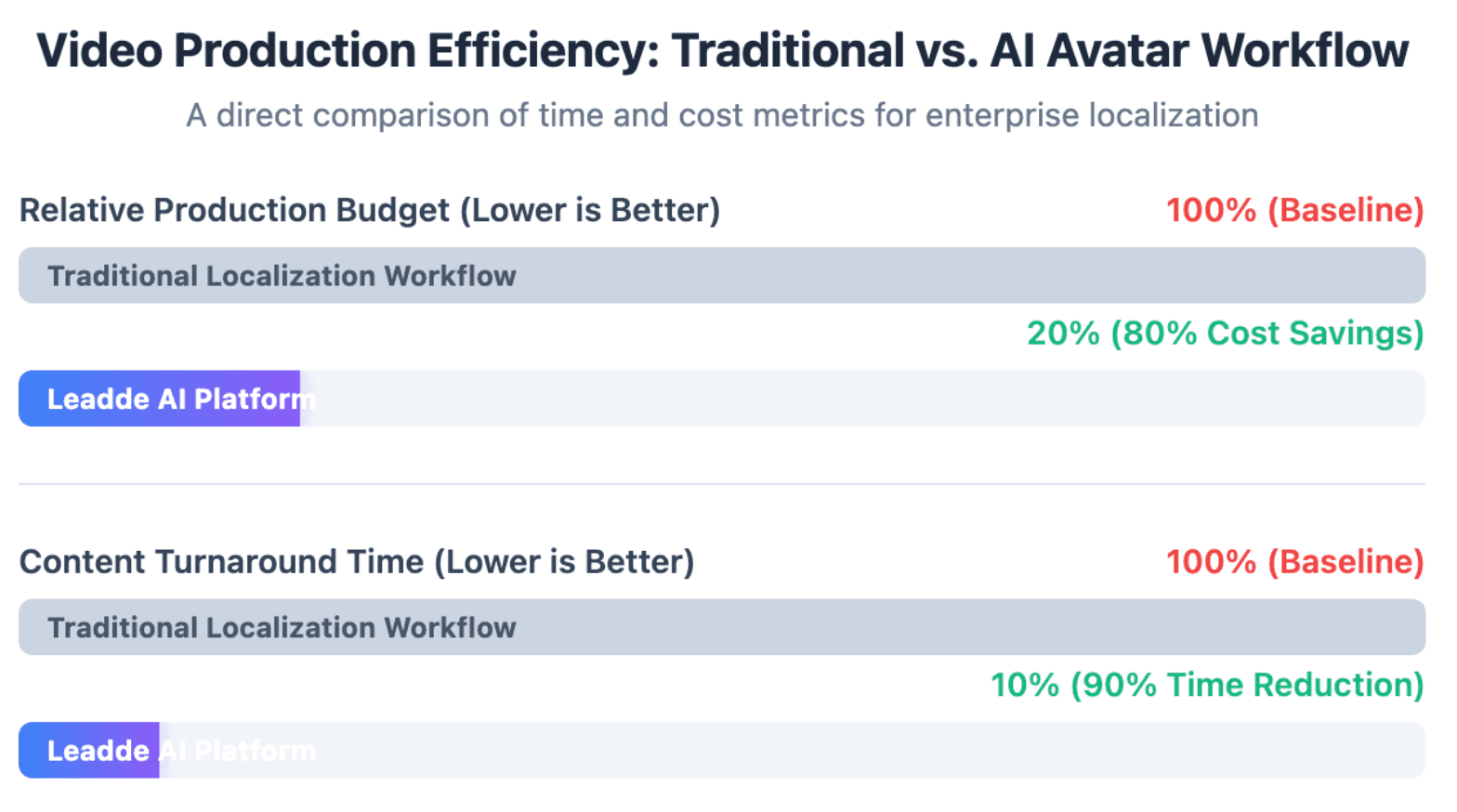
Leadde helps remove that bottleneck by turning any document or text into a professional business video automatically, enabling teams to create multilingual videos in minutes while saving over 80% in production costs and 90% in content creation time.
What Are the Best Multilingual AI Avatar Generators in 2026?
The best multilingual AI avatar generator depends on what you need to create. Some tools are built for polished talking-head videos, while others focus on corporate training, video translation, API use, or document-to-video workflows.
For global businesses, the strongest platform is usually not the one with the longest language list. It is the one that helps teams create, localize, update, and manage multilingual videos with the least manual work.
Leadde: Best for Document-to-Video Workflows and Interactive Multilingual Avatars
Leadde is a strong choice for businesses that already have training decks, PDFs, Word documents, scripts, or internal knowledge materials. Instead of starting with a blank script, teams can turn existing content into structured business videos.
This makes Leadde especially useful for:
- Employee training
- Product education
- SOP videos
- Compliance content
- Internal communications
- Customer education
Leadde’s key advantage is its document-to-video workflow. It can help generate outlines, scenes, voiceover scripts, visual layouts, avatars, and how to create multilingual AI avatars from business content, reducing the need for manual storyboarding.
It is also well suited for teams that need more than a static video. Interactive video features, analytics, version control, and multilingual workflows make it more practical for enterprise content operations.
Synthesia, HeyGen, D-ID, and Colossyan: Best Alternatives by Use Case
Synthesia is often a strong fit for enterprise training teams that need structured videos, professional avatars, and learning content workflows. It is commonly used for onboarding, L&D, and internal communication.
HeyGen is a strong option for realistic talking avatars, digital twins, social videos, and video translation. It is often preferred by marketers, creators, and teams that need polished avatar-led videos quickly.
D-ID is useful for photo-to-talking-head videos and API-driven avatar experiences. It is a practical choice when teams want to animate still images or build avatar features into apps and customer-facing tools.
Colossyan is more focused on workplace learning and scenario-based training. It fits HR, compliance, and training teams that need structured learning videos rather than high-energy marketing content.
Which Platform Is Best for Training, Marketing, Support, and Global Communication?
For training, look for structured content workflows, custom avatars, subtitles, translation review, LMS compatibility, and easy updates. Leadde, Synthesia, and Colossyan are often stronger fits for this use case.
For marketing, prioritize avatar realism, brand control, short-form formats, fast iteration, and localization speed. HeyGen and some template-based platforms can be useful here.
For customer support and education, choose a tool that can turn repeated questions, product guides, and help documents into multilingual explainers. Leadde is especially relevant when the source material already exists in documents or knowledge bases.
For global internal communication, the best choice is usually a platform that supports version control, consistent presenters, multilingual output, and fast updates when policies or product details change.
Why Are Global Teams Using Multilingual AI Avatar Generators?
Global teams use multilingual AI avatar generators because traditional video localization is slow, expensive, and difficult to update. Every new language often requires translation, voiceover, editing, review, and export.
AI avatar tools simplify this process by allowing teams to create multiple localized video versions from one source script or document. This helps companies communicate faster across regions.
How AI Avatars Reduce Translation, Voiceover, and Video Production Bottlenecks
Traditional multilingual video production requires several separate steps:
- Scriptwriting
- Translation
- Voiceover recording
- Filming or editing
- Subtitle creation
- Final review
- Re-exporting for each language
AI avatar generators can combine many of these steps into one workflow. A team can upload source content, select target languages, choose an avatar and voice, then generate localized versions faster. This is especially useful when companies need to make employee training videos or update onboarding, product education, and policy content regularly.
How Native-Language Videos Improve Accessibility, Trust, and Engagement
People understand and remember information better when it is delivered in a language they are comfortable with. Native-language videos can make training, support, and product education more accessible.
Multilingual AI avatars also help companies create a more human experience than plain subtitles or translated PDFs. A digital presenter can guide viewers through the content in a more structured and engaging way.
For global teams, this matters because the same message must feel clear, consistent, and locally understandable across different regions.
When Multilingual AI Avatars Deliver the Strongest Business ROI
Multilingual AI avatars deliver the strongest ROI when the content is:
- Repetitive
- Structured
- Frequently updated
- Needed in many languages
- Used across large teams or markets
Good examples include onboarding videos, compliance training, SOP explainers, product updates, customer education, and internal announcements. They are less suitable for high-emotion brand films, sensitive executive messaging, or sales videos where deep human nuance and trust are critical.
How Do Multilingual AI Avatar Generators Work?
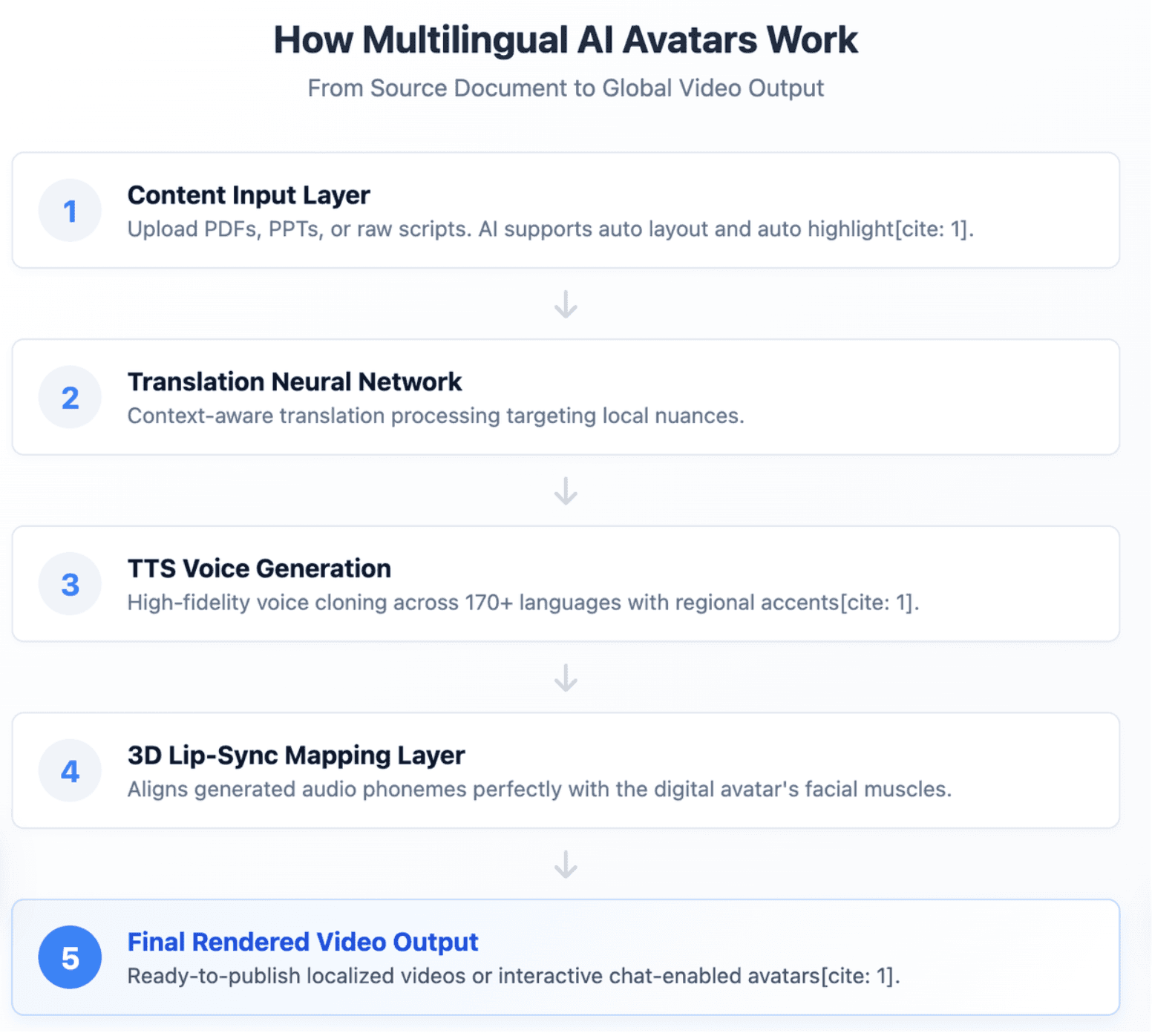
Multilingual AI avatar generators combine several technologies into one video creation workflow. These usually include translation, text-to-speech, avatar animation, lip sync, subtitles, and video rendering.
The quality of the final video depends on how well these technologies work together. A tool may support many languages, but still produce weak results if the voice sounds unnatural or the lip sync fails.
How AI Translation, Text-to-Speech, and Lip Sync Create Localized Videos
The process usually starts with a script, document, or video transcript. The platform translates the content into the selected target languages.
Then text-to-speech technology converts the translated text into spoken audio. The avatar animation system matches the presenter’s mouth movement, facial motion, and timing to the generated speech.
Finally, the tool renders the finished video with subtitles, scenes, visuals, and branding elements. In stronger platforms, teams can review and edit the translated scripts before publishing.
Why Voice Quality, Accent Support, and Lip-Sync Accuracy Matter More Than Language Count
A long language list does not guarantee high-quality localization. What matters more is how natural the voice sounds in the specific language your audience uses.
Teams should check:
- Pronunciation
- Regional accent fit
- Speaking pace
- Tone
- Emotion
- Lip-sync timing
- Subtitle accuracy
For business content, clarity is more important than dramatic expression. A slightly simple video with accurate language and clean delivery is usually better than a flashy avatar with poor localization.
What Are the Limits of AI Avatars in Realism, Emotion, and Cultural Nuance?
AI avatars have improved quickly, but they still have limits. Some avatars may look slightly stiff, especially in close-up shots or longer videos.
Common issues include:
- Unnatural facial expressions
- “Dead eyes”
- Robotic pacing
- Weak emotional nuance
- Lip-sync mismatch
- Literal translation
- Cultural tone errors
This does not mean AI avatars are ineffective. It means businesses should use them where they work best: clear, structured, repeatable, multilingual communication.
How Can You Turn PDFs, Docs, and Slides into Multilingual AI Avatar Videos?
Many businesses already have useful content stored in PDFs, slide decks, policy documents, SOPs, and product guides. The challenge is turning that static content into clear video without rebuilding everything manually.
Document-to-video AI solves this problem by helping teams transform existing materials into structured avatar-led videos.
Why Manual Storyboarding Slows Down Enterprise Video Localization
Manual storyboarding is one of the hidden bottlenecks in business video production. Teams must read source documents, extract key points, write scripts, divide content into scenes, choose visuals, and prepare voiceover copy.
This becomes harder when the same video must be created in multiple languages. Every edit may require translation, review, timing adjustments, and re-exporting.
For enterprise teams, the real problem is not creating one video. The real problem is managing many versions across teams, languages, and updates.
How Document-to-Video AI Creates Outlines, Scenes, Scripts, and Visual Layouts
Document-to-video platforms can analyze source content and help convert it into a video-ready structure. This may include:
- Topic outlines
- Scene-by-scene flow
- Voiceover scripts
- Key point highlights
- Visual layouts
- Avatar presenter sections
- Captions and subtitles
This workflow is different from simple script-to-video generation. Instead of asking users to write everything from scratch, the platform helps turn existing business knowledge into video. For teams with large content libraries, this can save significant planning and editing time.
Why This Workflow Is Better for Training, SOPs, Product Education, and Compliance Updates
Training, SOP, product education, and compliance content often follows a structured format. That makes it suitable for document-to-video automation. These content types also change over time. Policies are updated, product features change, and onboarding materials need revision.
A document-to-video workflow makes it easier to refresh content when the source material changes. This is especially important when teams need to update several language versions at the same time.
How Do You Create a Multilingual AI Avatar Video Step by Step?
Creating a multilingual AI avatar video is easier when the process starts with a clear source. The source can be a script, PDF, PowerPoint, Word document, training guide, or existing video transcript.
The best workflow includes both automation and review. AI can speed up production, but human checks are still important for translation accuracy, brand tone, and cultural fit.
Step 1: Upload a Script, Document, Presentation, or Source Content
Start by uploading your source material. This could be a script, slide deck, PDF, Word document, product brief, training manual, or internal announcement.
Before uploading, make sure the content is clear and well organized. Short sections, simple headings, and direct language usually produce better video results.
If the content is too dense, simplify it first. AI avatar videos work best when each scene communicates one clear idea.
Step 2: Select Your Avatar, Voice, Tone, Target Languages, and Video Style
Next, choose the presenter, voice, target languages, tone, and video style. For business videos, the avatar should match the audience and context.
For example:
- A formal avatar may fit compliance training.
- A friendly avatar may fit AI avatar videos for employee onboarding.
- A professional presenter may fit product education.
- A concise style may fit executive updates.
You should also choose the language variants carefully. Spanish for Spain and Spanish for Latin America may require different tone, vocabulary, and pronunciation.
Step 3: Review, Generate, Export, and Update All Language Versions
Before generating the final video, review the translated scripts. For important languages, ask a native speaker or local team member to check the meaning, tone, and terminology.
After review, generate the video with avatar speech, lip sync, scenes, subtitles, and visuals. Then export the versions you need for your channels.
When the source content changes, update the script or document and refresh the affected language versions. This is where platforms with version control and multilingual workflows become more valuable.
How Should You Choose the Right Multilingual AI Avatar Platform?
The right platform depends on your content type, audience, language needs, workflow, and budget. A creator making short social videos needs different features from an enterprise team localizing training materials.
Do not choose a platform only because it has the most languages or the most realistic demo. Test it with your own content before committing.
How to Test Lip Sync, Voice Quality, Translation Accuracy, and Avatar Consistency
Start with a real script from your business. Do not rely only on the platform’s demo videos.
Test your top three target languages first. Check whether the voice sounds natural, whether the pacing feels clear, and whether the lip sync stays accurate.
Also test avatar consistency across multiple videos. Look for changes in face, lighting, tone, gestures, and voice style.
A strong test should answer four questions:
- Does the avatar sound natural?
- Does the translation make sense?
- Does the lip sync look believable?
- Can the same presenter stay consistent across videos?
How to Compare Free Plans, Starter Plans, Export Limits, and Commercial Licenses
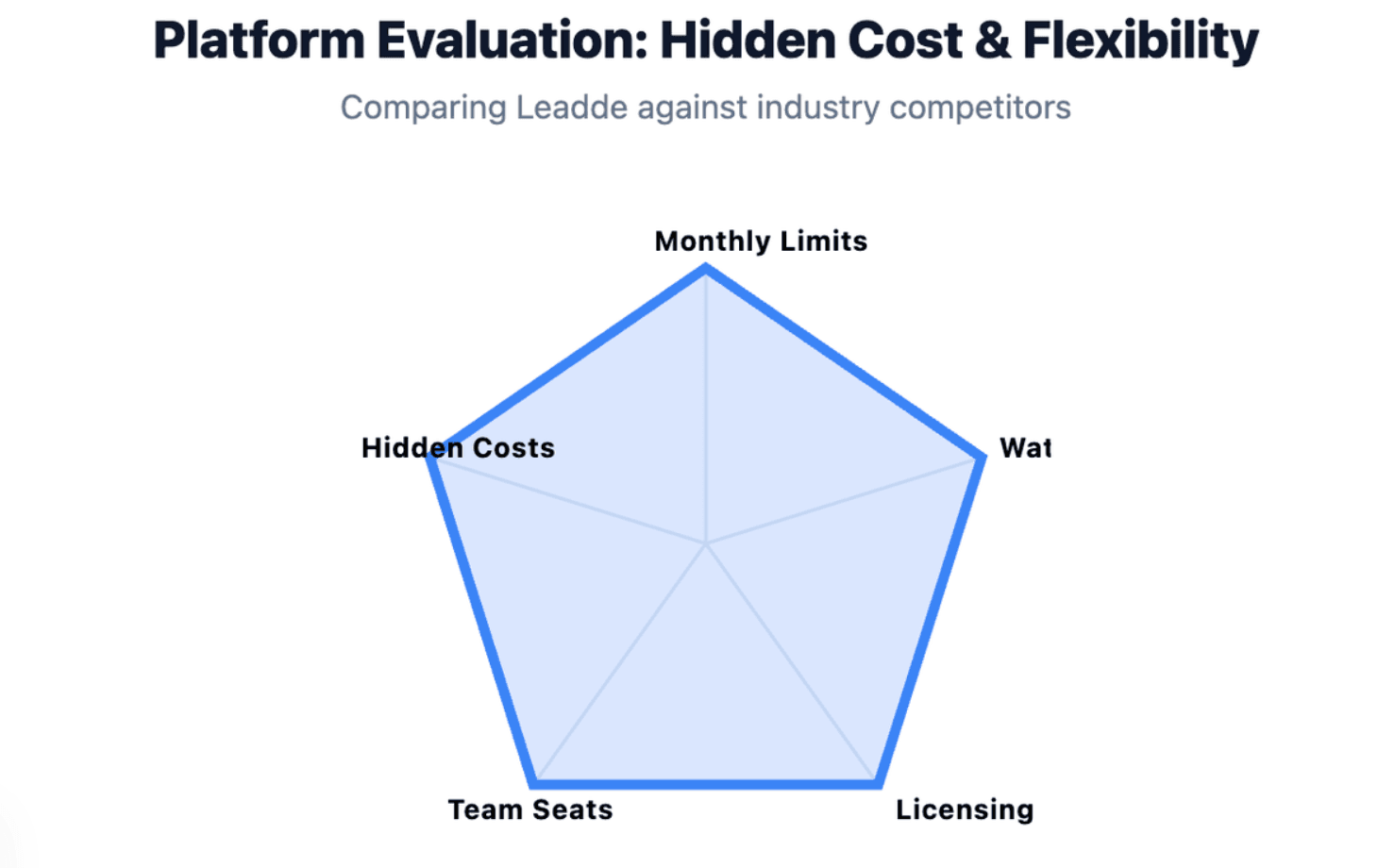
Pricing can be confusing because many tools offer free trials or low starter plans, but limit exports, video length, watermark removal, avatar access, or commercial usage.
Before choosing a tool, check:
- Monthly video minutes
- Export limits
- Watermark rules
- Commercial rights
- Custom avatar costs
- Voice cloning limits
- Translation limits
- Team seats
- Storage and project limits
The cheapest plan is not always the lowest-cost option. For high-volume multilingual production, export limits and revision costs matter more than the headline price.
How to Evaluate Enterprise Features Like Version Control, Analytics, Security, and Team Workflows
Enterprise teams need more than video generation. They need a repeatable content workflow.
Important enterprise features include:
- Version control
- Role-based access
- Team collaboration
- Review and approval workflows
- Analytics
- Content management
- Security and compliance support
- Multilingual project tracking
If your team creates many training, support, or product videos, workflow quality may matter more than avatar realism alone.
What Is the Future of Multilingual AI Avatars in 2026 and Beyond?
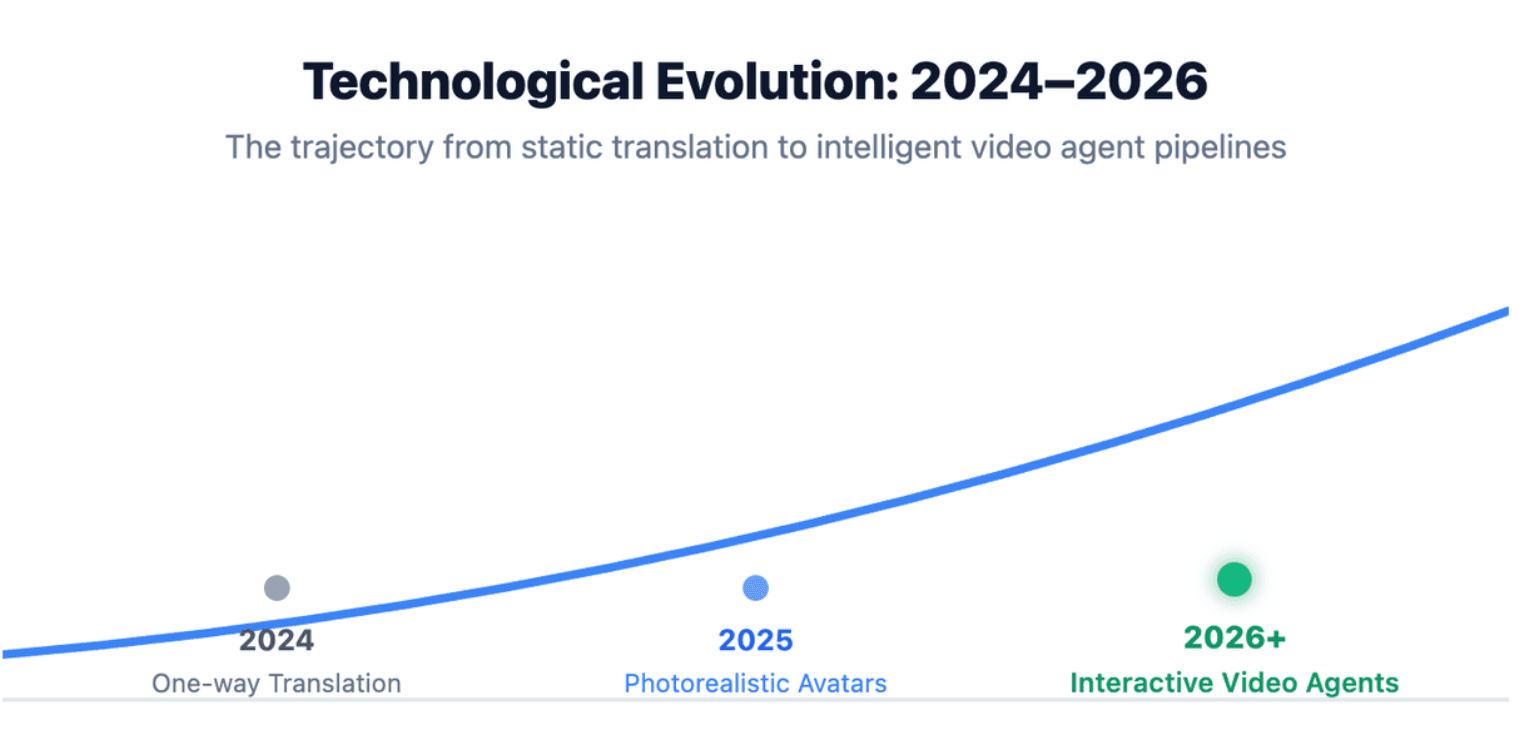
Multilingual AI avatars are moving beyond static, pre-rendered videos. The next stage is interactive, updateable, and workflow-connected video communication.
This shift matters because businesses do not only need more videos. They need smarter ways to create, localize, distribute, measure, and update video content.
From Static Avatar Videos to Chat-Enabled Interactive Avatars
Traditional avatar videos are linear. Viewers watch the content from start to finish.
Interactive avatars and chat-enabled videos create a more flexible experience. Viewers can ask questions, explore topics, and receive more relevant information in their preferred language.
This is especially useful for training, onboarding, product education, and customer support, where users often need answers beyond the original video script.
Real-World Uses in Global Sales, Customer Support, Employee Training, and 24/7 Education
Multilingual AI avatars can support many global communication needs:
- Sales teams can create localized product explainers.
- Support teams can turn help articles into video answers.
- HR teams can deliver onboarding in multiple languages.
- Training teams can update compliance lessons quickly.
- Education teams can generate multilingual online courses across regions.
The strongest use cases are practical and repeatable. AI avatars are best when they help teams explain, teach, update, and scale information.
Why Multilingual Video Creation Is Becoming a Content Operations Workflow
In 2026, multilingual video creation is becoming less like a one-off design task and more like a content operations workflow.
Teams need to manage:
- Source content
- Scripts
- Translations
- Avatars
- Voices
- Subtitles
- Versions
- Reviews
- Publishing channels
- Analytics
This is why document-to-video platforms and enterprise video workflows are becoming more important. The future is not just about generating a realistic avatar. It is about managing global video communication at scale.
Conclusion
The right multilingual AI avatar generator depends on your use case. A marketing team may prioritize realism and fast short-form output, while an HR or training team may need structured workflows, document import, review controls, and easy updates.
Do not choose a platform only by language count. Choose it by language quality, workflow fit, update flexibility, security, and how well it supports your real production process.





