
How to Make a Flipped Classroom Video with AI: Complete Guide
To make a flipped classroom video with AI, upload structured instructional materials—such as syllabi, lecture notes, PDFs, PowerPoint decks, or scripts—into an AI video generator that supports document-to-video conversion. The platform can turn your content into a short pre-class lesson with organized scenes, visual highlights, narration, multilingual delivery, and an interactive avatar, helping students learn key concepts before class instead of passively watching a one-way recording.
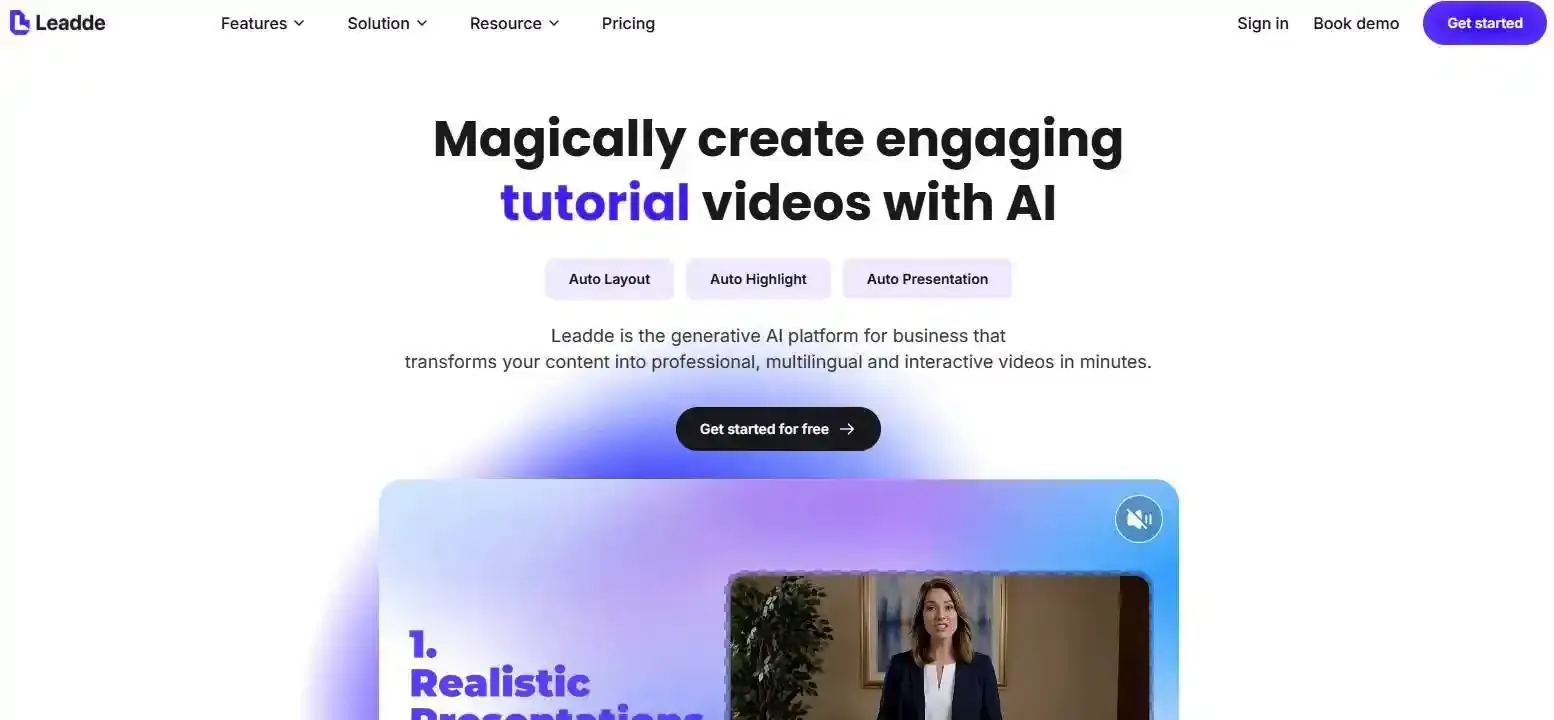
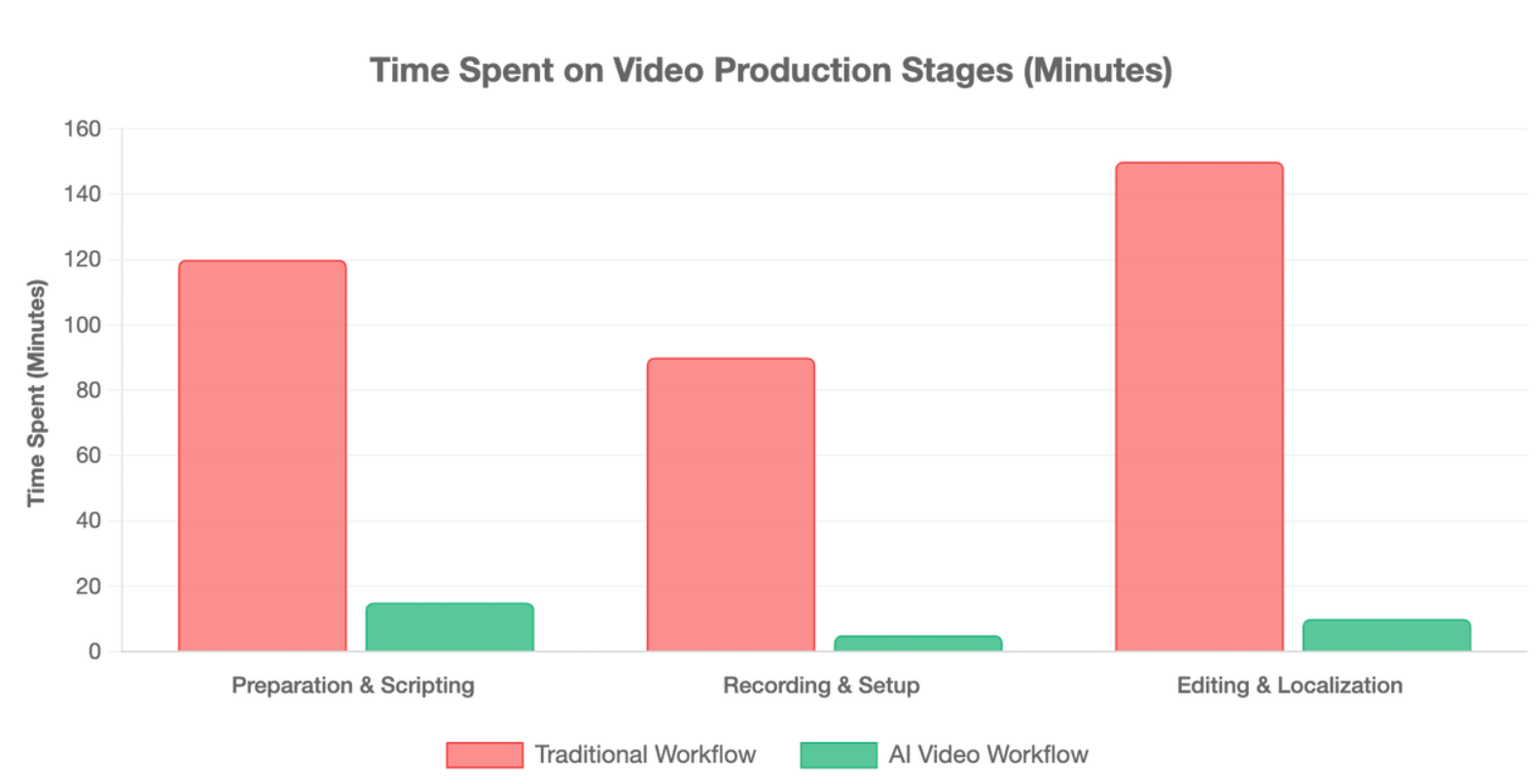
Traditional screen recording can drain hours on setup, recording, editing, and localization.Leadde solves this by turning any document or text into a professional business video automatically, helping teams create videos in minutes while saving over 80% of production costs and 90% of content creation time.
How to Make a Flipped Classroom Video with AI Automatically?
An AI flipped classroom video is a short, structured lesson that students watch before class so classroom time can focus on discussion, practice, feedback, and problem-solving. The fastest workflow is to start with materials you already have, then use AI to turn them into scenes, narration, visuals, and learning checks.
Traditional flipped classroom tools often focus on recording a teacher’s screen or webcam. AI video tools shift the workflow toward generating the lesson from existing documents, scripts, or slides. Panopto describes flipped classroom video creation as a screen-recording process using a laptop, webcam, and screen recorder, while newer AI workflows can start from structured instructional content instead.
What is an AI flipped classroom video generator?
An AI flipped classroom video generator is a tool that turns instructional content into a video lesson. Instead of manually recording every explanation, teachers or training teams can use AI to create:
- Scene structure
- Narration
- Visual layouts
- Avatar-based presentation
- Captions or multilingual versions
- Review questions or interactive checks
The goal is not to replace the teacher. The goal is to reduce repetitive production work so teachers can spend more time on feedback, classroom application, and student support.
Can AI turn your syllabus, PDF, PPT, or lesson notes into a video?
Yes, modern platforms execute automated document-to-video conversion by instantly analyzing raw training or educational files. You simply drag and drop your source documents directly into the generator workspace.
- Syllabus Parsing: The platform extracts core learning targets to construct visual scenes.
- PPT Layout Retention: It syncs your text slides with custom graphics while maintaining business branding.
- Auto Layout & Highlighting: AI engines automatically adjust font positioning and apply auto highlight to key terms on screen.
How is AI video generation different from traditional screen recording?
Screen recording captures what the teacher says and shows in real time. AI video generation builds the lesson from content inputs and then lets the teacher review, edit, and publish the result.
| Workflow | Traditional Screen Recording | AI Video Generation |
| Starting point | Webcam, microphone, slides | PDF, PPT, syllabus, script, notes |
| Teacher workload | Record, re-record, edit manually | Review AI outline, script, scenes |
| Visual design | Mostly static slides or screen | AI layouts, highlights, visuals |
| Updates | Often require re-recording | Edit script or source content |
| Localization | Manual translation and recording | Multilingual generation, depending on tool |
| Best for | Live demos, personal explanations | Repeatable lessons and training content |
Screen recording still works well for live software demos, handwritten problem-solving, or moments where the teacher’s real presence matters. AI video generation is stronger when the goal is to create many consistent, reusable, multilingual pre-class lessons.
What should a complete AI flipped classroom video include?
A pedagogically sound AI lesson must combine visual, auditory, and conversational elements to maximize data retention. It cannot rely on a single voice track layered over static presentation slides.
- A Branded Virtual Presenter: A clear photo-generated avatar that keeps students looking at the screen.
- Dynamic On-Screen Elements: Text phrases that bold or shift based on the spoken narration.
- Conversational Checkpoints: Integrated interactive chat modules that stop the video to test learner compliance.
Why Are Traditional Screen Recording Tools Burning Out Educators?
Traditional screen recording works, but it often creates hidden workload. Teachers must prepare slides, set up the camera, test the microphone, record the lesson, fix mistakes, edit the video, export it, upload it, and sometimes repeat the process for every update.
That workflow can become exhausting when a school, university, or corporate training team needs many short videos across multiple classes, languages, or learner levels.
Why do Panopto-style or TechSmith-style workflows take so much time?
Legacy lecture-capture systems require instructors to spend hours configuring hardware inputs, adjusting desktop layouts, and performing manual editing. If an educator misspeaks during a 20-minute lecture, they must stop, re-record, and splice the audio files together manually.
This process creates immense labor overhead for school faculty and corporate enablement managers. It forces instructional design experts to act as technical video editors, slowing down content deployment.
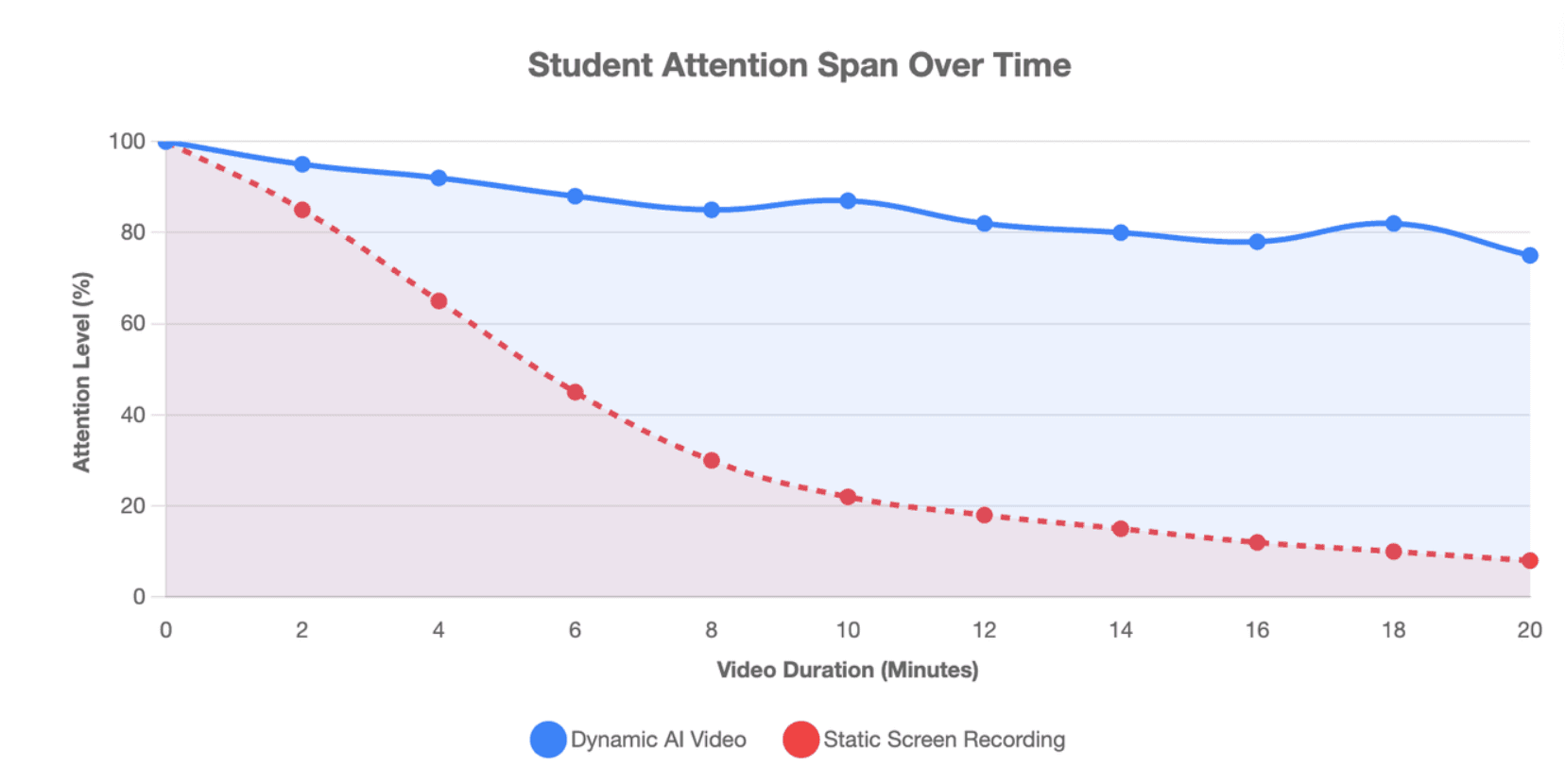
Why do static talking-head videos lose student attention?
Human eyes tune out unchanging visual stimuli very quickly. Standard lecture capture often features a tiny, low-resolution camera frame box of the teacher shoved into the corner of a giant slide deck.
- Visual Boredom: The teacher's physical movement is minimal, leading to high student drop-out rates.
- Lack of Visual Sync: Key teaching vocabulary terms remain hidden inside walls of dense text.
- Passive Consumption: Learners watch the video like a television program, triggering rapid attention loss.
How do dynamic visuals, auto highlights, and AI layouts improve learning?
AI presentation workflows keep the student's brain active by making micro-adjustments to the screen layout every few seconds. When the digital speaker mentions a critical rule, the platform triggers an auto highlight visual cue.
This multi-modal delivery ensures that visual stimulation mirrors the spoken curriculum track. By shifting layouts automatically, the software emphasizes core definitions, increasing memory encoding and post-class test performance.
When should teachers still use screen recording instead of AI video?
Screen recording remains useful when an instructor must demonstrate real-time software debugging or spontaneous sketching. If an assignment requires free-hand drawing or complex math proofs on a live whiteboard, recording the desktop interface is practical.
However, for structural theories, standard compliance updates, policy tutorials, and onboarding modules, AI video workflows are much faster and more scaleable.
How Do You Make a Flipped Classroom Video with AI in Minutes?
The best workflow starts with the learning goal, not the tool. A flipped classroom video should prepare students for something they will do in class, such as solving a problem, joining a discussion, completing a case study, or practicing a skill.
Edcafe AI’s flipped classroom guide also starts with clear learning objectives before creating pre-class content, which is a useful principle for any AI video workflow.
Step 1: Upload your syllabus, PDF, PowerPoint, or lesson text
Begin by selecting your core instructional materials or lesson transcripts. Upload the text documents or structured slides directly into your chosen AI studio interface.
The system accepts multiple text formats, including docx, webp, and raw lesson outlines. This initial upload acts as the complete semantic anchor for the synthetic lesson, eliminating the need to write video scripts from scratch.
Step 2: Let AI parse the content, create scenes, and highlight key ideas
Once uploaded, the platform’s layout intelligence acts as an automated design assistant. It reads your document paragraphs and splits the text into distinct thematic scenes.
- Graphic Mapping: The engine chooses supporting graphical imagery to populate each block.
- Branding Protection: Colors and font themes change to reflect your school or enterprise style guide.
- Emphasis Allocation: Important technical concepts are automatically isolated for text highlight elements.
Step 3: Choose an AI avatar, voice, language, tone, and video style
Next, select a virtual speaker that matches the demographics of your learner profile. You can pick a pre-made presenter or upload a photo to generate a personalized custom digital avatar.
Configure the voice parameters by choosing from over 170 languages and authentic local accents. You can use options to make an AI voice that replicates your exact speech patterns, selecting an objective, informative, or energetic delivery tone.
Step 4: Preview, edit, and publish the flipped classroom video
Review the complete timeline inside the cloud editing suite. If any visual asset requires a modification, you can adjust the wording or swap backgrounds instantly without rendering the entire file again.
Once checked, hit publish to export the completed high-definition asset. The entire asset generation takes only a few minutes, giving you a deployment-ready lesson link or a clean file optimized for LMS insertion.
Why Are Students Ignoring Flipped Videos, and How Can AI Fix It?
Students often ignore flipped videos when the video feels like extra homework instead of useful preparation. AI can help, but only when the video becomes active, short, and connected to class.
A flipped video should answer one student question clearly: “Why should I watch this before class?”
Why do passive one-way lesson videos fail in 2026?
As of 2026, students routinely use third-party summary extensions to read text summaries of assigned videos instead of watching them. Passive one-way videos do not require active input, making it easy for learners to fake their homework compliance.
When videos are just long audio monologues, there is zero verification of actual cognitive engagement. This breakdown leaves students unprepared for complex tasks when they arrive at the physical classroom the next day.
How can interactive avatars and Socratic video chat increase engagement?
AI fixes student passivity by introducing chat-enabled interactive avatars that convert video lectures into real-time dialogues. Instead of just watching a video, students can pause the lecture to ask questions directly to the presenter.
- Two-Way Video Chat: Students converse with the avatar using spoken text or chat windows.
- On-Demand Explanations: If a learner misses a concept, the avatar provides instant, personalized breakdowns.
- Active Dialogue: The presentation behaves like a private tutor, keeping attention levels consistently high.
How do guided notes, quizzes, and pre-class questions keep students accountable?
Advanced educational video engines insert real-time interactive assessment prompts into the middle of the lecture timeline. The video stops automatically and will not proceed until the student responds to a contextual multiple-choice question.
These integrated questions test intermediate understanding and generate immediate feedback scores. Instructors can view this data instantly, allowing them to spot conceptual confusion before the group session begins.
How can AI help students learn at their own pace before class?
Every student processes educational information at a different speed. AI video delivery systems allow individual learners to adjust play rates, trigger localized translations, or re-run specific scene elements on demand.
For multi-language classrooms, voice-cloning extensions translate lessons into native dialects while preserving the instructor's original voice structure. This ensures equitable material access for all students.
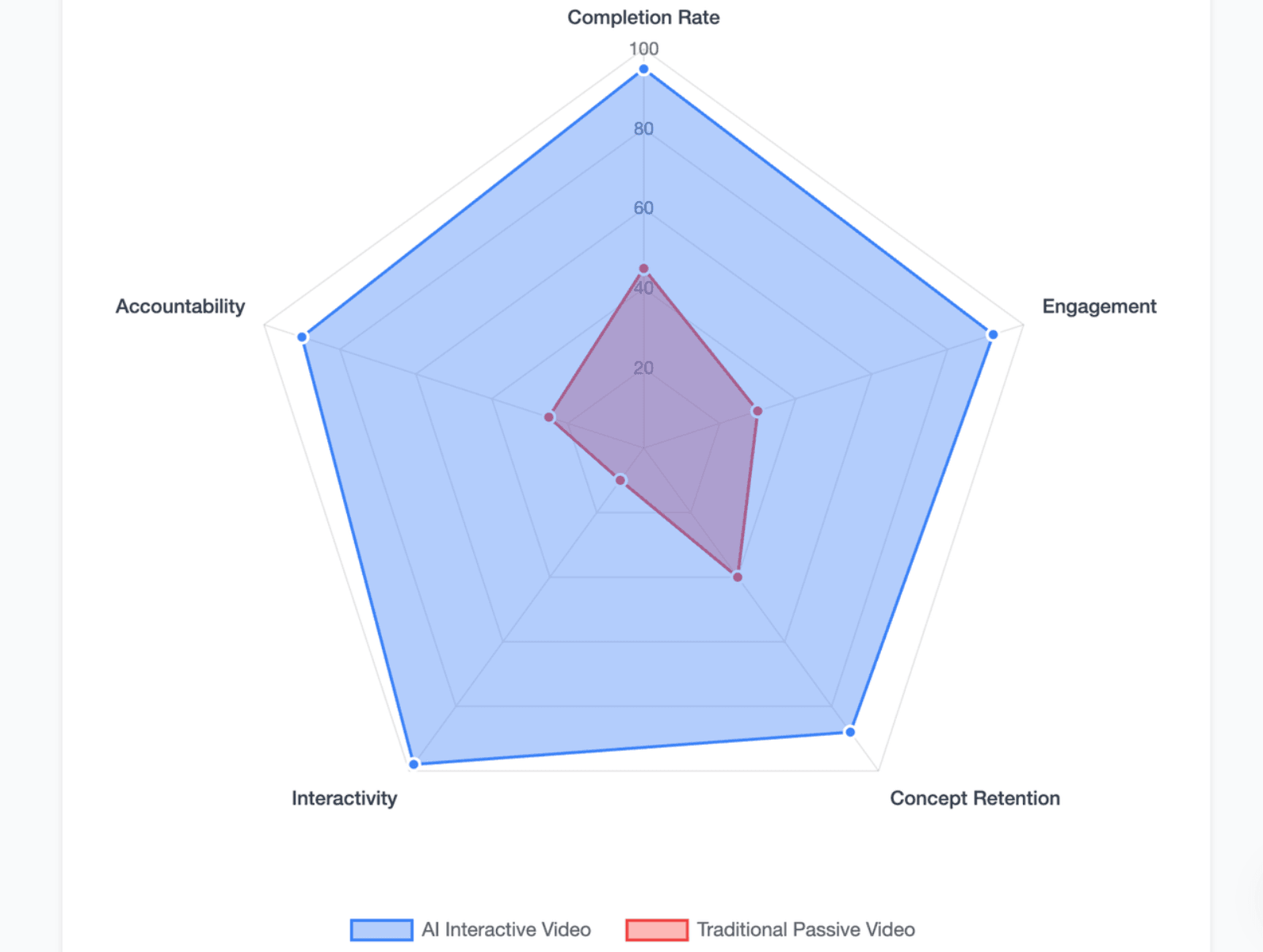
How Do AI Flipped Classroom Videos Help Reduce Cheating and Improve Learning Compliance?
AI has changed homework. If teachers assign only answer-based tasks at home, students can use AI to finish the task without learning. A stronger flipped model uses AI for preparation and keeps deeper application inside class.
The key shift is simple: use AI before class to build understanding, then use class time to verify, apply, and extend that understanding.
How can AI shift from a homework shortcut to a learning engine?
Jon Bergmann’s Mastery Flip framework notes a major division in education: students use AI to cheat on homework, or they use it to deepen understanding. When AI handles basic content delivery, the teacher can focus home study entirely on guided discovery.
By using conversational video tools, the home lecture becomes a diagnostic system. AI shifts from a shortcut that answers questions for the student into a conversational engine that probes the student's actual logic.
How do interactive video quizzes make understanding harder to fake?
When quiz modules are deeply embedded into the video timeline, students cannot cheat by skimming an external article summary. The AI presenter evaluates how the student responds to dynamic scenario questions during the video.
Because these checkpoints are randomized and tied to specific timestamps, copying answers from a classmate becomes very difficult. This setup forces students to engage directly with the lecture.
How can analytics, rubrics, and student responses track real engagement?
AI learning suites gather behavioral analytics that go far beyond standard video watch times. Instructors receive a detailed learning dashboard highlighting student performance metrics.
- Attention Mapping: Identifies exactly which scenes were paused or repeated by the class.
- Response Analysis: Packages free-form conversational answers into structured student profiles.
- Grading Automation: Scores open-ended student comments against pre-set evaluation rubrics automatically.
Why should graded application happen during class instead of at home?
Flipped learning assumes that high-level evaluation and problem-solving belong inside the classroom under the guidance of a live teacher. Low-level content delivery happens at home via video, freeing up valuable class time.
When high-stakes testing happens in the classroom, the incentive to use AI for cheating on home assignments disappears. Home study becomes a safe space for practice, while class time is reserved for true mastery verification.
Which AI Video Tool Is Best for Flipped Classrooms and Training?
The best AI video tool depends on the content source, learner group, review process, and scale. A school making one video has different needs from a corporate L&D team building multilingual training libraries.
For flipped classrooms and training, the strongest tool is usually the one that supports document-to-video, teacher review, interactive learning, multilingual delivery, and content management.
Leadde vs. Synthesia vs. HeyGen: which tool fits education and L&D use cases?
Leadde, Synthesia, and HeyGen all support AI video creation, but they emphasize different strengths.
| Tool | Strong Fit | Notable Features |
| Leadde | Document-to-video, training videos, multilingual interactive video | Converts PPT, PDF, Word, scripts, and text into structured videos; supports 92 languages, 200+ avatars, Chat with Video, version control, and analytics. |
| Synthesia | Enterprise avatar video and branded business content | Official materials describe 240+ ready-made avatars and video generation in 160+ languages. |
| HeyGen | Avatar videos, translation, creator/business video workflows | Official materials describe video creation from ideas and video translation into 175+ languages. |
For flipped classrooms, Leadde is especially relevant when teachers or training teams want to start from existing documents and create interactive, multilingual learning videos instead of recording from scratch.
What features matter most: document-to-video, avatars, languages, interactivity, or analytics?
The most important features depend on the use case, but education and training teams should prioritize features that affect learning, not just video appearance.
| Feature | Why It Matters |
| Document-to-video | Turns existing lesson materials into video faster |
| AI avatars | Reduces repeated camera recording |
| Multilingual support | Helps diverse classrooms and global teams |
| Interactive video | Lets learners ask questions and review ideas |
| Analytics | Shows what learners watched, missed, or misunderstood |
| Editing control | Keeps the teacher or trainer in charge |
| Version control | Makes updates easier over time |
As of 2026, available information suggests that schools and L&D teams should avoid choosing tools only by avatar quality. The better question is whether the tool supports the full learning workflow.
How do multilingual videos support diverse and global classrooms?
Global universities and BPO training teams require highly adaptive, multi-language solutions to serve diverse student groups. Relying on traditional translation agencies creates major budget and scheduling bottlenecks.
AI systems resolve this by supporting 140 to 170+ languages with native accent options. Instructors can translate a video instantly from a single training document into dozens of localized video lessons, keeping course content consistent worldwide.
What is the most cost-efficient workflow for schools and corporate training teams?
Legacy tools like Synthesia use restrictive meters, charging $29 a month for a meager 10 minutes of video output. This strict limit makes creating long lecture series or scaling corporate onboarding modules impossible.
Leadde changes these economics with its $19/month Starter Plan, which includes unlimited videos. This flat rate allows schools and corporate L&D teams to convert their entire text training databases into video without worrying about credit limits.
Conclusion
AI-driven flipped classrooms are evolving from passive video assignments into interactive learning systems. By combining short AI-generated lessons, document-to-video workflows, interactive avatars, guided questions, and teacher review, educators can save production time while keeping control of learning goals and assessment quality. The future is not just faster video creation—it is a more responsive way to prepare students for deeper in-class practice and mastery.





