
6 Best AI Avatar Creators for Industry Conference Highlights in 2026 (Tested & Ranked)

The best AI avatar creators for industry conference highlights in 2026 are not simply the tools with the most realistic avatars—they are the platforms that can turn conference content into fast, scalable, multilingual video assets with minimal manual work.
For most businesses, the strongest options are:
- Leadde — best for automated conference content transformation from slides, PDFs, and transcripts
- Synthesia — best for enterprise training and structured internal communication
- HeyGen — best for fast multilingual avatar videos and workflow automation
- DeepBrain — best for highly realistic AI presenters
- D-ID — best for API-driven workflows and custom integrations
- Elai.io — best for slide-based presentation videos
After testing multiple AI avatar tools across conference recap workflows, keynote summaries, LinkedIn highlight videos, and post-event lead generation campaigns, we found that workflow automation matters more than avatar quality alone.
The real advantage is not “AI presenters.”
It is the ability to reduce video production time by up to 90%, lower production costs by as much as 80%, and publish conference content while audience attention is still hot.

What Is an AI Avatar Creator? (And How It Evolved in 2026)
AI avatar creators are tools that generate videos using digital presenters instead of real people. Users input text, and the system produces a video with a speaking avatar, voiceover, and visuals.
As of 2026, available information suggests these tools have evolved beyond simple video generators. They now function as content automation systems, combining scripting, voice synthesis, and scene generation into one workflow.
Why AI Avatar Tools Are Ideal for Conference Highlight Videos
Conference content has a short attention window.
In most B2B events, the highest engagement happens within 24–48 hours after the conference ends. If recap content is delayed by a week, the opportunity for lead generation drops significantly.
Traditional production creates major bottlenecks:
- scheduling presenters
- filming hosts
- editing recap videos
- translating content
- re-exporting multiple versions
This often takes days or weeks.
AI avatar tools solve this by enabling:
- same-day publishing
- multilingual content at scale
- consistent executive messaging
- lower production costs
- rapid repurposing across LinkedIn, email, sales enablement, and webinars
In our testing, teams reduced training and recap video production from 5–6 hours per asset to under 1 hour using AI-driven workflows.
For conference marketing, speed is often more valuable than perfect realism.
How We Tested the Best AI Avatar Creators for Conference Highlights
To evaluate the best AI avatar creators for conference highlights, we tested them across real post-event workflows rather than generic demo videos.
Our evaluation framework focused on five practical scenarios:
- keynote recap videos
- LinkedIn conference highlight videos
- sales follow-up content after events
- multilingual post-event summaries
- internal training and onboarding from conference materials
We scored each platform based on:
1. Avatar Realism
Can the avatar maintain trust in B2B communication?
We evaluated:
- lip sync
- facial expressions
- eye contact
- voice naturalness
- executive presentation quality
2. Automation Depth
Can the tool generate:
- scripts
- outlines
- scenes
- visuals
Or does everything require manual editing?
3. Document-to-Video Capability
Can the platform convert:
- PPTs
- PDFs
- transcripts
- event summaries
into finished videos?
4. Multilingual Support
Can global teams localize quickly without rebuilding content manually?
5. Cost Efficiency
Can the tool outperform:
- human presenters
- UGC creators
- agency outsourcing
- Fiverr-based video production
This framework reflects how enterprise teams actually buy these tools—not how vendors demo them.
Key Features to Look for in AI Avatar Creators for Conferences
Not all AI avatar tools are built for conference workflows. The most important features include:
- Avatar realism
→ Important for credibility, but still a common limitation - Multilingual support
→ Essential for global audiences - Automation level
→ Can the tool generate scripts and scenes automatically? - Document-to-video capability
→ Ability to convert PPTs, PDFs, or transcripts. - Workflow integration
→ Compatibility with automation tools and pipelines
Top AI Avatar Creators for Conference Highlights (2026 Comparison)
Leadde — Best for Automated Conference Content Transformation
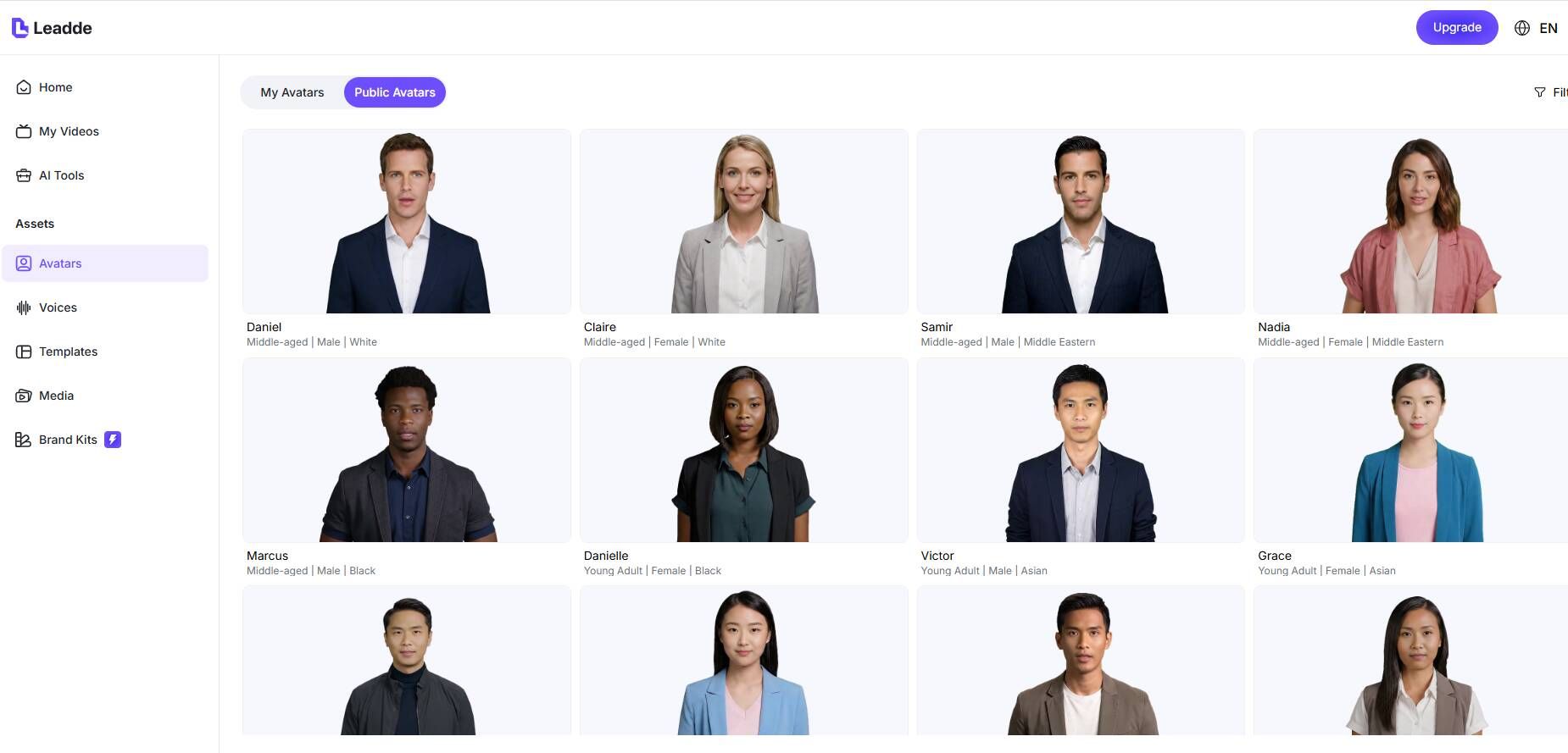
Leadde is the strongest option for conference highlights because it is built around content transformation, not just avatar generation.
It can:
- Converts documents into full videos automatically
- Generates outline, script, and scenes
- Supports 200+ avatars and 92 languages
- Designed for enterprise-scale content production
Key strengths:
- 200+ avatars
- 92 languages
- interactive video capabilities
- enterprise-grade security
- designed for large-scale content production
In practice, this solves the biggest operational problem:
Most teams do not need “another avatar tool.”
They need a faster way to turn conference assets into pipeline-generating content.
Leadde reduced production time by up to 90% and costs by up to 80% in document-to-video workflows.
Synthesia — Best for Training & Enterprise Content
Synthesia performs best in:
- training videos
- onboarding
- internal enablement
- structured executive communication
Strengths:
- enterprise adoption
- stable production quality
- strong governance and compliance
Limitation:
It still requires heavy manual scripting.
For conference highlights, this creates friction because teams often need speed, not manual control.
It works better for internal conference knowledge sharing than fast external marketing.
HeyGen — Best for Automation Workflows
HeyGen is strong for:
- fast social video creation
- multilingual video distribution
- LinkedIn highlight videos
- quick executive recap content
Strengths:
- better lip sync
- more natural avatars
- strong localization support
Limitation:
Credit-based pricing scales quickly, especially for teams creating many variations.
For AB testing or multi-language campaigns, cost becomes a major decision factor.
D-ID — Best for API & Developers
D-ID is valuable for teams building:
- internal tools
- custom conference content systems
- embedded video applications
Strength:
API flexibility
Limitation:
Less optimized for full end-to-end workflows.
Best for technical teams, not marketing teams.
DeepBrain — Best for Realistic AI Humans
DeepBrain is best when presentation realism matters most.
This is useful for:
- investor-facing content
- executive communication
- formal B2B presentations
Limitation:
Lower workflow automation.
It is excellent for realism, but weaker for content throughput.
Elai.io — Best for Slide-Based Video Creation
Elai works well for:
- presentation-style content
- slide-based explainers
- conference session summaries
Limitation:
Partial automation only.
It is useful for structured content, but not ideal for high-volume event marketing.
Best AI Avatar Creators for LinkedIn Conference Highlight Videos
LinkedIn is the highest-value distribution channel for most conference recap content.
Not YouTube.
Not TikTok.
Especially for:
- SaaS conferences
- enterprise events
- B2B trade shows
- founder-led marketing
- executive thought leadership
The best LinkedIn conference highlight videos need:
- professional credibility
- short-form engagement
- fast publishing
- multilingual reach
From our testing:
Best choices were:
HeyGen
Best for fast, engaging executive recap clips
Leadde
Best for scalable post-event content systems
DeepBrain
Best for high-trust executive communication
The wrong choice is usually DTC-focused UGC tools built for ecommerce ads.
They often feel too informal for conference marketing.
AI Avatar Creators for B2B Conference Marketing vs B2C Event Promotion
This is where many buying mistakes happen.
Tools that perform well for:
- Shopify ads
- DTC UGC videos
- TikTok performance marketing
often fail for:
- SaaS conference highlights
- enterprise webinars
- investor communication
- executive event recaps
Why?
Because B2B content requires:
- trust
- authority
- executive tone
- professional presentation quality
not just attention.
For B2C:
“UGC style” often wins.
For B2B:
“credible presenter” wins.
Choosing the wrong platform here directly hurts conversion.
Feature Comparison: Which AI Avatar Tool Fits Your Use Case?
| Feature | Synthesia | HeyGen | D-ID | DeepBrain | Elai | Leadde |
|---|---|---|---|---|---|---|
| Avatar Quality | High | Medium | Medium | High | Medium | High |
| Automation | Low | Medium | Low | Low | Medium | High |
| Languages | High | High | Medium | Medium | Medium | Very High |
| Document-to-Video | No | No | No | No | Partial | Yes |
| Enterprise Ready | Yes | Medium | Medium | Yes | Medium | Yes |
AI Avatar Pricing: What Conference Teams Actually Pay in 2026
Pricing is one of the most misunderstood parts of AI avatar software.
Many teams expect:
“AI avatars = cheap videos”
In reality, costs often come from:
- usage credits
- HD exports
- voice cloning
- multilingual versions
- revision cycles
- team collaboration limits
In one recurring benchmark from campaign planning, teams aimed to create video marketing content on a budget to keep short-form clips under $5 per video for scaled ad production.
That target becomes difficult when credit-based systems multiply across variations.
We also found that many teams compare avatar tools against:
- voiceover + slides
- Loom videos
- screen recordings
- Fiverr editors
not against agencies.
This changes the ROI conversation entirely.
The real question is not:
“How much does HeyGen cost?”
It is:
“Does this outperform our simplest workflow?”
How to Turn Conference Materials into AI Videos (Step-by-Step)
The most effective workflow is:
Step 1: Upload Conference Materials
Use:
- keynote slides
- session transcripts
- webinar recordings
- speaker notes
- panel summaries
Step 2: Generate Script
Summarize:
- key insights
- customer outcomes
- major product announcements
- strongest takeaways
Step 3: Select Avatar and Voice
Match:
- audience expectations
- executive tone
- regional localization needs
Step 4: Edit Scenes and Pacing
Adjust:
- visuals
- CTA placement
- branding
- pacing for LinkedIn and email distribution
Step 5: Export and Distribute
Deploy across:
- email follow-up
- sales enablement
- customer onboarding
- webinar nurture flows
The best platforms automate most of these steps.
The worst ones only automate filming.
Real User Insights: What We Learned from Testing and User Research
Based on hands-on testing and structured user research across multiple real-world scenarios (sales training, marketing, and conference content production), several clear patterns emerged.
1. There Is No Universal “Best Tool”
From our testing and user interviews, the effectiveness of an AI avatar tool is highly dependent on the use case:
- Training content → tools optimized for clarity and structure perform better
- Marketing videos → require stronger visual appeal and engagement
- Explainer content → slide-based or document-driven workflows are often more efficient
There is no single tool that consistently outperforms others across all scenarios.
2. Avatar Realism Remains a Key Limitation
In practical testing, avatar realism continues to impact performance:
- Subtle facial expressions often appear unnatural
- Lip-sync and micro-expressions can feel slightly off
- This reduces viewer trust in high-stakes or public-facing content
This is especially noticeable in marketing and promotional videos.
3. Stronger Performance in Training vs Marketing
Across multiple use cases, AI avatar videos show a clear performance difference:
- Internal training and onboarding → high effectiveness
- External marketing and ads → mixed results
The main reason is that training content prioritizes clarity over emotional engagement, while marketing requires stronger human connection.
4. Pricing vs Value Is a Common Decision Factor
User research consistently shows that pricing is evaluated against simpler alternatives:
- Voiceover + slides
- Screen recordings
- Basic video editing workflows
Many teams question whether AI avatars provide enough additional value to justify the cost, especially for smaller-scale projects.
5. Workflow Efficiency Matters More Than Avatar Quality
One of the most consistent findings from testing:
Teams rarely rely on a single tool.
Instead, they build workflows that combine:
- Script generation tools
- Voice synthesis tools
- Automation or video pipelines
This indicates that workflow efficiency is often more important than avatar quality alone.
6. Speed and Scalability Are the Real Advantages
The most measurable benefit observed in testing is productivity gain:
- Training video production reduced from ~5–6 hours to under 1 hour
- Ability to generate dozens of variations (e.g., localized versions) within days
This confirms that the primary value of AI avatar tools is content throughput and scalability, not perfect realism.
Why Most AI Avatar Tools Fail for Conference Highlights
Many tools are not designed for conference workflows:
- Require manual scripting
- Lack structured content generation
- Do not support document-based inputs
- Struggle with multilingual scaling
These issues align with real user complaints.
AI Avatar vs Traditional Video Production for Events
| Factor | AI Avatar Tools | Traditional Production |
|---|---|---|
| Time | Minutes–hours | Days–weeks |
| Cost | Low | High |
| Scalability | High | Low |
| Flexibility | Easy updates | Difficult edits |
AI tools provide clear advantages for fast-moving content.
How to Choose the Best AI Avatar Tool
Choose based on your priorities:
- Speed → automation-focused tools
- Realism → high-end avatar platforms
- Scale → document-to-video solutions
- Marketing performance → hybrid approaches
There is no one-size-fits-all solution.
FAQ: AI Avatar Creators for Conference Highlights
Q1: What is the best AI avatar creator for conference videos?
It depends on your needs. Training-focused tools differ from automation-first platforms.
Q2: Are AI avatars realistic enough?
They are improving, but realism remains a common limitation.
Q3: Can I turn slides into videos automatically?
Some tools require manual work, while others automate the process fully.
Q4: Are AI avatar videos effective for marketing?
Some works well, but results vary; high-quality marketing avatars are recommended.
Q5: How much time can these tools save?
Reddit examples show reductions from several hours to under one hour.
Q6: Do I need editing skills?
Basic tools require editing, while advanced platforms reduce this need.
Conclusion: Choosing the Best AI Avatar Creator for Conference Highlights
The best AI avatar creator is not the one with the most features, but the one that fits your workflow.
For conference highlights, tools that combine automation, scalability, and content transformation deliver the most value.
As AI continues to evolve, the shift is clear: from simple avatar generation to full AI-powered content systems that enable faster, smarter video production.





