
HeyGen vs Colossyan (2026): Which AI Video Generator Wins? (Honest Review & Pricing)
Choosing between HeyGen and Colossyan depends on whether your priority is marketing scale or structured corporate learning. HeyGen excels in high-volume, photorealistic marketing and multilingual localization, while Colossyan specializes in workplace learning and development (L&D) with native quizzes and multi-avatar dialogue.
In professional video workflows, selecting the wrong platform leads to immediate friction: marketing teams feel constrained by slide-based editors, while training teams struggle without pedagogical structures. Furthermore, teams scaling internal knowledge libraries hit a severe bottleneck: avatar tools require manual scripting and slide design from scratch, and updating even a single policy change triggers costly re-rendering cycles across video libraries. Exploring dedicated sales training videos with AI or examining a comprehensive heygen review can clarify these distinctions.
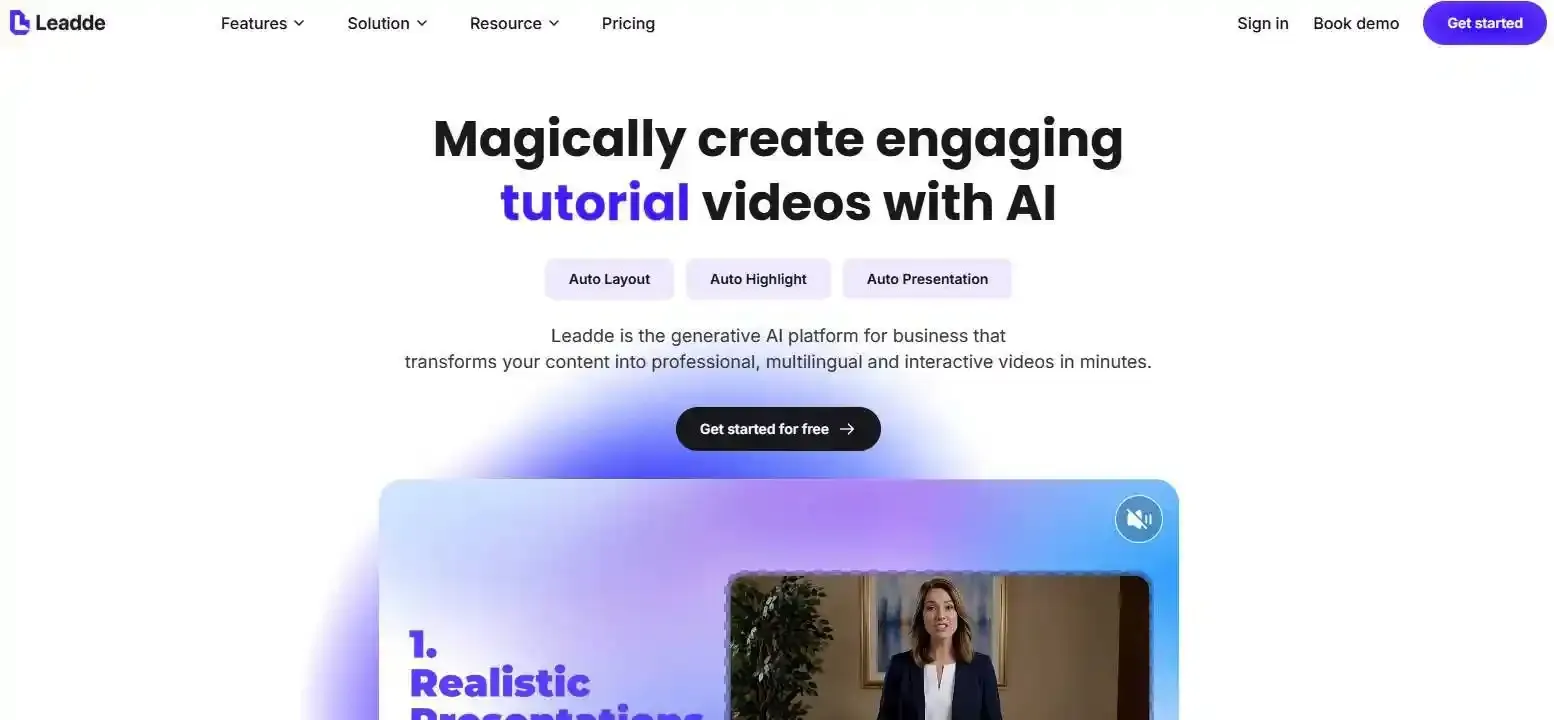
To resolve this operational gap, enterprise training teams increasingly adopt automated document-to-video platforms like Leadde. By discovering how to convert a pdf manual into a training video and transforming raw PDFs, SOPs, and PowerPoint decks directly into structured educational videos with synchronized AI instructors and auto-generated scripts, Leadde eliminates the manual friction between static knowledge bases and scalable video production. This guide compares HeyGen and Colossyan across avatars, workflows, and true costs at scale, helping you pick the right solution for your content pipeline. For an in-depth platform evaluation, check out our colossyan review and head-to-head analysis of heygen vs synthesia.
What is an AI Video Generator?
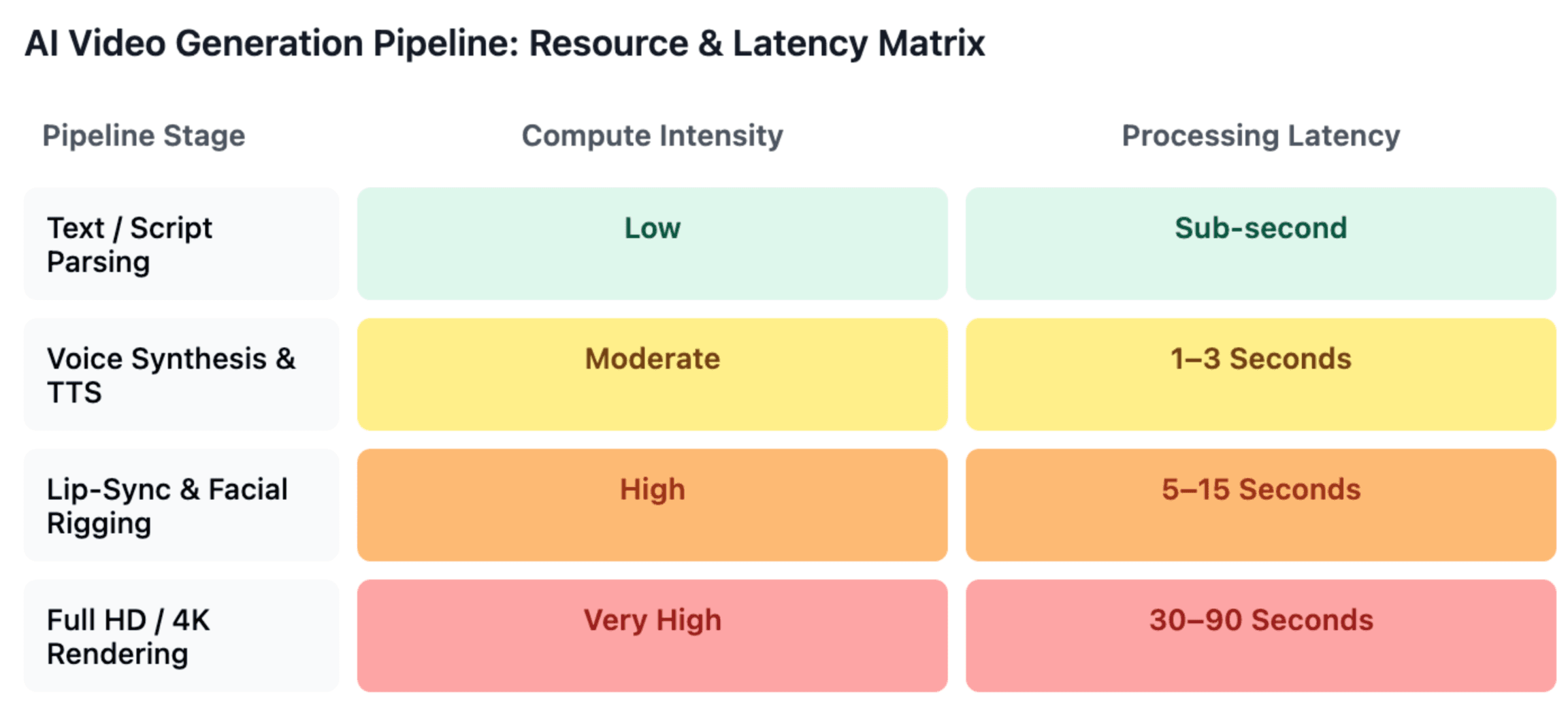
An AI video generator is a cloud-based software platform that converts text, documents, or audio into professional video content. These tools use machine learning to animate digital avatars, synthesize natural voices, and map accurate lip-syncing, allowing teams to produce localized, studio-quality videos without physical cameras, actors, or complex video editing software. Learn more about the underlying mechanics in our guide on what is synthetic video and see how are people making realistic ai videos.
HeyGen vs Colossyan: Core Differences in Philosophy and Design
To evaluate both platforms effectively, content teams must look beyond raw avatar metrics and examine how their core architecture aligns with production goals.
HeyGen: The Marketing and Localization Engine
HeyGen is engineered for creative breadth, rapid asset generation, and global reach. Operating on a timeline-based editor that mirrors traditional video production suites, it gives creators granular control over cuts, layers, and transition timings. Powered by its Avatar IV engine, it prioritizes photo-realistic presence, making it well-suited for social content, explainer video script creation, and commercial campaigns across 175+ languages. Teams assessing their options often look into the best heygen alternatives.
Colossyan: The Instructional Design Specialist
Colossyan deliberately trades creative variety for pedagogical depth. Tailored for corporate trainers and instructional designers, its interface functions like a presentation deck rather than a timeline editor. Key capabilities include multi-avatar conversations—allowing up to four avatars to interact in a single scene—and native SCORM exports on business tiers, enabling direct deployment to Learning Management Systems (LMS). If you are considering other training options, see our guide on the best colossyan alternative for corporate teams.
Feature Comparison: Avatars, Languages, and Editor Experience
Understanding how each tool performs across essential production dimensions reveals where your team will gain or lose operational efficiency.
AI Avatars and Visual Realism
- HeyGen: Offers 700+ stock avatars across various settings, backed by its Avatar IV engine for lifelike facial expressions and fluid head movements.
- Colossyan: Features 170+ avatars powered by its NEO 2 model. While smaller in quantity, it provides unique controls over age, emotional posture (neutral, serious, cheerful), and side angles for natural dialogue.
Language Support and Voice Localization
- HeyGen: Leads with 175+ languages and dialects, accompanied by voice cloning and automated lip-sync translation.
- Colossyan: Supports 100+ languages. A standout feature for compliance teams is its custom pronunciation dictionary, which prevents synthetic voices from mispronouncing industry-specific jargon and acronyms.
Editing Architecture
- HeyGen: Utilizes a multi-track timeline, ideal for editors syncing b-roll, background audio, and dynamic overlays.
- Colossyan: Employs a scene-by-scene, slide-oriented canvas, allowing educators to build structured lesson plans with embedded interactive quizzes and branching decision paths.
| Feature | HeyGen | Colossyan |
| Primary Focus | Marketing, Social Media, Creators | HR, Compliance, Enterprise L&D |
| Editing Interface | Timeline-based | Scene-based (Presentation style) |
| Avatar Library | 700+ (Avatar IV photorealism) | 170+ (NEO 2 with emotion controls) |
| Multi-Speaker Scenes | Single avatar per scene | Up to 4 avatars in conversation |
| Built-in Interactivity | Limited / Add-on | Native quizzes and scenario branching |
| SCORM / LMS Support | Restricted to higher tiers | Available on standard Business tiers |
| Language Coverage | 175+ Languages (Auto lip-sync) | 100+ Languages (Pronunciation lexicon) |
The "Regeneration Penalty": What Most AI Video Reviews Miss About Maintenance
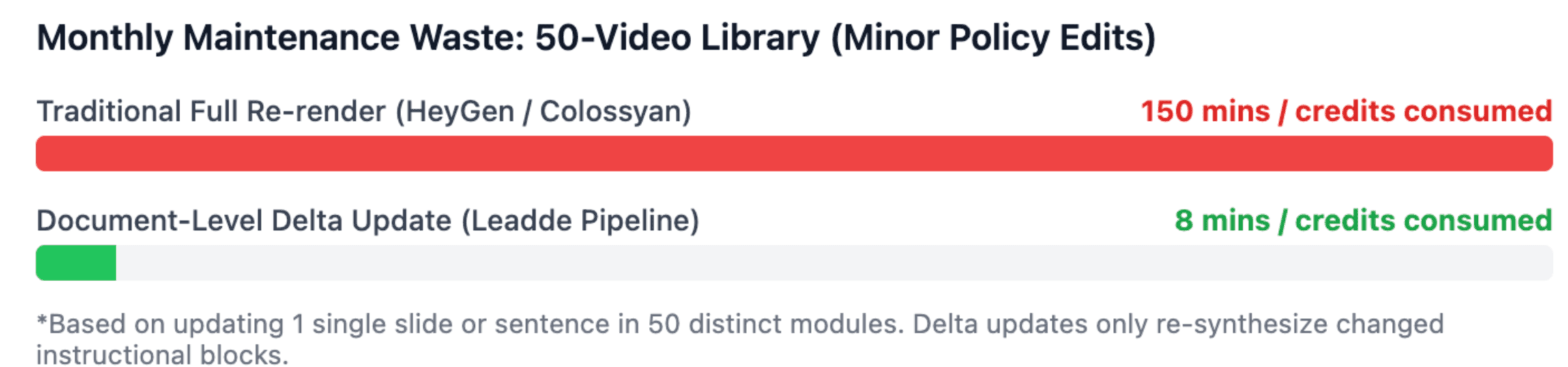
A critical variable often ignored in head-to-head reviews is the Regeneration Penalty—the operational cost of updating active video libraries. Learning how to update outdated video content without starting from scratch is crucial for scaling organizations.
In enterprise environments, standard operating procedures, HR handbooks, and compliance policies are constantly updated. When using traditional avatar generators, changing a single line of narration or replacing an outdated screenshot requires manual timeline re-edits and re-rendering the entire video.
- On credit-based platforms like HeyGen, re-rendering small revisions consumes credits that could otherwise go toward new assets.
- On minute-capped platforms like Colossyan, minor edits deplete fixed monthly production limits.
For organizations maintaining libraries with dozens or hundreds of lessons, understanding how to keep sop training videos updated prevents content maintenance from becoming an expensive, ongoing operational overhead.
How Can AI Automate Training Videos From PDFs and PowerPoints?
To eliminate the manual re-authoring process, digital learning teams are shifting toward automated document-to-video pipelines.
[Static Enterprise Docs: PPT / PDF / SOP]
                   ↓
 [Semantic Extraction & Scripting]
                   ↓
 [Automated Scene & Avatar Mapping]
                   ↓
[SCORM-Ready Interactive Video Course]
The Automated Document-to-Video Workflow
A scalable document-to-video pipeline bypasses manual scripting and slide layout through a structured four-phase process:
- Document Ingestion: Static enterprise assets (PowerPoint decks, PDF manuals, or onboarding docs) are uploaded directly into an AI conversion system. You can see how this works in practice by learning how to turn sop documents into training videos minutes or exploring how to convert powerpoint training videos employees.
- Semantic Script Extraction: Natural language processing parses the instructional hierarchy, identifying key concepts and summarizing dense text into natural spoken narration. Discover how to generate a script from power point slides with ai to speed up drafting.
- Automated Scene Generation: Visual assets and bullet points from the original files are converted into structured video slides, pairing appropriate AI presenter avatars and setting pacing automatically. A dedicated power point to ai video workflow ensures consistent styling across all training decks.
- LMS-Ready Export: The compiled lesson is exported with SCORM tracking metadata for instant integration into corporate learning platforms.
Specialized platforms like Leadde focus directly on this operational bridge. Instead of forcing instructional designers to copy-paste text slide by slide, Leadde ingests core source documents and automatically outputs structured video courses. When source documents change, the video can be updated directly from the document level, solving the regeneration friction that slows down enterprise L&D teams through the best ppt to video ai tools for training and education.
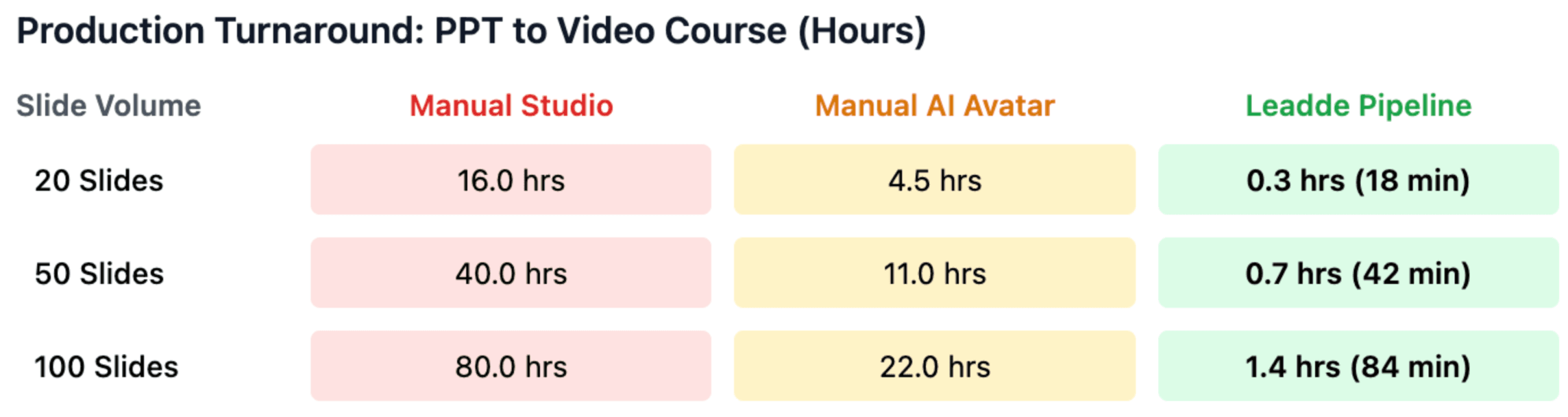
What is the True Cost of HeyGen vs Colossyan at Scale?
Headline subscription rates rarely represent real-world enterprise production costs.
HeyGen: The Credit-Consumption Model
HeyGen starts at accessible subscription pricing with unlimited base generation on specific tiers, but advanced features—such as photo avatars, high-definition lip syncing, and API video calls—consume credits. For marketing teams producing dozens of localized product variations, credit tracking requires active management to avoid unexpected top-ups.
Colossyan: Per-Seat and Minute Caps
Colossyan offers predictable per-user subscriptions, but entry-level tiers place strict caps on monthly video minutes (often 10 to 30 minutes per month). For L&D departments creating extensive multi-module training courses, these minute thresholds require upgrading to customized enterprise plans.
The Document Workflow Alternative
When organizations evaluate total cost of ownership, spending hundreds of designer hours building slides inside manual video editors often exceeds software licensing costs. Investing in dedicated document-to-video automation like Leadde reduces the manual hours spent per module, offering a cost-effective alternative for high-volume corporate training.
Frequently Asked Questions (FAQ)
Which AI platform has more realistic avatars, HeyGen or Colossyan?
HeyGen provides higher photorealism and a broader selection of 700+ avatars powered by its Avatar IV engine, making it superior for marketing and external media. Colossyan’s avatars feature customizable emotions and support multi-character conversations, which are optimized for role-play scenarios in employee training.
Can I export SCORM files from HeyGen and Colossyan?
Colossyan includes native SCORM exports on its self-serve Business tier, making LMS course deployment straightforward. HeyGen also supports SCORM, but it is typically reserved for its higher-tier enterprise plans.
What is the best AI video tool to convert PowerPoint to video?
While Colossyan allows slide imports via its Cora tool, Leadde is specifically designed for end-to-end document-to-video automation. It analyzes complex PDFs and PowerPoints to generate complete, structured educational courses with AI narration without manual slide-by-slide reassembly, following a proven guide on how to turn powerpoint slides into ai narrated videos.
Do HeyGen and Colossyan support voice cloning?
Yes. HeyGen provides rapid voice cloning across 175+ languages with matched lip-syncing. Colossyan supports voice cloning in up to 28 languages and adds a pronunciation dictionary to ensure technical terms are spoken accurately.
Is HeyGen or Colossyan easier for beginners?
Colossyan is generally more accessible for beginners and educators because its scene-based interface mirrors presentation software like PowerPoint. HeyGen utilizes a multi-track timeline editor, which provides greater creative control but requires basic video editing familiarity.
Aligning your AI video tool with your team's core operational needs—choosing HeyGen for creative marketing agility, Colossyan for interactive compliance lessons, or Leadde for automated document-driven learning—ensures high content velocity and sustainable production costs.





