
Turn Lesson Plan into Video: 2026 AI Guide for Educators

To turn a lesson plan into a video, educators can upload curriculum documents, PowerPoint slides, PDFs, Word files, or raw lecture text into an AI video platform that converts the material into structured scenes, narration, captions, and visuals. The best 2026 workflows use AI auto-layout, semantic highlighting, voiceover, and avatars to transform static lesson content into clear, editable microlearning videos without manual frame-by-frame editing.
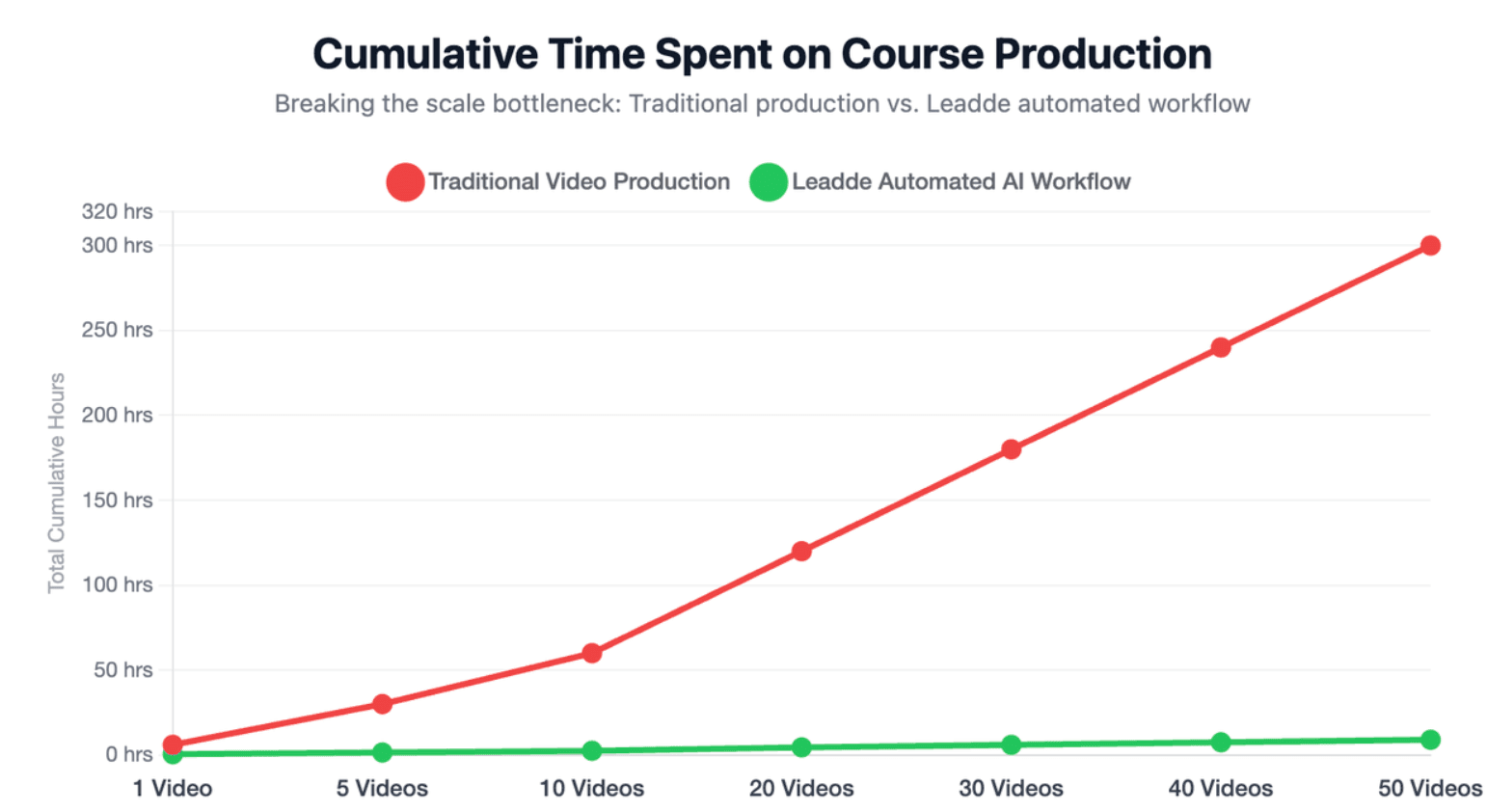
Yet manually storyboarding lessons still takes hours, and traditional video editing costs can drain your budget fast. Leadde removes this bottleneck by automatically turning any document or text into a professional business video in minutes—helping teams scale course production while cutting costs by over 80% and creation time by 90%.
Turn Lesson Plan into Video: Why Are Educators Shifting to AI Workflows?
Educators and L&D teams are shifting to AI video workflows because written lesson plans are hard to scale. A lesson plan may be useful for a teacher, but learners often need visual structure, narration, examples, and repeatable access.
AI video tools help teams move from static planning documents to video learning assets that can be reused, updated, translated, and shared across classrooms or training programs.
From Static Lesson Plans to High-Retention Microlearning Videos
A traditional lesson plan is usually designed for delivery by a teacher. It may include objectives, timing, activities, notes, and assessment ideas, but it is not always learner-ready.
A microlearning video turns one part of that plan into a short, focused learning experience. For example:
- A learning objective becomes the video hook.
- A key concept becomes the main explanation.
- A classroom activity becomes a demonstration.
- An assessment question becomes a recap or checkpoint.
Research on LLM-generated short-form educational videos found that structured short videos can improve engagement, quiz performance, and task efficiency without increasing cognitive load. That supports the growing shift toward shorter, clearer educational videos instead of long, dense recordings.
Why Traditional Educational Video Production Is Too Slow to Scale
Traditional educational video production usually depends on scriptwriting, design, recording, editing, reviewing, and sometimes translation. That workflow can produce polished content, but it becomes expensive and slow when teams need dozens or hundreds of course videos.
For schools, online course creators, and enterprise training teams, the real challenge is not making one great video. The challenge is turning existing lesson materials into consistent, updateable videos at scale.
How AI Helps Teachers and L&D Teams Save Time on Repetitive Content Creation
AI is most useful when the teaching content already exists. A strong AI workflow can read the source material, divide it into scenes, create narration, match visuals to key ideas, and prepare captions or multilingual versions.
Leadde is designed around this document-to-video model. It converts PowerPoint files, PDFs, Word documents, scripts, and text into structured video presentations, then automatically generates outlines, scenes, voice-over scripts, and visual layouts.
What Are the Real Frustrations With Standard AI Video Generators?
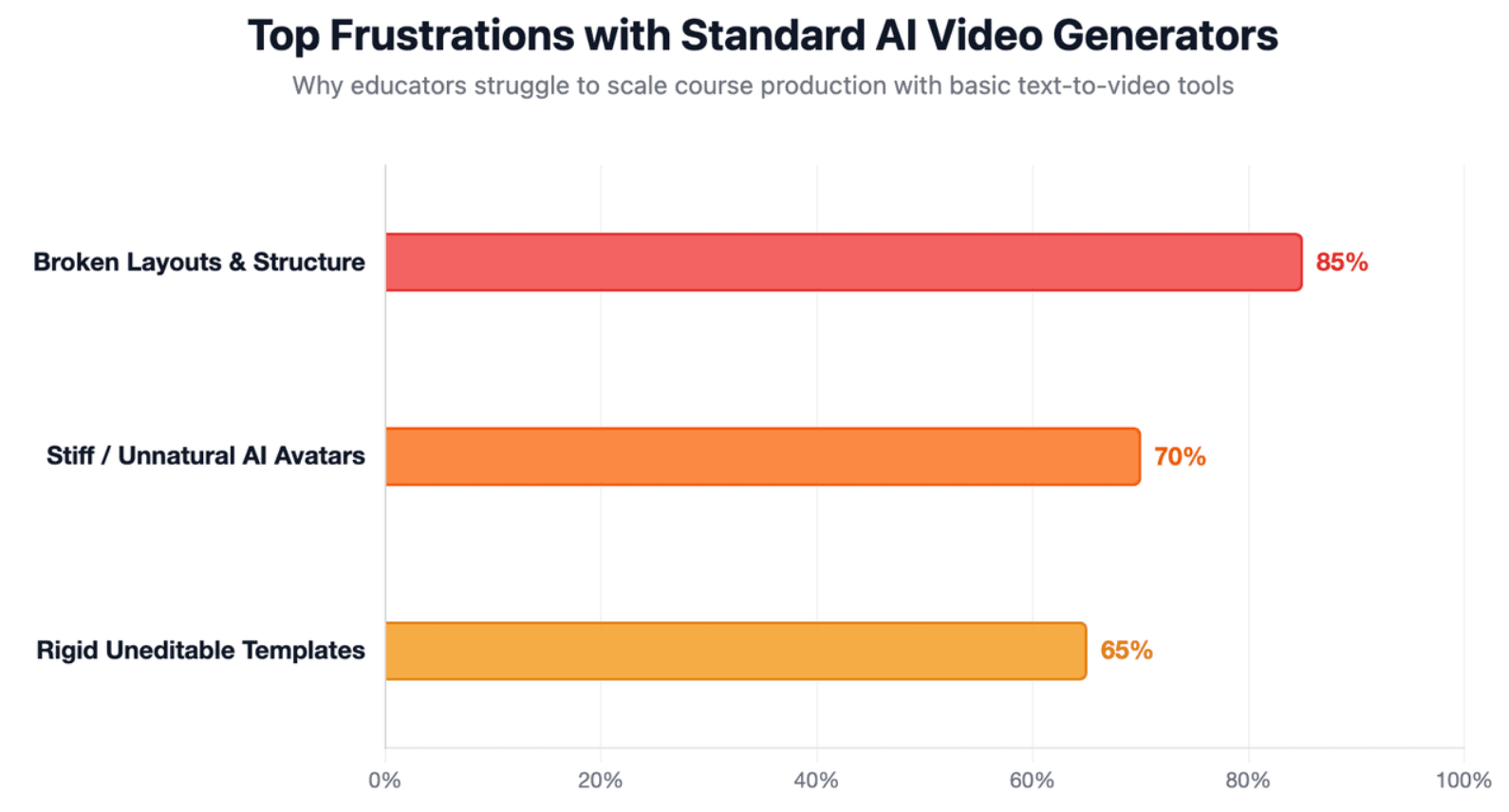
Standard AI video generators are often fast, but speed alone does not solve educational video production. Educators need videos that preserve teaching logic, not just videos that look animated.
The common frustration is that many tools treat lesson content as plain text. They can generate a video, but they may miss the difference between a learning objective, a teacher note, a student activity, and an assessment prompt.
Why Raw Text-to-Video Tools Often Break Layouts, Structure, and Visual Flow
A lesson plan is rarely a clean video script. It may include headings, tables, notes, instructions, standards, activities, and examples. When a generic text-to-video tool reads all of that as one block, the output can feel crowded or visually inconsistent.
The better approach is to first identify the role of each section. A learning objective should become the opening direction, a key concept should become the main explanation, and an activity should become a demonstration or scenario.
How the “Stiff AI Feel” Hurts Educational Engagement
The “stiff AI feel” happens when the avatar, voice, visuals, and pacing do not match the lesson. The result may look polished but feel unnatural.
In education, this matters because learners need clarity and trust. A video should feel guided, not robotic.
To avoid this problem:
- Use simple language.
- Keep scenes short.
- Match the avatar or voice to the learner group.
- Avoid unnecessary motion.
- Use visuals that explain, not decorate.
Why Rigid Templates Fail With Complex Lesson Plans, PDFs, and Slide Decks
Rigid templates often work for short marketing videos, but they can fail with complex educational materials. A lesson plan may include explanation, practice, examples, reflection questions, and checks for understanding. A slide deck may also have layered elements that need to stay editable.
This is why flexible layout handling matters. Leadde’s recent product updates include layered PowerPoint import, layer-level editing, automatic stock image matching, and one-click multilingual video draft creation, all of which support more adaptable content production.
Why Editable Drafts Matter More Than One-Click Generation
One-click generation sounds attractive, but educators rarely want to publish the first draft without review. They need to check accuracy, pacing, examples, captions, and whether the visuals actually support the lesson.
Editable drafts are becoming the standard direction in AI video tools. Google Vids, for example, says Gemini in Vids can create an initial video storyboard with suggested scenes, stock media, background music, and more from a prompt and a file.
What Is the Best Way to Prepare a Lesson Plan for AI Video Generation?
The best way to prepare a lesson plan for AI video generation is to make it video-ready. That means removing private or teacher-only content, clarifying the learning goal, and organizing the lesson into a sequence that can become scenes.
A strong input document gives the AI enough structure to generate a useful draft. A messy input document often creates a messy video, even when the tool itself is powerful.
How to Turn Learning Objectives Into a Clear Video Opening
Every lesson video should start with a clear learning goal. Instead of opening with background details, tell learners exactly what they will understand or be able to do.
A weak opening says:
“Today we will cover chapter three.”
A stronger video opening says:
“By the end of this video, you will be able to explain how photosynthesis converts light energy into chemical energy.”
This helps both the AI and the learner understand the purpose of the video.
How to Convert Activities, Examples, and Assessments Into Video Scenes
A lesson plan is not a script. It must be translated into video scenes.
Use this simple mapping:
| Lesson Plan Element | Video Conversion |
| Learning objective | Opening hook |
| Key concept | Main explanation |
| Teacher explanation | Narration |
| Classroom activity | Demonstration or scenario |
| Discussion question | Reflection prompt |
| Assessment | Knowledge check or recap |
This structure makes the video easier to follow and helps avoid random scene generation.
What Teacher-Only Notes, Private Data, and Extra Instructions Should Be Removed?
Before uploading a lesson plan, remove anything that should not appear in the final video. This includes private student information, internal comments, grading notes, classroom management reminders, and unused instructions.
This step is especially important in education because AI video production should never compromise privacy. The goal is to upload teaching content, not sensitive learner data.
Should You Start With a Word Document, PDF, PowerPoint, Script, or Raw Text?
The best input format depends on what you already have. A Word document is useful for detailed lesson plans, a PDF works well for curriculum files, PowerPoint is better for slide-based lessons, and a clean script is ideal when narration is already written.
Leadde supports file and text input modes, including .pptx, .pdf, .doc, .docx, and .txt. Its workflow also lets users set language, tone, detail level, audience, speaker background, and learning objectives before generation.
How Do Synthesia, HeyGen, and Leadde Compare for Educational Content?
Synthesia, HeyGen, and Leadde can all support educational video creation, but they are built around different strengths. The right choice depends on whether your main need is avatar-led delivery, voice and avatar personalization, or document-to-video automation.
For lesson-plan-to-video workflows, the key question is simple: Do you want to build a video around an avatar, or do you want to convert existing curriculum materials into structured video scenes?
Synthesia: Strong Enterprise Video Workflows, but Less Flexible for Complex Lesson Structures
Synthesia is strong for enterprise training videos, AI avatars, multilingual video creation, and LMS workflows. Its official site says it supports AI avatars and voiceovers in 160+ languages, and its documentation notes that publishing can create a shareable link, embed code, and SCORM package for LMS upload.
Synthesia is a strong fit when you need:
- Avatar-led training videos
- Enterprise controls
- LMS export
- Collaboration
- Scalable training content
The limitation for lesson-plan-to-video work is that complex lesson structures may still require manual script planning, scene design, and visual organization before production.
HeyGen: Strong Avatar and Voice Features, but More Manual Scene Planning May Be Needed
HeyGen is strong in avatar videos, voice cloning, video translation, and fast video generation. Its official educational video maker page says it can turn outlines or notes into narrated visual content, and its voice cloning page describes secure voice cloning for videos and training.
HeyGen is a strong fit when you need:
- Realistic avatar delivery
- Voice cloning
- Multilingual narration
- Short explainer videos
- Personalized presenter videos
However, if your source material is a complex curriculum document, training manual, or detailed lesson plan, you may still need to manually organize scenes, visuals, and instructional flow.
Leadde: Document-to-Video Automation With AI Outlines, Auto-Layout, and Visual Highlighting
Leadde is strongest when your starting point is an existing document, slide deck, script, or block of text. It converts business content such as PowerPoint files, PDFs, Word documents, scripts, and text into structured video presentations, then generates outlines, scenes, voice-over scripts, and visual layouts.
This makes Leadde a strong fit for:
- Lesson plans
- Curriculum documents
- Training manuals
- SOPs
- PowerPoint lessons
- Onboarding materials
- Multilingual course content
Leadde also supports 92 languages, 200+ AI avatars, interactive video experiences, version control, analytics, and content management.
Which Tool Fits Teachers, Course Creators, and L&D Teams Best?
The best tool depends on the production problem.
| Use Case | Best-Fit Tool Type |
| Avatar-led enterprise training | Synthesia-style workflow |
| Personalized avatar or voice clone videos | HeyGen-style workflow |
| Existing documents, PDFs, slides, or scripts to video | Leadde-style workflow |
| LMS-heavy compliance modules | Enterprise video platform |
| Fast microlearning from curriculum text | Document-to-video workflow |
| Multilingual training at scale | Tool with localization and version management |
For most “turn lesson plan into video” use cases, document-to-video automation is usually more practical than starting from a blank prompt.
How Do You Turn a Lesson Plan into a Video Step by Step Without Manual Editing?
To turn a lesson plan into a video without manual editing, start with a clean document, let AI generate the structure, then review the draft before publishing. The goal is not to remove human judgment, but to remove repetitive production work.
A strong workflow should move from input → outline → script → scenes → visuals → voiceover → preview → export → update.
Step 1: Upload or Paste Your Curriculum, Lesson Plan, Word Document, PDF, or Slides
The process begins with source material. This could be a curriculum document, a lesson plan, a Word file, a PDF, a slide deck, or raw lecture text.
In Leadde’s workflow, users can begin with either file mode or text mode. File mode supports common teaching and training formats, while text mode allows users to paste lecture notes or prepared scripts directly.
Step 2: Generate the Outline, Script, Scene Structure, and Visual Layout Automatically
After upload, the AI should turn the source material into a video-ready structure. This is the stage where the lesson becomes an outline, the outline becomes scenes, and the scenes become narration and visuals.
This step matters because educational videos need logical sequencing. A good AI draft should preserve the teaching flow instead of simply placing text on slides.
Step 3: Choose the Template, AI Presenter, Voiceover, Language, and Video Length
Once the draft structure is ready, the educator can choose the presentation style. In Leadde, the second stage includes choosing a template, presenter, image source, and video length after the system generates the video outline and script structure.
This step helps align the video with the audience. A compliance training video may need a formal presenter and clean template, while a student review video may need a lighter tone and shorter pacing.
Step 4: Review, Preview, Export, Translate, and Update the Lesson Video
The final step is review. Even if AI generates the draft, the educator should check the script, examples, visuals, captions, and overall teaching flow before publishing.
Leadde’s workflow allows users to edit the script page by page, adjust text and page elements, preview the video, and then generate the final version.
Can AI Avatars and Interactive Video Improve Online Learning in 2026?
AI avatars and interactive video can improve online learning when they support clarity, guidance, and learner engagement. But they should not be used only because they look new.
The best question is not “Can we add an avatar?” The better question is “Will this avatar help the learner understand the lesson faster?”
When AI Avatars Help Students Feel Guided Through the Lesson
AI avatars can help when the learner needs a sense of human presence.
They are useful for:
- Onboarding
- Compliance training
- Language learning
- Customer education
- Scenario-based lessons
- Course introductions
- Personalized learning support
Leadde offers 200+ AI avatars and supports personal digital avatars from uploaded photos, which can help teams create consistent presenter-led videos without repeated recording.
When Clean Voiceover and Slides Work Better Than a Talking Avatar
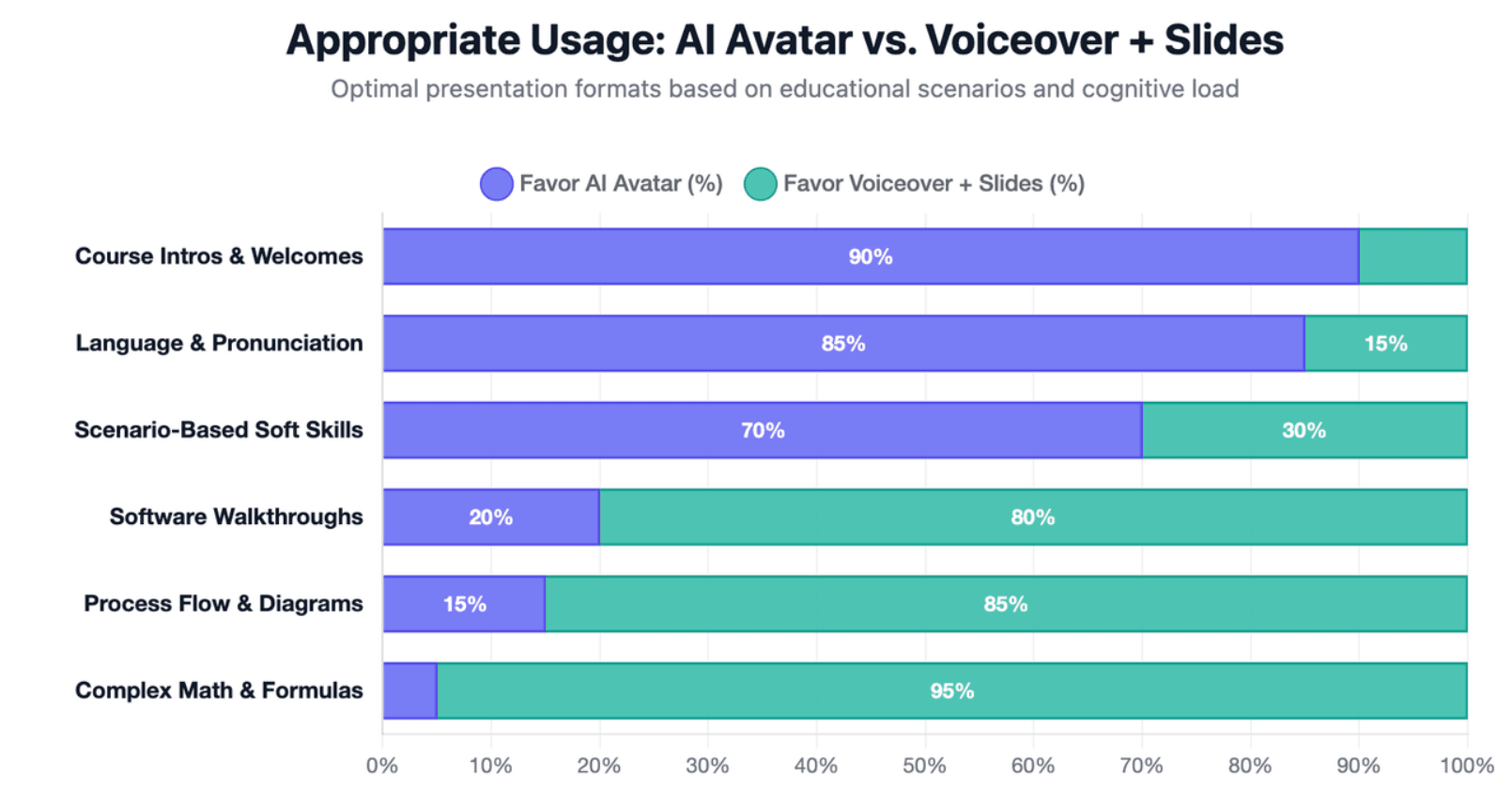
A talking avatar is not always necessary. For complex topics, learners may benefit more from diagrams, slide highlights, examples, and clean narration.
Use voiceover and slides when:
- The topic is technical.
- The learner needs to focus on diagrams.
- The lesson includes formulas, charts, or processes.
- The avatar may distract from the concept.
- The video is designed for quick review.
The best decision is based on learning clarity, not novelty.
How Chat-Enabled Interactive Video Can Support Student Questions and Review
Interactive video adds value because learners often have questions while watching. A video that supports questions, review, or guided exploration can move beyond passive viewing.
Leadde supports Chat with Video and advanced playback modes, allowing viewers to interact with video content and explore material more deeply.
How Multilingual Video, Analytics, and Version Control Help Scale Learning Programs
Scaling educational video is not only about making one video faster. Teams also need to translate content, update lessons, manage versions, and understand engagement over time.
Leadde supports multilingual workflows across 92 languages, version control, real-time updates, sharing, and analytics. These features help teams manage video content as an evolving learning asset rather than a one-time export.
Conclusion
The smartest strategy is to treat AI video as a repeatable learning workflow, not a one-time generation trick. Start with a structured lesson plan, turn it into an editable draft, review it for accuracy and learner fit, then publish, localize, and update it as a reusable learning asset.
In 2026, the best lesson-plan-to-video workflow combines automation, human review, accessibility, localization, and long-term content management. AI should handle the repetitive production work, while educators stay in control of teaching quality, clarity, privacy, and learning outcomes.





